electron: Slow/weird network requests
- Electron Version: 3.0.0 beta 3
- Operating System (Platform and Version): Windows 7 64 bit
- Last known working Electron version: 2.0.5
I’m doing HTTP requests using fetch from my application to a server running on the same machine, and starting with 3.0.0 beta 1 these take several seconds to complete. For testing I’ve just typed in the following in the console:
fetch('http://192.168.0.202:32155/api/panels').then(console.log)
When I do one at a time it seems to consistently take 2.5 seconds. When I queue up several requests without waiting for a response they seem to get processed one after another or something. Looks like this in the console:
 All the time seems to be alotted to stalling and proxy negotiation.
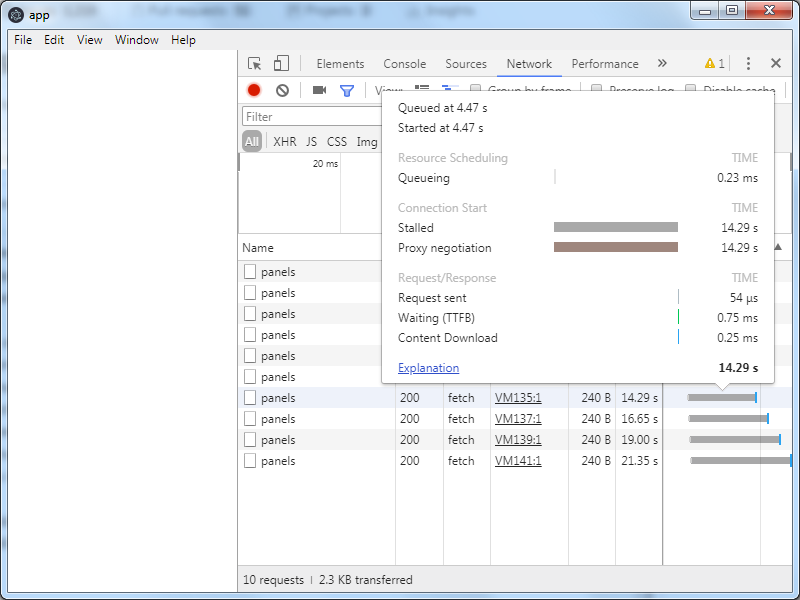 I don’t know what to make of that. I don’t have any special proxy configuration.
In contrast, on version 2.0.5 it looks like this:

Requests using XMLHttpRequest and net.request from the main process seems to behave in the same way. As far as the server is concerned all the requests finish in <1 ms.
I’m developing my application on Electron 1.7.6 currently, where I’ve never experienced this issue either. Planning to upgrade to 3.0.
I’m not passing any command line arguments, nor does it seem to be affected by any of my code. I had the same both in my application and a barebones one I made for testing with an empty index.html.
const electron = require('electron')
electron.app.on('ready', () => {
	let win = new electron.BrowserWindow()
	win.loadFile("index.html")
})
About this issue
- Original URL
- State: closed
- Created 6 years ago
- Reactions: 1
- Comments: 34 (18 by maintainers)
Meanwhile, since downgrading to 2-0-x was not an option for us, I disabled some of the flags previous comments mentioned ☝️
Not sure which one made it work, but the following two lines fixed it for us (hard to know which one because I never reproduced the error, only some customers did):
Hope this will save time for some people.
Backport for 3.x is available now https://github.com/electron/electron/pull/15813
So far there is no ideal solution. We can either have two builds of the same app (but it’s not scalable) or add an option in a menu to enable/disable this option. (the option can be stored in a local preference and the app can check this preference at launch.
😕
(I do not understand the vision behind working on version 4 while version 3 is still at this stage.)
It can break connectivity, this was reported to me by some users. Looking for another solution today
@deepak1556 Waiting for 4.0 stable release is difficult. 3.0.x were already not so stable (connectivity issues, print issues, etc)
@jakubzitny we are predicting to release 4.0 stable sometime in December, but you can test with one of the 4.0 beta releases from https://electronjs.org/releases now. Thanks!
@marco-ms It is not limited to Windows 7 I don’t think. I reproduced it on a physical machine. As for the net log, you’d have to ask @deepak1556.
@marco-ms
I don’t know if this can be of any help, but this very same fix of
--no-proxy-serveris also used for very similar issues for Puppetter / Headless Chrome: https://github.com/Codeception/CodeceptJS/issues/561 https://github.com/GoogleChrome/puppeteer/issues/2391 https://github.com/GoogleChrome/puppeteer/issues/1718I hadn’t even tried 4.0 yet, but 3.1.0 fixes this, indeed.
net-log.txt
No additional command line flags.
I noticed that passing --no-proxy-server seems to be another workaround though, in case that helps.