electron: Requiring electron outside of main.js causes a TypeError
- Electron version: 1.3.5
- Operating system: Mint 17
Hello
I am using Electron with React.js and babelify, among other plugins (list at the bottom).
Attempting to use require('electron'), for example to gain access to electron’s BrowserWindow, results in the console showing the following error:
index.js:4 Uncaught TypeError: fs.readFileSync is not a function
I can, however, use const electron = require('electron'); in main.js. For what it’s worth, I am also using watchify to pack everything into a js bundle.
Here is the complete list of dependencies in my package.json:
"devDependencies": {
        "axios": "^0.9.1",
        "babel-preset-es2015": "^6.6.0",
        "babel-preset-react": "^6.5.0",
        "babelify": "^7.2.0",
        "classnames": "^2.2.3",
        "electron": "^1.3.5",
        "electron-reload": "^0.2.0",
        "jquery": "^2.2.3",
        "react": "^0.14.8",
        "react-autocomplete": "^1.0.0-rc2",
        "react-dom": "^0.14.7",
        "react-sound": "^0.4.0",
        "soundmanager2": "^2.97.20150601-a"
    },
About this issue
- Original URL
- State: closed
- Created 8 years ago
- Reactions: 52
- Comments: 93 (6 by maintainers)
Links to this issue
Commits related to this issue
- Show transaction content via external link Because NeonWallet does not have an website that displays blockchain contents, the code will use Neotracker.io website. During the implementation, there wa... — committed to hyunchel/neo-address-viewer by hyunchel 7 years ago
- fix: importing electron in renderer caused an error for details see https://github.com/electron/electron/issues/7300#issuecomment-274269710 — committed to gia-urjc/Bike3S-Simulator by tao-cumplido 7 years ago
- used craco for react-app imports https://github.com/electron/electron/issues/7300#issuecomment-444649911 implemented dont-ask-again checkbox — committed to Rookout/explorook by hedwigz 5 years ago
- RK-764 warn non git repos (#37) * warn when user adds a non git repository * Added custom confirm modal * used craco for react-app imports https://github.com/electron/electron/issues/7300#issuecomm... — committed to Rookout/explorook by deleted user 5 years ago
- Include small prototype of using ipcRender Use this commit as a base on how to send messsages between the renderer and main process. It is important to set nodeIntegration to true when creating a ne... — committed to greenmochi/ultimate by koffeeboi 5 years ago
- Include small prototype of using ipcRender Use this commit as a base on how to send messsages between the renderer and main process. It is important to set nodeIntegration to true when creating a ne... — committed to greenmochi/ultimate by koffeeboi 5 years ago
- Add a menu item to start and stop recording renderer process では window.require('electron') でインポートしないとエラーになる https://github.com/electron/electron/issues/7300 — committed to mashabow/cappi by mashabow 5 years ago
- Add a menu item to start and stop recording renderer process では window.require('electron') でインポートしないとエラーになる https://github.com/electron/electron/issues/7300 — committed to mashabow/cappi by mashabow 5 years ago
- Fix electron import by adding 'const electron = window.require(electron)', see https://github.com/electron/electron/issues/7300 — committed to ttrude/hackbois by KarlSobischDigitium 4 years ago
For anyone encountering this problem in the future and reading this thread, using
window.requireinstead of require is one possibility of avoiding the conflict between electron’s and browserify’srequirefunction.window.requiredid solve the issue offs.existsSync is not a functionbut it lead to another error :window.requireis not a function. How shall I solve it?FWIW, I ran into the same issue trying to use electron in the renderer process with create-react-app that uses webpack in the backend instead of browserify.
window.requireseems to solve it for me too though I’m not entirely clear why.Edit: I figured out why 😃 We want to
requireelectronduring runtime from the nodejs environment provided at the runtime rather than the nodejs environment used during compilation by webpack. By default, globals are bound towindowand webpack compilation ignores thewindowglobal - hencewindow.requireworks.Another way to tell webpack to ignore a global name is to use a comment like
/*global Android*/in the JS file. In another project using CRA built app in an Android WebView, I used the above to get access to a Java object exposed to JS through the JavaScript interface provided by Webview.For anyone still stuck on this: you’ll get the error
window.require is not a functionunless you explicitly declarenodeIntergationastruewhen you declare yourBrowserWindow:yep fixed my create react app / webpack issue. change
to
@srinathh how are you exposing/loading your CRA app as renderer in your main? are you building first (and modifying the html static resource paths)
@steric85, I faced the
window.require is not a functionin typescript, I managed to fix it this way:One reason some people are still experiencing this problem is that
nodeIntegrationhas been removed from Electron v12. So settingnodeIntegration: truehas no affect. Instead, you need to setcontextIsolation: false. I suggest reading the justification to understand why and becoming familiar with the contextBridge to make it work safely.With Create-React-App 2, you can use the
craconpm module:https://www.npmjs.com/package/@craco/craco
Change
react-scriptsbycracoin your package.jsoncraco.config.js
And in you’ll have access to your Electron context like that:
@nukeop How are you launching your app. Your `start script should look like.
I have a feeling you are attempting to run your
main.jswith nodeWhich won’t work
@steric85 It is because you running the app in webpage environment => you must run the app in Electron environment (Nodejs environment)
I’m using typescript and I had to use
to get my renderer to communicate with my main. Hope this helps someone.
On windows with Vue CLI 3, window.require will work but will require a full path instead of a relative path from “node_modules/”.
But similar to the React case, webpack can be configured properly for Vue by editing vue.config.js. “require” will then work as expected.
vue.config.js:
router.js (this is just an example, it would work in any other vue js file)
The only one good enough solution I found is following:
react-app-rewiredpackageeject-ing the CRA:config-overrides.jswith according content:Thanks to: @Lilanga comment, @agrublev comment and creators of react-app-rewired.
Updated: Actually the 2nd version of how to do the same: https://www.codementor.io/randyfindley/how-to-build-an-electron-app-using-create-react-app-and-electron-builder-ss1k0sfer
Updated2: @nukeop I removed some misleading statements due to lack of time to follow debates regarding why not to use Browserify or why to use it and can’t write down now detailed explanation what I meant. But I will keep personal opinion regarding that “just use
window.requirewill solve the problem” seems very unreliable.Using react-create-app I found the same errors. The solution so far was:
const electron = window.require("electron")in the electron partBrowserWindowaddnodeIntegration:truein the following way.mainWindow = new BrowserWindow({ width: 900, height: 680, webPreferences: { webSecurity: false, nodeIntegration: true } });I had the problems while
require("fs")as well aswindow.require("fs"). Thanks to @Maxou44 for introduction CRACO in this discussion.To solve the issue I made 3 changes in my project:
new BrowserWindow({ width: 1200, height: 800 })tonew BrowserWindow({ width: 1200, height: 800, webPreferences: { nodeIntegration: true } })const fs = require("fs")toconst fs = require("electron").remote.require("fs")Refer this git repo by @wwlib for more clarification https://github.com/wwlib/cra-craco-electron-example
Forgot to revert
nodeIntegration: falsewhich disables evenwindow.require()... stupid mistake. Hope this spares someone an hour of researching.make sure you’re compiling your code
I’m not using Electron, but Node-Webkit (nw.js). Using
window.requiredid also fix my issue. Thanks very much for this!For anyone still struggling with this especially regarding quitting the electron application through a react button please read on.
What helped for me was the following:
When you declare your window make sure you set
nodeIntegration: trueas this is currently by defaultfalsefor security reasons. Usually that is done in yourelectron.jsfile.As @packetstracer already mentioned: you have to relaunch the app in order to load Electron window with that config
electron.jsput the following statement near the top this ensures that theipcMainwill listen on the event “close-me”:window.requirestatement after your imports. The usualrequiredid not work:Feel free to comment and give feedback I am still new to electron. I know the context with the quit button is unrelated but I could not find a better suited thread. Please feel free to point me to another more suitable thread if there is one.
My configuration:
@nukeop
window.requiredid the trick for me as well thank you very much! 🎉@nukeop - thanks for your last post; it helped me a lot.
window.requireworked for me.Not even last comment helped me. Im trying to follow this article emphasis on simple in title. And then spend two days to resolve errors that should not be there. Its ether
fs.existsSync is not a functionorwindow.require is not a functionThere are x solutions, and articles and all are different from another, including this topic. This is ridicules.
Today is 16.03.2012, allow me to ask: Does anyone has a suggestion how to modify simple script from article to work?
Hi, I am having the same error. When using window.require, the
Uncaught TypeError: fs.readFileSync is not a functionerror is fixed but i came up with another errorUncaught TypeError: window.require is not a function.Is there any suggestion on how to fix this. I am using browserify on node js.
window.requireit’s not working for me when I call the function inside the React App. I got “TypeError: window.require is not a function”.App.js:Mainwindow variable on
Main.js:Preload.js:What I am missing?
@cperthuis, your fix worked for un-ejected CRA app using ‘react-app-rewired’. thank you.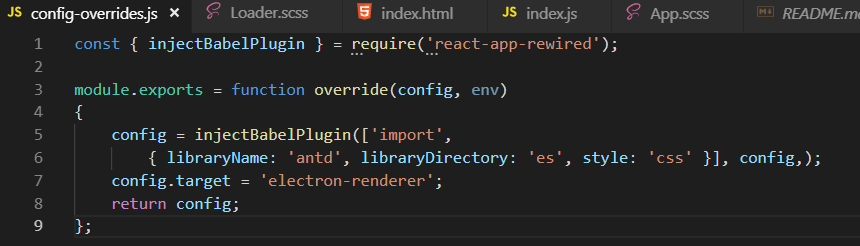
For anyone who happens to be struggling with this or similar issues and is using Vue and vue-electron-builder, see here
So, issue solved. I answer myself because maybe someone can benefit from it (I stucked for hours). If you have a
Preload.jsfile, you don’t need to callwindow.require('electron').ipcRendereragain from theÀpp.js(renderer); you call directly the variable aswindow.ipcRendererlike this:App.js:Mainwindow variable on
Main.js:Preload.js:After running the app from the command line, the window generated by the React process will throw an error (ipcRenderer is undefined). Ignore it. The window generated by the Electron process (main app ) will work fine.
People who are still facing the issue, somehow doing a
window.require()spoils the consistency of usingimportstatements throughout the codebase. An easy alternative is to set your webpacktargettoelectron-renderer. If using Create React App, ejecting can be a mess. Hence, you can use this package which does the webpack hooking for you and you can use for eg.,import fs from 'fs'in your React components (or any other node module ), happily in your life 😃If you get window.require is not a function and you are using Angular-CLI, use the following to instantiate the Window interface:
Then you can use this to include electron:
const { ipcRenderer } = window.require('electron');@solominh Thanks for your explanations here. However I have a similar configuration as @holgersindbaek, which environment is a preload script in a webview?
Info:
mainWindow.loadURL(url), where url is a local index.html<webview>preloadfield which loads inject.js, and this script does the window.require(‘electron’).Remarks:
const electron = require('electron'), I have the errorfs.readFileSync is not a functionconst electron = window.require('electron'), I have the errorwindow.require is not a function.EDIT: Solved for me using
<webview nodeintegration="true">and window.require. Leaving note here for future reference.@holgersindbaek You shouldn’t view your app in browser like Chrome, Firefox, etc. It won’t work because it is the webpage environment. You should view your app in an Electron window.
I’m still getting
window.require is not a function. I’m using Electron with React Starter Kit (https://github.com/kriasoft/react-starter-kit). Everything is working nicely, except this.I’ve set my Electron app to load my app from the web, so the app is not running locally: https://gist.github.com/holgersindbaek/68f6db82f507967a51ca75c527faeff6
What I’m trying to do, is call the
ipcRendererin one of my React files. I’m not sure if it’s even possible when my app is being loaded from the web though. Any suggestions?I’m using electron-typescript-webpack-react and electron-forge.
This solution https://github.com/electron/electron/issues/9920#issuecomment-575839738 works only I put the window.api in index.html:
But if I put this code in the renderer process: renderer.ts I get the error:
I tried also to add
and I get
Thanks to @tumbledwyer for posting the link to a solution that works for me:
The solution from Randy Findley: Now, if you need to access the
fsmodule like I did, you’ll quickly hit theModule not founderrorFirst, install Rescripts.
yarn add @rescripts/cli @rescripts/rescript-env --devThen, change the scripts tags in package.json from this…
to this
Now add a new file called
.rescriptsrc.jswith the following contents:module.exports = [require.resolve('./.webpack.config.js')]Finally add another new file called
.webpack.config.jswith the following contents:Now you can use the
fsmodule, no worries.@cperthuis I just want to say THANK YOU!! Hahah I am not even using Vue, but logical thinking led me to figure out that i can change my webpack.config.js to have a target property 😃 WORKED LIKE A CHARM.
This worked for me. For e.g. if you want to require remote, then
declare const window: any; const { remote } = window.require(‘electron’);
After many hours of trying to make this work, I finally got it to work using the
contextBridgeas other have suggested. I needed to access the electronshellobject from my React Native Electron app code to open an external browser window as part of OAuth sign in flow. Inelectron.js:in
preload.jsIn the client application:
@timsamart it does works. Thank you, it saves me days of work. 🤣
I read whole thread from top to bottom and nothing worked. EXCEPT, @Saroopashree 's method above. Thanks @Saroopashree for sharing the solution. I guess since react and webpack have changed somewhat since the start of the thread, the solutions above are obsolete. I may be wrong ofcourse but using above method worked. This is what I did:
npm install craco -Dmodule.exports = { webpack: { configure: { target: 'electron-renderer' } } };new BrowserWindow({ width: 1200, height: 800, webPreferences: { nodeIntegration: true } })in main.js. Ofcourse with different width and height.npm startto start development server for react app created using create-react-app. This opened a tab with same errors. And I felt tired again.npm run electronto run electron app. And Viola!!! I was able to see the page.So thank you @Saroopashree.
Wow… Tried EVERYTHING in this thread and missed your replay because there no upvotes… Still got
window is not a function… removed and reinstallednode_modulesand its working.PS: you still need to do all the solutions but if you did everything and still the same re install
node_modulesYou saved my day @joshuapinter !
@Maxou44 thanks for the tip about craco & electron. It is just what I needed. In case anyone is looking for an example…
https://github.com/wwlib/cra-craco-electron-example
I almost don’t want to add this but it would have saved me an hour or two of debugging.
I had to
rm -rf node_modules && npm installto fix this issue. I was then able to remove thewindowfromwindow.requireand things started working again. Hopefully that helps somebody else.For @ikiK-CRO and others, I created my own “starter kit” project with Electron/TypeScript/Svelte using the latest (as of this posting) versions of the libraries with
contextIsolation=true. It may not be received well. I’m no expert at any of these, much less combining them. It uses thecontextBridgeto enforce isolation between the renderer process and the main process. Thereadme.mdreferences other useful discussions on context isolation and thecontextBridge, which is crucial to getting your goodies attached to thewindowobject in your renderer process.https://github.com/pglezen/electron-typescript-svelte-starter
Thank you for the replay, I made rollback of everything to versions from article, still same thing:
It is reporting
window.require is not a functiononline var remote = window.require('electron').remote;in FileTree.jsand if I remove window I get
fs.existsSync is not a functiononnode_modules/electron/index.js:8Just so you know, that article references
in the
package.json. The behavior of thenodeIntegrationproperty is vastly different between that and Electron 12. If you’re really using Electron 4, then the article should work, sincenodeIntegration: truewas the default back then. But Electron 5 and later breaks this.Why would window.require not be scalable?
If you are trying to access ‘electron’ or its other component inside a react component/class, then try this: #336757899
Ya, put declare const window: any; at the top, just after where the imports are.
window.require worked for me! Thanks guys!
Hi, thanks man.
On Sun, Dec 3, 2017 at 9:29 PM, Michael - ሚካኤል ሰልጠነ < notifications@github.com> wrote:
@nukeop The renderer process inside Electron has access to a full node/commonjs environment as well, so you don’t need to bundle anything.
I’m not sure I understand here, any script you load in your HTML file has a full commonjs environment and can therefore use
requireto load in extra files without browserifying anything