electron: [Bug]: Text selection via accessibility on macOS broken when lines start with blank
Preflight Checklist
- I have read the Contributing Guidelines for this project.
- I agree to follow the Code of Conduct that this project adheres to.
- I have searched the issue tracker for a bug report that matches the one I want to file, without success.
Electron Version
Unknown / Latest
What operating system are you using?
macOS
Operating System Version
macOS Ventura
What arch are you using?
arm64 (including Apple Silicon)
Last Known Working Electron version
No response
Expected Behavior
I am working on a (native) macOS app that needs to select text in other apps using macOS Accessibility API .
The following Swift code should select the given range of characters in a text field:
let element: AXUIElement = someElement
var range = CFRange(location: 1, length: 3)
if let axRangeValue: AXValue = AXValueCreate(AXValueType.cfRange, &range)  {
    AXUIElementSetAttributeValue(
      element,
      kAXSelectedTextRangeAttribute as CFString,
      axRangeValue
  )
}
Actual Behavior
In Electron apps (e.g. Slack and Obsidian) it generally works but it is broken in some cases:
- when a line of text starts with one or more blanks, the Electron app will select the wrong character range (one char missing)
- when the range is exactly the last characters of a line, the Electron app will also select the following line break even though it is outside the given range
These issues do not arise in native Mac apps.
That Electron apps get confused with the selection when a line starts with blank can easily be seen in the Accessibility Inspector app (comes with XCode). In the following screenshot from Obsidian, the word “This” is selected. But the accessibility inspector shows that the text field reports a wrong selection range of (loc: 2, length: 4). Correct would be (loc: 1, length: 4)
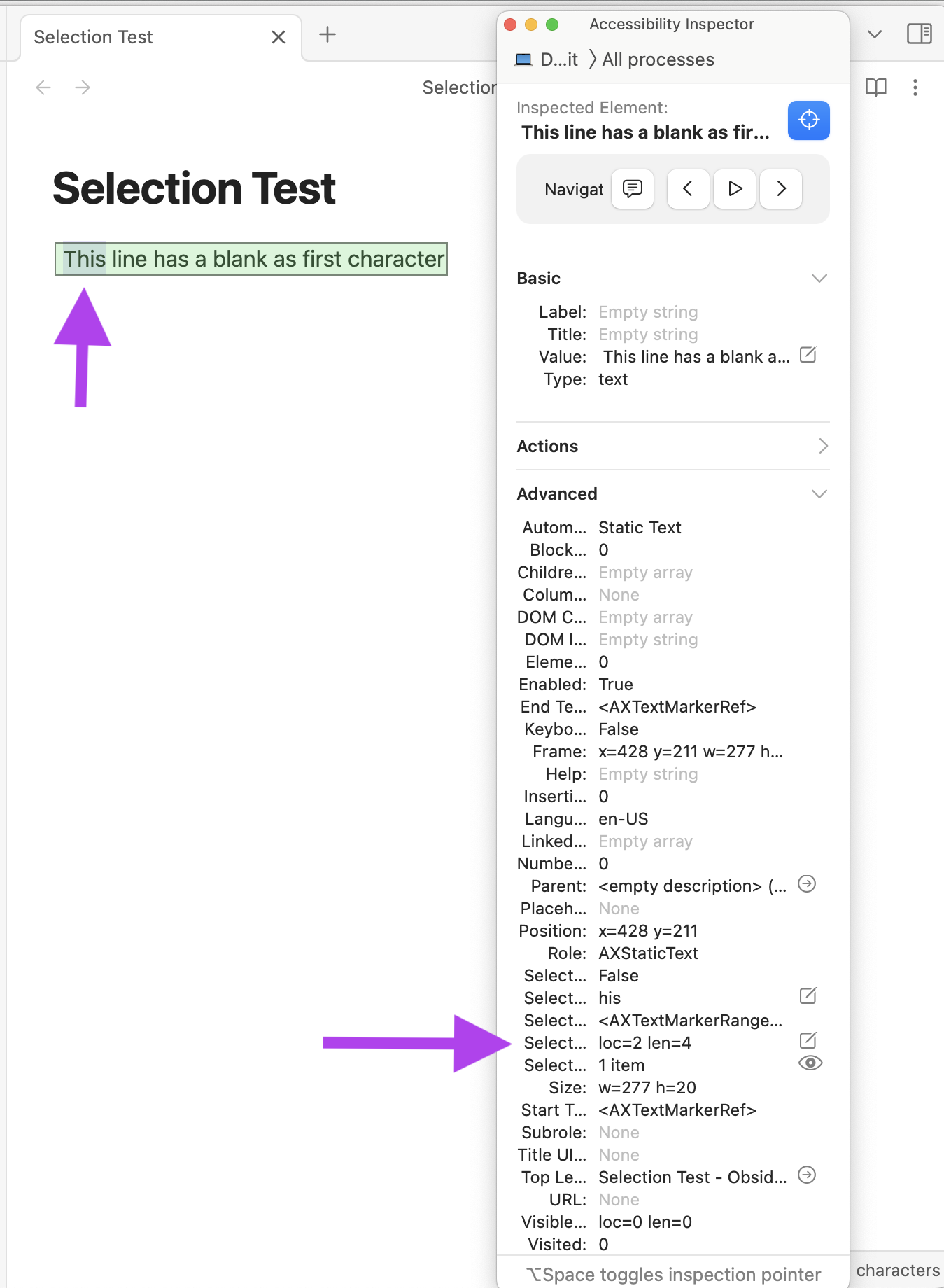
Please note that inspecting Electron apps with the Accessibility Inspector requires programmatically activating accessibility access for them. My sample project covers that.
Testcase Gist URL
No response
Additional Information
I have created a simple sample app in Swift that can be used to reproduce the issue and play with text selection using Accessibility API. It includes all the required Accessibility calls and a simply UI to trigger text selection events on the currently focused app (can be any app).
The Zip contains an XCode SwiftUI project that is ready to run and has a ReadMe with instructions to reproduce the bugs.
About this issue
- Original URL
- State: closed
- Created 4 years ago
- Reactions: 3
- Comments: 18 (3 by maintainers)
bump
Is there any progress on this issue? I am developing a similar app as the author and I have stumbled across this bug as well and unfortunately it makes my app unusable in these cases.
suffering from this issue with apps like Obsidian - with multi-line text the problem seems worse and what is shown as selected is very unpredictable.
also, activating accessibility programmatically works on one computer, but not the other - maybe there’s also an additional setting I need to turn on per app?
This issue has been automatically marked as stale. If this issue is still affecting you, please leave any comment (for example, “bump”), and we’ll keep it open. If you have any new additional information—in particular, if this is still reproducible in the latest version of Electron or in the beta—please include it with your comment!