electron: 2.0.0-beta.2 devtools & CSP: Uncaught … ProductRegistryImpl.Registry inspector.js(105)
- Electron version: 2.0.0-beta.1 & 2.0.0-beta-2
- Operating system: macOS High 10.13.3 (17D102)
Expected behavior
Regardless of any security related options (and even when CSP is not set in head of the page) devtools should be able to download it’s resources correctly.
This might only apply when custom protocols are registered (and possible when used to load at least one resource not necessarily the actual page).
Actual behavior
Devtools stderrs this when first opened (⌘⌥I) after page loads without issues:
[50393:0308/191909.964381:ERROR:CONSOLE(0)] "Failed to load https://chrome-devtools-frontend.appspot.com/serve_file/@7accc8730b0f99b5e7c0702ea89d1fa7c17bfe33/product_registry_impl/product_registry_impl_module.js: No 'Access-Control-Allow-Origin' header is present on the requested resource. Origin 'chrome-devtools://devtools' is therefore not allowed access. The response had HTTP status code 404.", source: chrome-devtools://devtools/bundled/inspector.html?remoteBase=https://chrome-devtools-frontend.appspot.com/serve_file/@7accc8730b0f99b5e7c0702ea89d1fa7c17bfe33/&can_dock=true&toolbarColor=rgba(223,223,223,1)&textColor=rgba(0,0,0,1)&experiments=true (0)
[50393:0308/191909.964523:ERROR:CONSOLE(22)] "Empty response arrived for script 'https://chrome-devtools-frontend.appspot.com/serve_file/@7accc8730b0f99b5e7c0702ea89d1fa7c17bfe33/product_registry_impl/product_registry_impl_module.js'", source: chrome-devtools://devtools/bundled/inspector.js (22)
Then it constantly stderrs the same message when using devtools (possible just the console):
[50393:0308/191909.964873:ERROR:CONSOLE(105)] "Uncaught (in promise) Error: Could not instantiate: ProductRegistryImpl.Registry", source: chrome-devtools://devtools/bundled/inspector.js (105)
[50393:0308/191909.965058:ERROR:CONSOLE(105)] "Uncaught (in promise) Error: Could not instantiate: ProductRegistryImpl.Registry", source: chrome-devtools://devtools/bundled/inspector.js (105)
[50393:0308/191909.965236:ERROR:CONSOLE(105)] "Uncaught (in promise) Error: Could not instantiate: ProductRegistryImpl.Registry", source: chrome-devtools://devtools/bundled/inspector.js (105)
[50393:0308/191909.965395:ERROR:CONSOLE(105)] "Uncaught (in promise) Error: Could not instantiate: ProductRegistryImpl.Registry", source: chrome-devtools://devtools/bundled/inspector.js (105)
[50393:0308/191909.965453:ERROR:CONSOLE(105)] "Uncaught (in promise) Error: Could not instantiate: ProductRegistryImpl.Registry", source: chrome-devtools://devtools/bundled/inspector.js (105)
[50393:0308/191915.876576:ERROR:CONSOLE(105)] "Uncaught (in promise) Error: Could not instantiate: ProductRegistryImpl.Registry", source: chrome-devtools://devtools/bundled/inspector.js (105)
[50393:0308/191915.876628:ERROR:CONSOLE(105)] "Uncaught (in promise) Error: Could not instantiate: ProductRegistryImpl.Registry", source: chrome-devtools://devtools/bundled/inspector.js (105)
[50393:0308/191915.876707:ERROR:CONSOLE(105)] "Uncaught (in promise) Error: Could not instantiate: ProductRegistryImpl.Registry", source: chrome-devtools://devtools/bundled/inspector.js (105)
[50393:0308/191915.876741:ERROR:CONSOLE(105)] "Uncaught (in promise) Error: Could not instantiate: ProductRegistryImpl.Registry", source: chrome-devtools://devtools/bundled/inspector.js (105)
[50393:0308/191915.876808:ERROR:CONSOLE(105)] "Uncaught (in promise) Error: Could not instantiate: ProductRegistryImpl.Registry", source: chrome-devtools://devtools/bundled/inspector.js (105)
How to reproduce
-
Register custom protocol (ie protocol.registerStreamProtocol) doesn’t matter if it includes a ‘Access-Control-Allow-Origin=*’ in response.
-
Make sure there is no CSP meta tag in head of page.
-
Load page either using loadFile or loadURL over custom protocol.
About this issue
- Original URL
- State: closed
- Created 6 years ago
- Reactions: 16
- Comments: 18 (3 by maintainers)
I just reproduced this, by just open the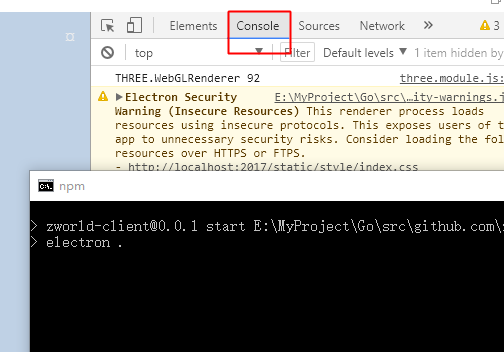
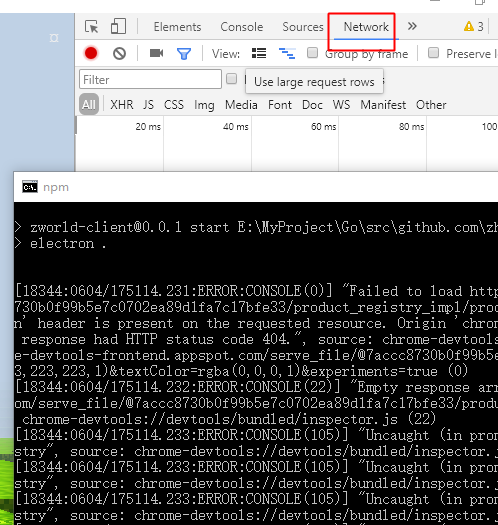
networkdevelop panel. And if I never open this panel, the error never report.Disable cacheindev-tool,andcommand + rto restartIf anyone else is bothered by Electron spamming the terminal with lots of errors, I have made this: https://github.com/sindresorhus/run-electron
I am encountering the same issue
I can confirm this happens after opening the “Performance” Tab or the “Network” Tab
I have broken down the issue into the smallest way possible: https://gist.github.com/HerrZatacke/95590030a67628fe8d02094cacaf1e4d
The “Test”-button just sends a fetch request to a base64 encoded url to make something appear in the Network-Tab
This is the result fo me:
I’m running Windows 10 (so as I understand this might not be platform related)
to me it seems, the devtools themselves are requesting this link which results in a 404. Maybe this is part of the issue?
Please let me know if i can help you in any way regarding this issue.
+1 same issue
I meeted the issue too.
@smotaal I did notice that dev. tools takes a really, really long time to open when this occurs. But dev. tools seems to take a really, really long time to open if multiple instances of Electron are running. The first instance is super fast but the second takes ages. Might be related.