BioDrop: [BUG] Copy to clipboard in the Share to social media icons is not working
Description
The following button is not working in the share to social media
- copy to clip board
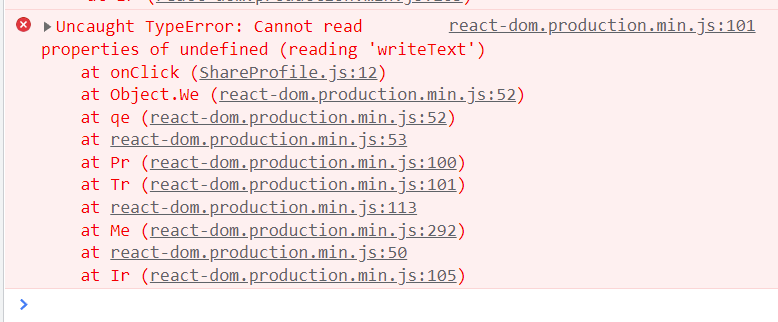
I tried clicking the button few times and it does not seem to copy the contents of the link. Instead it selects the contents of the description in the profile.
I am using BRAVE BROWSER.
At the time of this issue the linkfree is at the v0.58.3
Screenshots

Additional information
No response
About this issue
- Original URL
- State: closed
- Created 2 years ago
- Comments: 18 (14 by maintainers)
Hmm, I also found some information that this web API only works on https and we are currently using http so that may also be causing an issue
https has now been added to the LinkFree project and I just tested the copy link and it works 🎉
Thank you all for the great collaboration 🔥
My concern with adding the workaround is that it’s not acutally possible to test it in development as the copy to clipboard is working on localhost. Therefore, we won’t know if it works until pushing to production. Then when we finally do upgrade to https, there will be unnecessary code which we might forget to remove. My feeling would be to comment out the sharing link and just leave the three working social sharing links visible for now until Eddie has time to upgrade. Curious to see what others think.
thanks for catching this issue. I just checked and a similar thing is happening in Chrome and it’s throwing a console error.