wildwebdeveloper: Errors in tsx since upgrading to 1.0.0
Since upgrading to 1.0.0 (using Eclipse 4.25.0) I see these errors in my React tsx files:
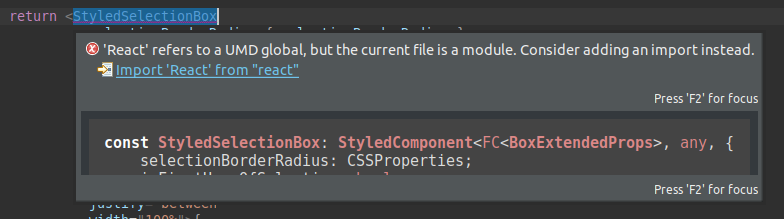
In one file of my project, after working on other issues, this error is permanently gone without following the advice to add the import. All other tsx files I open show that error.
How can I get rid of this?
I see also other errors which were also suddenly highlighted after upgrading to 1.0.0. Some of them are right and need to be resolved. But why they were not highlighted before?

Additionally, the production build does not highlight those “new” errors.
I’m using “typescript”: “^4.7.4” “react”: “^18.2.0”, “react-dom”: “^18.2.0”, “react-jsx”: “^1.0.0”, and this is my tsconfig.json
{
  "compilerOptions": {
    "target": "es6",
    "lib": [
      "dom",
      "dom.iterable",
      "esnext"
    ],
    "baseUrl": "src/",
    "allowJs": true,
    "skipLibCheck": true,
    "esModuleInterop": true,
    "allowSyntheticDefaultImports": true,
    "strict": true,
    "forceConsistentCasingInFileNames": true,
    "noFallthroughCasesInSwitch": true,
    "module": "esnext",
    "moduleResolution": "node",
    "resolveJsonModule": true,
    "isolatedModules": true,
    "noEmit": true,
    "jsx": "react-jsx",
    "sourceMap": true
  },
  "include": [
    "./src/**/*.ts"
  ],
  "exclude": [
    "node_modules",
    "build"
  ]
}
About this issue
- Original URL
- State: closed
- Created 2 years ago
- Comments: 31 (11 by maintainers)
Commits related to this issue
- Errors in tsx since upgrading to 1.0.0 #980 This PR recovers some changes made pn content type mappings in https://github.com/eclipse/wildwebdeveloper/pull/1009/files#diff-39186773eb7c359cf334445a924... — committed to vrubezhny/wildwebdeveloper by vrubezhny a year ago
- Errors in tsx since upgrading to 1.0.0 #980 This PR recovers some changes made pn content type mappings in https://github.com/eclipse/wildwebdeveloper/pull/1009/files#diff-39186773eb7c359cf334445a924... — committed to vrubezhny/wildwebdeveloper by vrubezhny a year ago
- Errors in tsx since upgrading to 1.0.0 #980 This PR recovers some changes made pn content type mappings in https://github.com/eclipse/wildwebdeveloper/pull/1009/files#diff-39186773eb7c359cf334445a924... — committed to eclipse-wildwebdeveloper/wildwebdeveloper by vrubezhny a year ago
@sinhote : No problem. I removed WWW manually. To do so, got to
Help->Install New Software->Already Installedsearch for “Wild” and remove it.Afterwards I added this repo
https://download.eclipse.org/wildwebdeveloper/releases/1.0.0
at
Help->Install New Softwareand installed all packages. That workes in November. Please make a backup of your Eclipse- and your workspace-folder before doing the patch. There is no guarantee that it will work with current plugins or with your plugins installed in particular.I managed to track that down. This worked for me.
change languageId from
typescripttotypescriptreactineclipse\plugins\org.eclipse.wildwebdeveloper\plugin.xmlfor contentType tsxAlso I had to delete this folder as somehow it is caching the original value:
eclipse\configuration\org.eclipse.core.runtimeUnfortunately not. I downgraded the plugin. Meanwhile I had a bunch of updates and my current version is
which is working fine. Since I need a running IDE without worries I do not update any more. Maybe in future I will give it another try.
Independent from this, Wild Web Developer uses that bundled typescript version instead of the version given in each project’s package.json. As long as your projects do fine with this its OK, but especially maintaining older code is a problem. So, at the moment the setup and the projects I’m working on are matching fine, but yes I’m worried about the future.