homebridge-hue: FOHSWITCH is "unsupported"; I tried to support it, but not working yet.
Issue
FOHSWITCH is “unsupported”; I tried to support it, but not working yet.
Here is some of the work I’ve already done:
Here’s some buttonevents numbers for this switch:
buttonevents-bed-switch-share.gz
As you can partially see, the above switch is a four button switch, but I’ve taken the optional two rockers off and placed the optional one rocker on, so there are only two buttons that I’m programming, thus only the up and down states; you might not notice that there are actually more than two buttons from the above diagnosis as a result. These switches give out an event for button down and button up, but it looks like software turns that into a button press without release for a while (a delay sense), and button release, which does cover most of the possible interpretation use cases. These Zigbee switches give out unique events for all the combinations I’ve tested on an earlier firmware on a switch bought before Philips had implemented the FOH program fully: each of press and release for: each possible combination of buttons pressed. For instance, if I press up left, or up right, or down left, or down right, or up both left and right, or down both left and right, or up left and down right, or dow left and up right, all of those have a unique code. Now, there is a different brand that sells these same switches but that does not expose the codes for more than one button press at a time; that means when I press both up or both down (or diagonal presses, for that matter), no code is sent, and nothing happens. As a result, I have 3 of these switches in my home (2 on another “Home” in homekit so you won’t see them in my log files here), and 1 of them is programmed properly via hand-coded zigbee event responses in the Hue gateway to turn on both lights when both upper buttons are pressed and all the other obvious combinations (even diagonal!), but since that was not part of the FOH program, that switch doesn’t show up as a Homekit accessory exported by the hue bridge, but the other two FOH switches I got do show up as Homekit accessories and are much better supported by Hue & native Homekit, but do not do anything when there are more than one button presses. Not all progress is improvement. Anyway, one of those FOH switches is in my personal “Home” that you see in these logs, and I really want to have it control some non-Hue devices, so I need to expose it to homebridge, but homebridge does not yet support it.
Here is how that switch shows up in Home app with homebridge running:
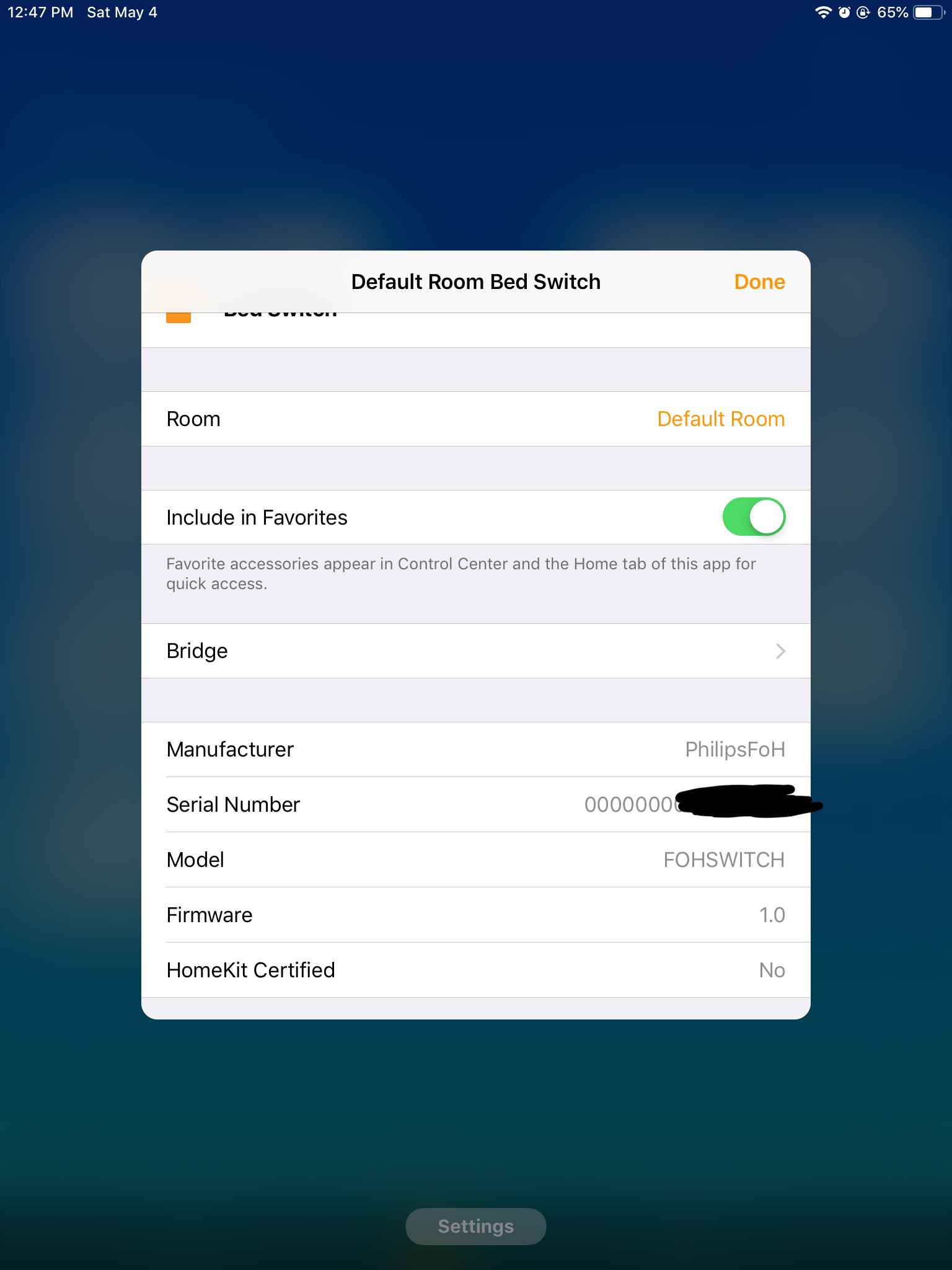
As you can see, the unsupported device has a Manufacturer of “PhilipsFoH” (which is wrong; it’s a different manufacturer; but that’s how lying Philips supports it, apparently), and a Model of “FOHSWITCH”, which is a total lack of information, since there will be a zillion switch types in FoH, but that’s what we have to work with.
I found some code pieces in homebridge-hue that seem like they are templates for support of this type of switch, so I started work on them around April 14:
Apparently, Google Node erased those files on April 24, so before I remembered I had TimeMachine running on that host, today I tried to remember a rough version of what I edited and came up with this sort of rough draft of lib/HueSensor.js and copied the case ‘ZGPSwitch’ in the switch for (this.obj.type) to a new ‘FOHSwitch’ (which you can see in the above screenshot); you can see I was a little more detailed above on April 14 with that diff file than in this little snippet, but they are conceptually similar; the above diff code was tested and failed, but the below is just conceptual and not as complete (never tested):
//===
      } else if (
        this.obj.manufacturername === 'Philips' &&
        this.obj.modelid === 'FOHSWITCH'
      ) {
        // FOH Switch
        this.createLabel(Characteristic.ServiceLabelNamespace.ARABIC_NUMERALS)
        this.createButton(1, 'UpDim', SINGLE_LONG)
        this.createButton(2, 'Up', SINGLE)
        this.createButton(3, 'DownDim', SINGLE_LONG)
        this.createButton(4, 'Down', SINGLE)
        this.type = {
          key: 'buttonevent',
          homekitValue: function (v) { return { 16: 1, 20: 2, 17: 3, 21: 4 }[v] },
          homekitAction: function () { return 0 }
//===
Log Messages
While censoring the log file, I ran across this error message which is about the switch I want supported. Note that the error message might be slightly different since I started trying to support it. Edit: looks like Google erased hours of my work, so no, that code is gone.
[4/24/2019, 5:35:24 PM] [Hue] Studio: /sensors/38: warning: unknown ZGPSwitch sensor {"state":{"buttonevent":21,"lastupdated":"2019-04-22T07:48:56"},"swupdate":{"state":"notupdatable","lastinstal\
l":null},"config":{"on":true},"name":"Bed Switch","type":"ZGPSwitch","modelid":"FOHSWITCH","manufacturername":"PhilipsFoH","productname":"Friends of Hue Switch","diversityid":"ded6468f-6b26-4a75-\
9582-f2b52d36a5a3","uniqueid":"00:00:00:00:01:70:xx:xx-xx","capabilities":{"certified":true,"inputs":[{"repeatintervals":[],"events":[{"buttonevent":16,"eventtype":"initial_press"},{"buttonevent"\
:20,"eventtype":"short_release"}]},{"repeatintervals":[],"events":[{"buttonevent":17,"eventtype":"initial_press"},{"buttonevent":21,"eventtype":"short_release"}]},{"repeatintervals":[],"events":[\
{"buttonevent":19,"eventtype":"initial_press"},{"buttonevent":23,"eventtype":"short_release"}]},{"repeatintervals":[],"events":[{"buttonevent":18,"eventtype":"initial_press"},{"buttonevent":22,"e\
venttype":"short_release"}]}]}}
[4/24/2019, 5:35:24 PM] [Hue] Studio: /sensors/38: warning: unknown ZGPSwitch sensor {"state":{"buttonevent":21,"lastupdated":"2019-04-22T07:48:56"},"swupdate":{"state":"notupdatable","lastinstal\
l":null},"config":{"on":true},"name":"Bed Switch","type":"ZGPSwitch","modelid":"FOHSWITCH","manufacturername":"PhilipsFoH","productname":"Friends of Hue Switch","diversityid":"ded6468f-6b26-4a75-\
9582-f2b52d36a5a3","uniqueid":"00:00:00:00:01:70:xx:xx-xx","capabilities":{"certified":true,"inputs":[{"repeatintervals":[],"events":[{"buttonevent":16,"eventtype":"initial_press"},{"buttonevent"\
:20,"eventtype":"short_release"}]},{"repeatintervals":[],"events":[{"buttonevent":17,"eventtype":"initial_press"},{"buttonevent":21,"eventtype":"short_release"}]},{"repeatintervals":[],"events":[\
{"buttonevent":19,"eventtype":"initial_press"},{"buttonevent":23,"eventtype":"short_release"}]},{"repeatintervals":[],"events":[{"buttonevent":18,"eventtype":"initial_press"},{"buttonevent":22,"e\
venttype":"short_release"}]}]}}
Debug Files
About this issue
- Original URL
- State: closed
- Created 5 years ago
- Comments: 15 (5 by maintainers)
Commits related to this issue
- Update HueSensor.js Add support for Friends of Hue switches (untested). See #466. — committed to ebaauw/homebridge-hue by ebaauw 5 years ago
- Update HueBridge.js Don't expose Friends of Hue switches when `nativeHomeKitSensors` is set, see #466. — committed to ebaauw/homebridge-hue by ebaauw 5 years ago
Thanks!
Apple’s Home app shows either n
DOTSorBUTTONn; it won’t show the button names (shown in the homebridge log). Other apps (Eve, Matthias’ Home) do show the button names.Yes it would, as no HomeKit event gets triggered when pressing both buttons simultaneously.
Indeed, Hue bridge rules are preferred over HomeKit automations when you want to control devices connected to the Hue bridge. Richer functionality, more responsive, and more reliable (no HomeKit hub needed). On the downside: creating them is less user friendly.
Setting it up natively to show that one switch can take hours, so I’m going to show the same hardware switch model that is installed on my other “Home” with a similar FOH switch that is run natively straight from the Hue hub to HomeKit (no homebridge on that “Home”):
Note that there are no “dots” on that switch. Also note that the screenshot shows no setting for both pressed at the same time, and indeed, the Hue bridge and app doesn’t have an action for any notice of both being pressed at the same time (which I thought might be a problem for me since I often want to press both down to turn both off, but I realized none of the things controlled by that switch need to be non-Hue devices, so I just now manually created 8 new rules on the Hue bridge to allow both buttons pressed at the same time to control the Hue lights that switch is for, and I don’t need any HomeKit for that).
https://github.com/ebaauw/homebridge-hue/commit/81d00a39dc2540dacb04b12528b2e017518b331d solves my issue. Thank you!!!
I’m curious what other buttonevents could be shown; I’m going to look them up. Running a one second poll of the Hue bridge directly using curl (btw, here’s the bash code I ran in order to do that:
where 10.x.x.x is the Hue bridge ip#, xxxxx-xxxxx is the username (you have to read Hue dev docs to log in for that), and sensors/38 is the sensor number assigned on that Hue bridge for my bedroom FOH switch), I’m getting:
Hold upper left: 16 (hex $10) Release upper left: 20 (hex $14) Press and release upper left quickly: 20
Hold lower left: 17 (hex $11) Release lower left: 21 (hex $15) Press and release lower left quickly: 21
Hold upper right: 19 (hex $13) Release upper right: 23 (hex $17) Press and release upper right quickly: 23
Hold lower right: 18 (hex $12) Release lower right: 22 (hex $16) Press and release lower right quickly: 22
Hold upper both: 100 (hex $64) Release upper both: 101 (hex $65) Press and release upper both quickly: 101
Hold lower both: 98 (hex $62) Release lower both: 99 (hex $63) Press and release lower both quickly: 99
Hold upper left and lower right: (nothing) Release upper left and lower right: (nothing) Press and release upper left and lower right quickly: (nothing)
Hold lower left and upper right: (nothing) Release lower left and upper right: (nothing) Press and release lower left and upper right quickly: (nothing)
That’s pretty complete information. As you said, that would require some type of polling that you think isn’t available, but what if the hue bridge sends that data somehow? Is there a way I could diagnose that? Since every hold button press that does work does also give out its release button event, it’s not an entire loss of any held button event.
(Note that I own an identical piece of switch hardware that I bought via Digikey October 29, 2018 by Illumra digikey part# 1082-1034-ND Illumra part# ZBT-S2AWH on another Homekit home that isn’t an FOH (Friends of Hue) switch which I think must have different firmware that does expose diagonal presses and doesn’t register using the interface FOH expects; it only outputs Zigbee information, and I have to program the Hue bridge manually and directly using the API interfaces (using curl in my case) to respond to its codes since it is not recognized as a FOH switch and not exported to Homekit; its buttonevent codes are all different, in addition to having more codes for the diagonal events, and its manual does not have the same initial programming function that the FOH switch manual for the identical hardware (but apparently different firmware) supports.) Since your code doesn’t input the hold values, that seems like the only thing missing from your code (for the FOH firmware, as I said).)
The original reason I wanted to program this switch, having it turn on and off the thermostat display and my desktop computer display, are now working as they originally were before I started using homebridge. (Now, when I go to bed, a single switch turns all lights off.) Great!