xlsx-populate: "numberFormat" style ignored
I just started using xlsx-populate (awesome API, by the way!) and am unsing it in the browser.
All things work so far, except that the numberFormat style is being ignored. I’m using the format can be found in the docs, for testing:
let val = new Date();
let cell = sheet.row(rowIdx + 2).cell(colIdx + 1);
cell.value(val);
cell.style("numberFormat", "dddd, mmmm dd, yyyy");
Displayed in Libre Office I only get the numeric date:
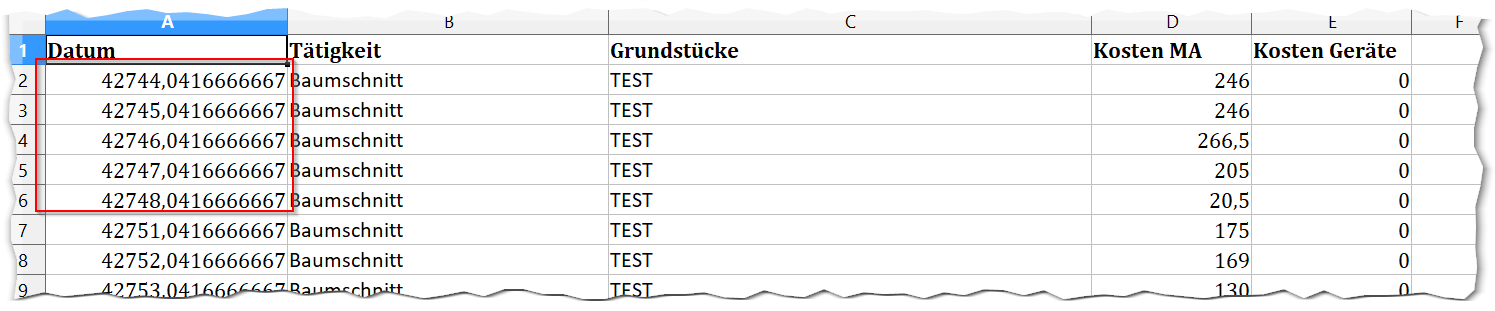
Same thing applies to currency cells that I tried to format as cell.style("numberFormat", "0.00 €"); - same problem (cols D and E in the screenshot).
I’ve attached the generated file: test (37).xlsx
I don’t have the original MS Excel and can only test with LibreOffice Calc 5.1.5.2 on a Windows 10 PC that uses german locale (if that matters).
Am I doing something wrong?
About this issue
- Original URL
- State: closed
- Created 7 years ago
- Comments: 19 (11 by maintainers)
@dtjohnson you’re right! I manually upgraded from LibreOffice 5.1.5.2 to LibreOffice 5.3.5.2 (the latest stable) and formatting works now as expected. 😃
Note that the internal “Update check” of the 5.1 version claimed that it was the most current version, so other users may also be stuck on a older version (Windows)…
Not by the spec, but perhaps by some implementations like older LibreOffice. It’s just one difference I noticed and thought worth trying. I guess if it’s not
count, then it’s maybe something else seemingly irrelevant. Just a gut feeling based on generic experience, but I don’t know anything about xlsx…Anyway, I checked the release notes of Calc and found two mentions of numberFormat. Nothing related as it seems to me: https://wiki.documentfoundation.org/ReleaseNotes/5.2#Number_Format https://wiki.documentfoundation.org/ReleaseNotes/5.3#Number_Format
OK, so i figured it out… now i will go try to figure out if its xlsx-populate that is causing it or not…
the reason its not formatting from your original test file was 2 reasons… one causing the second.
your
numFmtswas missing the format style<numFmt numFmtId="165" formatCode="MMMM\ D", "YYYY">that is directly out of Libra office after formatting a single cell on a blank workbook, no idea why the line breaks into 2 “” blocks.Please make note that changing the line above to this:
<numFmt numFmtId="165" formatCode="MMMM\ D\ YYYY">cause the style to display the42747.0416666667value and not the datethe second reason is each cell has…
s="0"so that was saying that the style was only General due to your General format being the first one. and not having the second Date format.UPDATE: i cant get Libra office to load any date formats, but the styles are in there, and the cells are referencing them.
not that the
Here is the code.
here is the output: out.xlsx
whats interesting is if i open that file is excel 2013 all of them work except Row… 4, 7 and 9 out-excel.xlsx
all of which have
NNNNMMMMinside them.all the tested formats where out of Libra office
UPDATE 2:
also note doing:
workbook.sheet("Sheet1").column("A").style("numberFormat", "dddd, mmmm dd, yyyy");has no change and is still not working.