simple-tab-groups: STG completely broken after upgrade to Firefox 71
Describe the bug I upgraded to Firefox 31 today and STG is completely broken. The toolbar icon just shows an orange triangle, and I can’t switch groups or display the list, nothing. In the extension preferences, I can save an error log. Here it is:
{
    "info": {
        "version": "4.3.6.1",
        "upTime": "179654ms",
        "browserInfo": {
            "name": "Firefox",
            "vendor": "Mozilla",
            "version": "71.0",
            "buildID": "20191203065433"
        },
        "platformInfo": {
            "os": "linux",
            "arch": "x86-64"
        },
        "permissions": {
            "bookmarks": false
        },
        "options": {
            "discardTabsAfterHide": false,
            "closePopupAfterChangeGroup": true,
            "openGroupAfterChange": true,
            "prependGroupTitleToWindowTitle": false,
            "createNewGroupWhenOpenNewWindow": false,
            "showNotificationAfterMoveTab": true,
            "openManageGroupsInTab": true,
            "showConfirmDialogBeforeGroupDelete": true,
            "showNotificationAfterGroupDelete": true,
            "showContextMenuOnTabs": true,
            "showContextMenuOnLinks": false,
            "exportGroupToMainBookmarkFolder": true,
            "showExtendGroupsPopupWithActiveTabs": false,
            "showTabsWithThumbnailsInManageGroups": false,
            "autoBackupEnable": true,
            "autoBackupIncludeTabThumbnails": false,
            "autoBackupIncludeTabFavIcons": false,
            "autoBackupGroupsToBookmarks": false,
            "autoBackupGroupsToFile": true,
            "enableDarkTheme": false,
            "hotkeys": [
                {
                    "ctrlKey": true,
                    "shiftKey": false,
                    "altKey": false,
                    "metaKey": false,
                    "key": "`",
                    "keyCode": 192,
                    "action": "load-next-group",
                    "groupId": 0
                },
                {
                    "ctrlKey": true,
                    "shiftKey": true,
                    "altKey": false,
                    "metaKey": false,
                    "key": "`",
                    "keyCode": 192,
                    "action": "load-prev-group",
                    "groupId": 0
                },
                {
                    "ctrlKey": false,
                    "shiftKey": true,
                    "altKey": false,
                    "metaKey": false,
                    "key": "F2",
                    "keyCode": 113,
                    "action": "move-active-tab-to-custom-group",
                    "groupId": 0
                }
            ],
            "defaultBookmarksParent": "toolbar_____",
            "defaultGroupIconViewType": "main-squares",
            "defaultGroupIconColor": "",
            "autoBackupLastBackupTimeStamp": 1575367066,
            "autoBackupIntervalKey": "hours",
            "autoBackupIntervalValue": 6,
            "autoBackupFolderName": "STG-backups",
            "autoBackupBookmarksFolderName": "STG bookmarks"
        }
    },
    "logs": [
        {
            "version": "4.3.6.1",
            "date": "12/4/2019, 10:14:08 AM",
            "message": "An unexpected error occurred",
            "lineNumber": 0,
            "stack": [
                ""
            ]
        },
        {
            "date": "8/22/2019, 3:42:44 PM",
            "message": "filename must not contain illegal characters",
            "lineNumber": 0,
            "stack": [
                ""
            ]
        },
        {
            "date": "8/22/2019, 3:35:19 PM",
            "message": "filename must not contain illegal characters",
            "lineNumber": 0,
            "stack": [
                ""
            ]
        },
        {
            "date": "8/22/2019, 1:55:08 PM",
            "message": "filename must not contain illegal characters",
            "lineNumber": 0,
            "stack": [
                ""
            ]
        },
        {
            "date": "8/22/2019, 1:51:44 PM",
            "message": "filename must not contain illegal characters",
            "lineNumber": 0,
            "stack": [
                ""
            ]
        },
        {
            "date": "8/22/2019, 1:51:25 PM",
            "message": "filename must not contain illegal characters",
            "lineNumber": 0,
            "stack": [
                ""
            ]
        },
        {
            "date": "8/22/2019, 1:50:48 PM",
            "message": "filename must not contain illegal characters",
            "lineNumber": 0,
            "stack": [
                ""
            ]
        }
    ]
}
I thought this could be related to auto-backup, so I tried to disable auto-backup, but when I restart the browser, the auto-backup feature is still enabled, so I can’t disable it. I was able to enable debug logging in STG preferences, but the new log after restart doesn’t seem to have any debug information, even though it looks a bit different:
{
    "info": {
        "version": "4.3.6.1",
        "upTime": "23783ms",
        "browserInfo": {
            "name": "Firefox",
            "vendor": "Mozilla",
            "version": "71.0",
            "buildID": "20191203065433"
        },
        "platformInfo": {
            "os": "linux",
            "arch": "x86-64"
        },
        "permissions": {
            "bookmarks": false
        },
        "options": {
            "discardTabsAfterHide": false,
            "closePopupAfterChangeGroup": true,
            "openGroupAfterChange": true,
            "prependGroupTitleToWindowTitle": false,
            "createNewGroupWhenOpenNewWindow": false,
            "showNotificationAfterMoveTab": true,
            "openManageGroupsInTab": true,
            "showConfirmDialogBeforeGroupDelete": true,
            "showNotificationAfterGroupDelete": true,
            "showContextMenuOnTabs": true,
            "showContextMenuOnLinks": false,
            "exportGroupToMainBookmarkFolder": true,
            "showExtendGroupsPopupWithActiveTabs": false,
            "showTabsWithThumbnailsInManageGroups": false,
            "autoBackupEnable": true,
            "autoBackupIncludeTabThumbnails": false,
            "autoBackupIncludeTabFavIcons": false,
            "autoBackupGroupsToBookmarks": false,
            "autoBackupGroupsToFile": true,
            "enableDarkTheme": false,
            "hotkeys": [
                {
                    "ctrlKey": true,
                    "shiftKey": false,
                    "altKey": false,
                    "metaKey": false,
                    "key": "`",
                    "keyCode": 192,
                    "action": "load-next-group",
                    "groupId": 0
                },
                {
                    "ctrlKey": true,
                    "shiftKey": true,
                    "altKey": false,
                    "metaKey": false,
                    "key": "`",
                    "keyCode": 192,
                    "action": "load-prev-group",
                    "groupId": 0
                },
                {
                    "ctrlKey": false,
                    "shiftKey": true,
                    "altKey": false,
                    "metaKey": false,
                    "key": "F2",
                    "keyCode": 113,
                    "action": "move-active-tab-to-custom-group",
                    "groupId": 0
                }
            ],
            "defaultBookmarksParent": "toolbar_____",
            "defaultGroupIconViewType": "main-squares",
            "defaultGroupIconColor": "",
            "autoBackupLastBackupTimeStamp": 1575367066,
            "autoBackupIntervalKey": "hours",
            "autoBackupIntervalValue": 6,
            "autoBackupFolderName": "STG-backups",
            "autoBackupBookmarksFolderName": "STG bookmarks"
        }
    },
    "logs": [
        {
            "version": "4.3.6.1",
            "date": "12/4/2019, 10:32:32 AM",
            "message": "An unexpected error occurred",
            "lineNumber": 0,
            "stack": [
                ""
            ]
        },
        {
            "version": "4.3.6.1",
            "date": "12/4/2019, 10:32:28 AM",
            "message": "An unexpected error occurred",
            "lineNumber": 0,
            "stack": [
                ""
            ]
        },
        {
            "version": "4.3.6.1",
            "date": "12/4/2019, 10:30:18 AM",
            "message": "An unexpected error occurred",
            "lineNumber": 0,
            "stack": [
                ""
            ]
        },
        {
            "version": "4.3.6.1",
            "date": "12/4/2019, 10:26:09 AM",
            "message": "An unexpected error occurred",
            "lineNumber": 0,
            "stack": [
                ""
            ]
        },
        {
            "version": "4.3.6.1",
            "date": "12/4/2019, 10:25:57 AM",
            "message": "An unexpected error occurred",
            "lineNumber": 0,
            "stack": [
                ""
            ]
        },
        {
            "version": "4.3.6.1",
            "date": "12/4/2019, 10:25:46 AM",
            "message": "An unexpected error occurred",
            "lineNumber": 0,
            "stack": [
                ""
            ]
        },
        {
            "version": "4.3.6.1",
            "date": "12/4/2019, 10:14:08 AM",
            "message": "An unexpected error occurred",
            "lineNumber": 0,
            "stack": [
                ""
            ]
        },
        {
            "date": "8/22/2019, 3:42:44 PM",
            "message": "filename must not contain illegal characters",
            "lineNumber": 0,
            "stack": [
                ""
            ]
        },
        {
            "date": "8/22/2019, 3:35:19 PM",
            "message": "filename must not contain illegal characters",
            "lineNumber": 0,
            "stack": [
                ""
            ]
        },
        {
            "date": "8/22/2019, 1:55:08 PM",
            "message": "filename must not contain illegal characters",
            "lineNumber": 0,
            "stack": [
                ""
            ]
        },
        {
            "date": "8/22/2019, 1:51:44 PM",
            "message": "filename must not contain illegal characters",
            "lineNumber": 0,
            "stack": [
                ""
            ]
        },
        {
            "date": "8/22/2019, 1:51:25 PM",
            "message": "filename must not contain illegal characters",
            "lineNumber": 0,
            "stack": [
                ""
            ]
        },
        {
            "date": "8/22/2019, 1:50:48 PM",
            "message": "filename must not contain illegal characters",
            "lineNumber": 0,
            "stack": [
                ""
            ]
        }
    ]
}
I had to downgrade to Firefox 70, STG works fine there. Please advise what to do and how to debug this further. I’m staying away from Firefox 71 at the moment.
To Reproduce Steps to reproduce the behavior:
- Upgrade to Firefox 71
Desktop (please complete the following information):
- OS and version: Fedora 31
- Firefox version: 71
- Simple Tab Groups version: 4.3.6.1
About this issue
- Original URL
- State: closed
- Created 5 years ago
- Reactions: 3
- Comments: 16 (6 by maintainers)
Commits related to this issue
- revert workaround for bug #500 — committed to Drive4ik/simple-tab-groups by deleted user a year ago
NO, you can not:
I create bug in bugzilla for this issue https://bugzilla.mozilla.org/show_bug.cgi?id=1601365
Hi! I found the cause of the breakdown. Firefox 71 on linux cannot save data in IDBDatabase.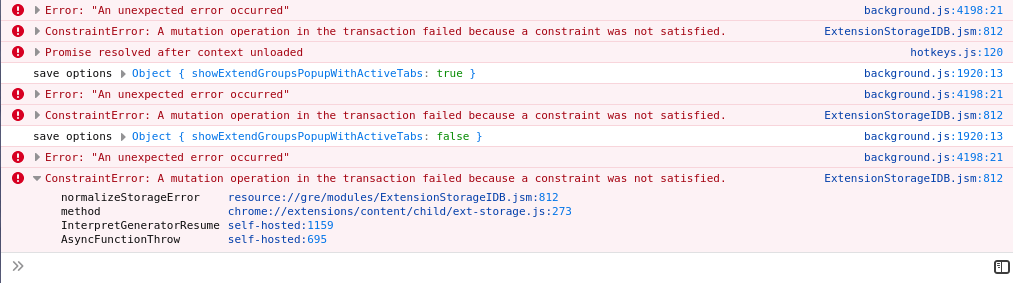 https://developer.mozilla.org/en-US/docs/Web/API/IDBDatabaseException
I managed to save the data only by clearing the storage, maybe there is an error related to the indexes in the database. This is less stable, but at least it works … 4cd553f437a5eab250586e7f7122761374d0bc86
please, wait for version 4.3.6.2 or above, bug fixed in it
I’m running Firefox 71.0.1 on Archlinux and it works fine. Tested with the my main FF profile that was running in an older FF version before (upgrade path) and in a newly created test profile (STG installed directly on FF 71). Both work as expected. Also in the inspect view of STG I can use
browser.storage.local.setwithout problems.Hi! Thanks for logs! Can you enable debug mode (in addon settings) and record logs with this error? How to start record logs
I need to understand exactly where the error occurs, but I just can not do it, and Firefox does not give a detailed log … Already a bunch of letters in my mail with this problem, but I can not understand because of what it is. Can you help me? You can make a copy of your Firefox profile, launch Firefox in this profile copy, delete all personal data, such as cache, passwords, browser history, tabs, etc. And send this profile to me, for debug. I have no error on Windows…
Thanks anyway!
This might be related to #499.