deconz-rest-plugin: IKEA Blind Stopped Working - Conbee II not recognized after firmware update
Describe the bug
In the last couple of days, by IKEA blind has stopped responding.
I have factory reset the blind, re-paired it to Deconz, and recharged the battery. Nothing has worked. I then tried updating Deconz to the latest but that hasn’t helped either.
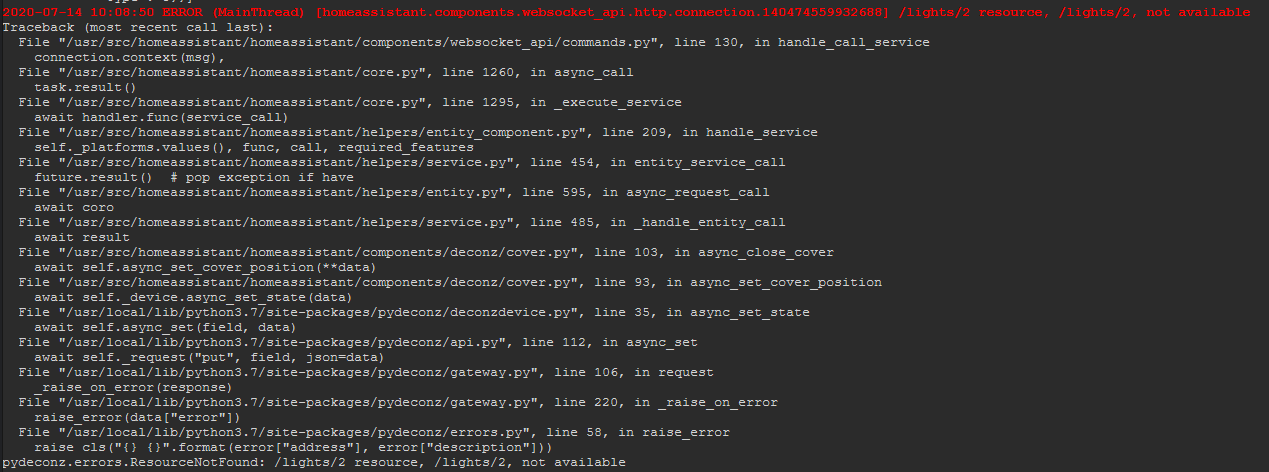
I can see the device in VNC and on the web app. but if I try to adjust it from the web app or from home assistant nothing happens. On Home Assistant I get a “Failed to call service cover/close_cover. /lights/2 resource, /lights/2, not available” and on Node-Red I get an API error.
I’m running my system in Docker. It has been working fine for a while.
If I manually call the “cover” service in HA, I see this error in the logs:

I also see this in the logs constantly.

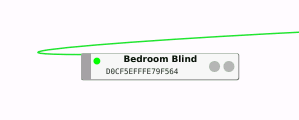
Also, in VNC, the device is sitting with a green flashing indicator. All other devices flash blue.

How can I troubleshoot please? The logs for the add-on don’t really show much…
I have tried to update the firmware on the ConbeeII but now Deconz won’t connect to it.
Steps to reproduce the behaviour
Adjust brightness of IKEA blind in Phoscon App - nothing happens
Expected behavior
Blind should open or close.
Screenshots

Environment
- Host system: NAS
- Running method: Home Assistent deCONZ Add-on
- Firmware version:
- deCONZ version: 2.05.78
- Device: ConBee II
- Do you use an USB extension cable: yes
deCONZ Logs
12:53:37:454 wait reconnect 10 seconds 12:53:38:454 wait reconnect 9 seconds 12:53:39:454 wait reconnect 8 seconds 12:53:40:454 failed to reconnect to network try=2 12:53:40:454 wait reconnect 7 seconds 12:53:41:454 wait reconnect 6 seconds 12:53:42:454 wait reconnect 5 seconds 12:53:43:454 wait reconnect 4 seconds 12:53:44:454 wait reconnect 3 seconds 12:53:45:454 failed to reconnect to network try=3 12:53:45:454 wait reconnect 2 seconds 12:53:46:454 wait reconnect 1 seconds 12:53:46:651 COM: /dev/ttyACM0 / serialno: DE2129434 12:53:46:651 COM: --dev: /dev/ttyACM0 (ConBee II) 12:53:47:282 device state timeout ignored in state 2 12:53:48:333 device state timeout ignored in state 2 12:53:49:383 device state timeout ignored in state 2 12:53:50:433 device state timeout ignored in state 2 12:53:50:454 try to reconnect to network try=4 12:53:51:954 device state timeout ignored in state 2 12:53:52:954 device state timeout (handled) 12:53:52:993 device disconnected reason: 1, index: 0 12:53:53:454 wait reconnect 15 seconds 12:53:53:454 void zmMaster::handleStateIdle(zmMaster::MasterEvent) not connected goto OFF state 12:53:53:454 device state timeout ignored in state 1 12:53:54:454 wait reconnect 14 seconds 12:53:55:454 failed to reconnect to network try=5 12:53:55:454 wait reconnect 13 seconds 12:53:56:454 wait reconnect 12 seconds 12:53:57:453 wait reconnect 11 seconds 12:53:58:454 wait reconnect 10 seconds 12:53:59:454 wait reconnect 9 seconds 12:54:00:454 failed to reconnect to network try=6 12:54:00:454 wait reconnect 8 seconds 12:54:01:454 wait reconnect 7 seconds 12:54:02:453 wait reconnect 6 seconds 12:54:03:453 wait reconnect 5 seconds 12:54:04:454 wait reconnect 4 seconds 12:54:05:454 failed to reconnect to network try=7 12:54:05:454 wait reconnect 3 seconds 12:54:06:453 wait reconnect 2 seconds 12:54:07:454 wait reconnect 1 seconds 12:54:07:650 COM: /dev/ttyACM0 / serialno: DE2129434 12:54:07:650 COM: --dev: /dev/ttyACM0 (ConBee II) 12:54:08:229 device state timeout ignored in state 2 12:54:09:279 device state timeout ignored in state 2 12:54:10:331 device state timeout ignored in state 2 12:54:10:454 try to reconnect to network try=8 12:54:11:954 device state timeout ignored in state 2 12:54:12:954 device state timeout ignored in state 2 12:54:13:954 device state timeout (handled) 12:54:13:994 device disconnected reason: 1, index: 0 12:54:14:454 wait reconnect 15 seconds 12:54:14:454 void zmMaster::handleStateIdle(zmMaster::MasterEvent) not connected goto OFF state 12:54:14:454 device state timeout ignored in state 1 12:54:15:453 failed to reconnect to network try=9 12:54:15:453 wait reconnect 14 seconds
Additional context
About this issue
- Original URL
- State: closed
- Created 4 years ago
- Comments: 37
Neither of this is a issue caused by the deCONZ application. We’ve got multiple reports and seen that the full string worked. This is something that needs to be fixed in the addon, which is not maintained by us.
Docker outputting in a xlsx?
This also is a HA Addon issue.
Have you tried with another browser ? or with deleting cache ?
On my side I have this bug when I use the wrong ip (the deconz on windows without conbee, instead of using the Pi ip)
The page says: Warning: It is strongly advised to use a native installation of one of the update methods. Virtual Machines may work but are not supported, using a VM while trying to update firmware is on your own risk.
While reading that page, i noticed that there wasn’t any mentioning about not able to update in HA . i’ve added that.
I suggest you to use the deCONZ windows version to update the firmware.
However, do you have any logs? Where does it not connect?