deconz-rest-plugin: Attempting to updating firmware yields, "2184: Error: uart reset failed, check retry"
Describe the bug
I am trying to flash the firmware on my ConBee.
When attempting to flash the ConBee I receive this error:
2184: Error: uart reset failed, check retry
Steps to reproduce the behavior
- Downloaded and installed the current D2XX drivers
- Downloaded and installed the current deCONZ software (deCONZ_Setup_Win32_V2_09_00)
- Downloaded the most recent firmware and confirmed it via the MD5 (deCONZ_Rpi_0x26390500.bin.GCF)
- Insert the ConBee, wait a few seconds, check COM port (
GCFFlasher -l) - Run the following command to flash:
GCFFlasher -d COM9 -f deCONZ_Rpi_0x26390500.bin.GCF - I get the following error:
2184: Error: uart reset failed, check retry
Expected behavior
Successful Flash
Screenshots
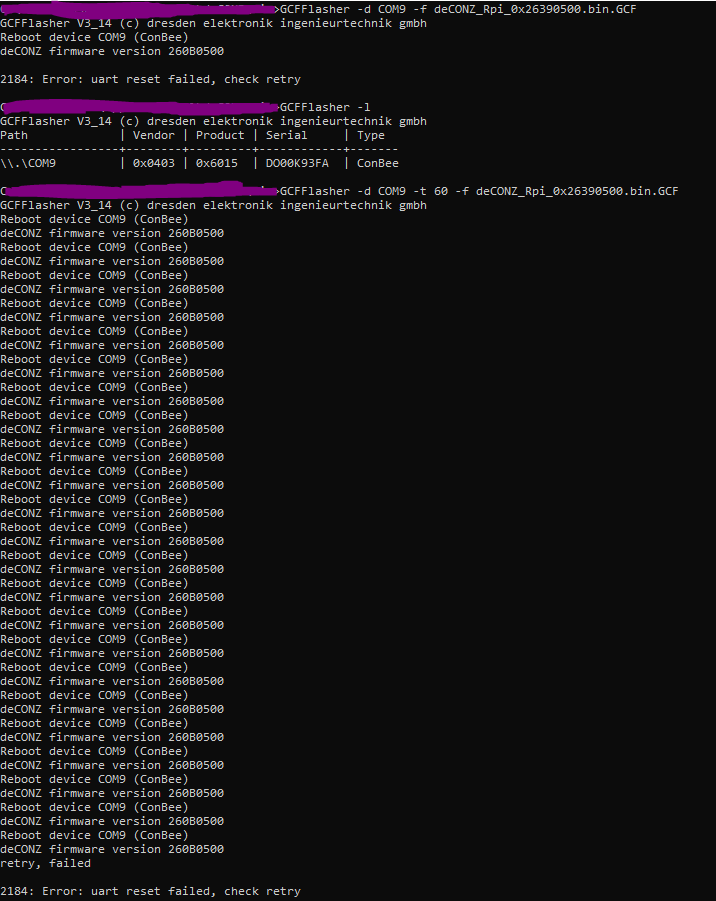
Environment
- Host system: Windows (currently)
- Running method: Windows (currently)
- Firmware version: 260B0500
- deCONZ version: 2.09.00
- Device: ConBee I
- Do you use an USB extension cable: Tried both with and without
- Is there any other USB or serial devices connected to the host system? No, I don’t think
deCONZ Logs
N/A
Additional context
N/A
About this issue
- Original URL
- State: closed
- Created 3 years ago
- Comments: 27 (1 by maintainers)
deCONZ_Setup_Win32_V2_05_04.exe(2018-02-04) and was able to installdeCONZ_Setup_Win32_V2_05_04.exe(2018-02-04) ->SUCCESSdeCONZ_Setup_Win32_V2_09_01.exeto update fromdeCONZ_Setup_Win32_V2_05_04.exetodeCONZ_Rpi_0x26390500.bin.GCF->FAILED(2184: Error: uart reset failed, check retry)deCONZ_Setup_Win32_V2_09_00.exeto update fromdeCONZ_Setup_Win32_V2_05_04.exetodeCONZ_Rpi_0x26390500.bin.GCF->FAILED(2184: Error: uart reset failed, check retry)deCONZ_Setup_Win32_V2_08_00.exeto update fromdeCONZ_Setup_Win32_V2_05_04.exetodeCONZ_Rpi_0x26390500.bin.GCF->FAILED(2184: Error: uart reset failed, check retry)deCONZ_Setup_Win32_V2_05_88.exeto update fromdeCONZ_Setup_Win32_V2_05_04.exetodeCONZ_Rpi_0x26390500.bin.GCF->FAILED(2184: Error: uart reset failed, check retry)deCONZ_Setup_Win32_V2_05_88.exeto update fromdeCONZ_Setup_Win32_V2_05_04.exetodeCONZ_Rpi_0x261e0500.bin.GCF->FAILED(2184: Error: uart reset failed, check retry)deCONZ_Setup_Win32_V2_05_04.exeto update fromdeCONZ_Setup_Win32_V2_05_04.exetodeCONZ_Rpi_0x261e0500.bin.GCF->SUCCESSdeCONZ_Setup_Win32_V2_05_04.exeto update fromdeCONZ_Rpi_0x261e0500.bin.GCFtodeCONZ_Rpi_0x262f0500.bin.GCF->SUCCESSdeCONZ_Setup_Win32_V2_05_04.exeto update fromdeCONZ_Rpi_0x262f0500.bin.GCFtodeCONZ_Rpi_0x26390500.bin.GCF->SUCCESSMy issue was solved by downgrading deConz
Nothing to see with your issue, but there is another strange issue here, that was solved using an old updater, if you can make a try by curiosity https://github.com/dresden-elektronik/deconz-rest-plugin/issues/4104#issuecomment-754878591 ?
Added a issue on our internal issuetracker. Asking Manup to reply.
You could try by removing the stick, execute the command and re-insert it after like 10 secs.
@Ruthalas I am wondering. You are using the filename directly. But the guide says /firmware/filename as location.
So instead of
GCFFlasher -d COM9 -f deCONZ_Rpi_0x26390500.bin.GCFuse
GCFFlasher -d COM9 -f ../firmware/deCONZ_Rpi_0x26390500.bin.GCFAlso, is CMD running as administrator?
Is deconz stopped? Are you using a vm?