sourcelink: SourceLink with GitHub Enterprise LDAP appears to fail
I’ve enabled a given internal Github Enterprise project with sourcelink (specifically 1.0.0-beta-63127-02). The sourcelink itself appears to be generated successfully.
When I load this package into a new console app made in Visual Studio 2017 Preview 15.8 with the new option Fall back to Git Credential Manager authentication for all Source Link requests enabled so that it will work with Github Enterprise, I get the following error from VS:
Source Link Error:
git-credential-manager.exe: Using credentials for username "myuser".
ERROR: The request returned an unexpected mime type (text/html).

Source Link URL: https://git.mycompany.com/raw/MyOrg/MyRepo/3875a6f3507fb3c4e5a727d49fe09328dba97a14/src/MyProject/MyFile.cs
It appears that the URL generated by sourcelink just returns a 200 response with a login page & a redirect.

Approximate URL is https://git.mycompany.com/login?return_to=https%3A%2F%2Fgit.mycompany.com%2Fraw%2FMyOrg%2FMyRepo%2F3875a6f3507fb3c4e5a727d49fe09328dba97a14%2Fsrc%2FMyProject%2FMyFile.cs
It’s unclear if this is a bug in SourceLink, Visual Studio or Github Enterprise. Advice appreciated on debugging this further or what we should correct to make this exciting integration work.
About this issue
- Original URL
- State: open
- Created 6 years ago
- Comments: 33 (14 by maintainers)
Any update on this?
@chuckries Is the potential to add header support to the Sourcelink protocol possible or a non-starter? As I understand it, this would require changes both on the Sourcelink side and inside VS & any other implementers.
I’m no Github expert, but it seems like this would be a win in several ways - Github API usage makes the API query for source consistent across Github & Github Enterprise, can use Basic Auth as expected, and it can’t be the only potential source that might need additional headers to access correctly.
@JamieKeeling sadly no, there is no update at this time.
I have Visual Studio 2017 15.8.3 installed. I just got it to work with a private repository on our GitHub Enterprise server! I’ve wanted this for so many years!!! 🎉 💓
When I tried stepping into the library, it 1st asked me to look for the file. I hit cancel and it gave me this screen:
I clicked on the link and these windows opened up: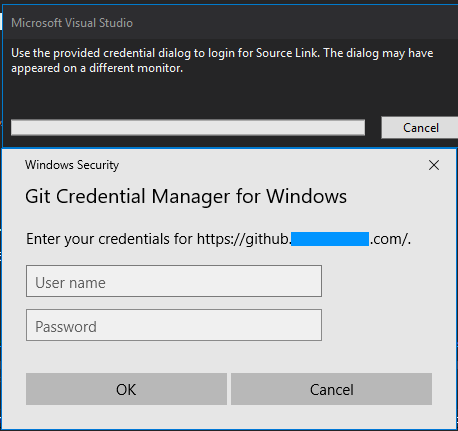
That debug process then crashed, but it worked perfectly when I started another debug process.