runtime: UrlAttribute and EmailAttribute validation with Blazor does not allow empty values
When trying to validate with Url and Email attributes in Blazor there is some weird behavior. When the value is optional you can’t delete it. If the input is empty you can submit the form (as you should) but if you type something and delete it or if it had value (say you are editing existing data) and you delete it the validation fails because the validation kicks in despite the fact that the value is optional. This behavior is inconsistent internally (it shouldn’t matter if the field was empty or the data was deleted) and also inconsistent with the behavior in the attributes elsewhere for example in ASP.NET MVC views
To Reproduce
Using the default Blazor WASM template in .NET 5 add the following page
@page "/url"
@using TestBlazorApp.Shared

<h1>URL</h1>

<EditForm Model="@Model">
    <DataAnnotationsValidator />
    <ValidationSummary />

    URL:
    <InputText @bind-Value="Model.Url" />

    <br />

    URL Regex:
    <InputText @bind-Value="Model.UrlRegex" />

    <br />

    Email:
    <InputText @bind-Value="Model.Email" />

    <br />
    <button type="submit">Save</button>
</EditForm>
@code {

    UrlModel Model = new UrlModel();

}
And the following class in the shared project
public class UrlModel
{
    [Url]
    public string? Url { get; set; }

    [RegularExpression(@"https?:\/\/(www\.)?[-a-zA-Z0-9@:%._\+~#=]{1,256}\.[a-zA-Z0-9()]{1,6}\b([-a-zA-Z0-9()@:%_\+.~#?&//=]*)")]
    public string? UrlRegex { get; set; }

    [EmailAddress]
    public string? Email { get; set; }
}
To reproduce write something in the fields move to another field come back and delete the value.
Result:
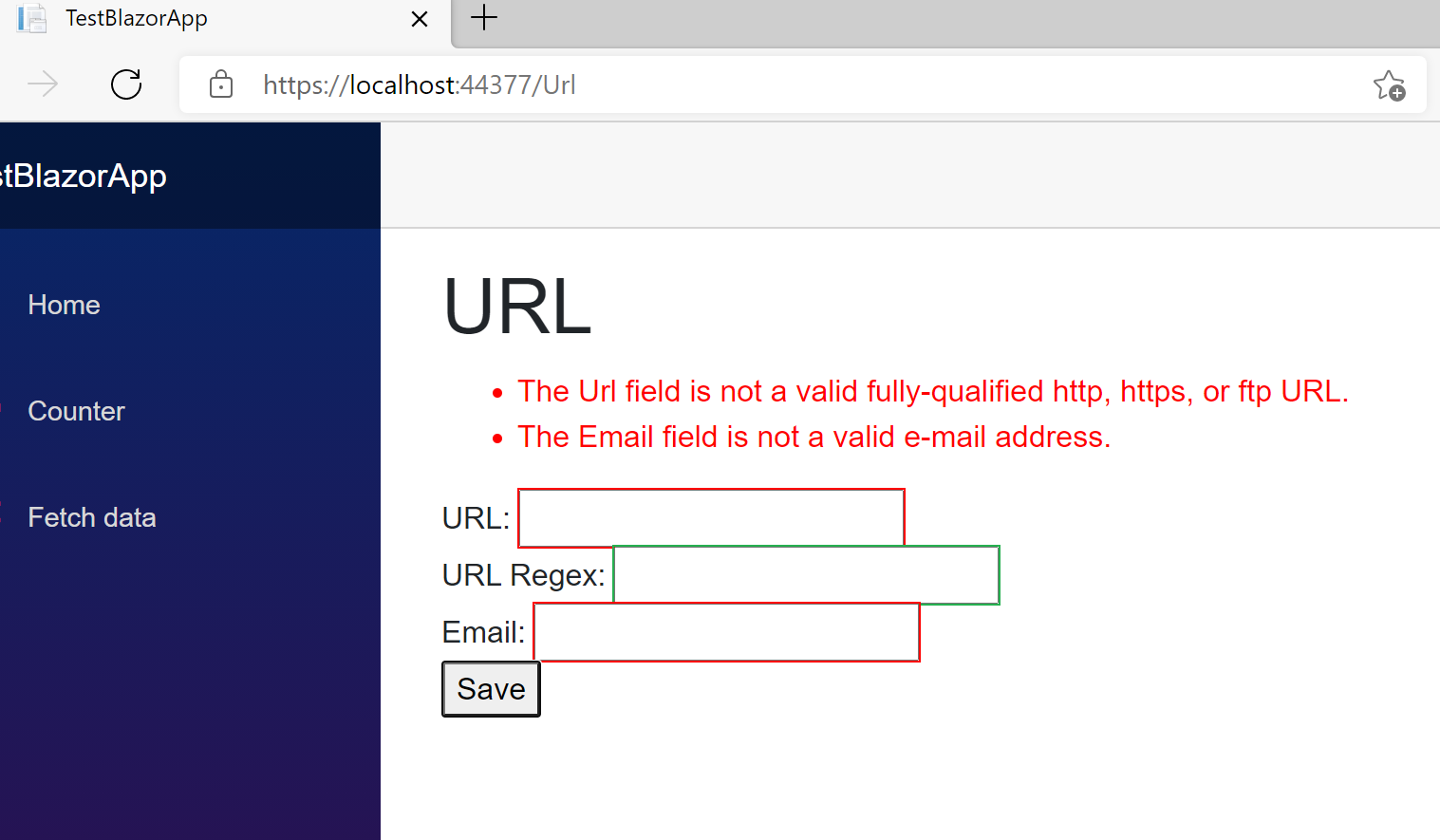
I am testing with Blazor WASM in .NET 5 with Microsoft Edge but I believe this happens with Blazor Server, Blazor Client and all versions of .NET and all browsers
About this issue
- Original URL
- State: closed
- Created 3 years ago
- Comments: 16 (7 by maintainers)
By definition - if a field isn’t required it can have an empty value. Non-empty value may not be valid email or url, but empty value is valid unless the field is required.
So this isn’t by design. This is definitely a bug here.
“Validated” should mean that it contains a valid value. Optional means it might not have a value and that no value is a valid one. On any string input an empty string is logically the same as “null”, because users cannot possibly tell the difference.
This is definitely a bug.
This is terrible design which makes the attributes useless. I don’t see how anyone can think that submitting empty textbox is ok but typing in it and deleting it should trigger validation. Even disregarding the attributes the idea that a field in the same state should result in two different states of the backing field feels extremely wrong.
@nsimeonov I agree. That’s why we moved this issue to the
dotnet/runtimerepo which owns the code forUrlAttributeand DataAnnotations in general.Saying this is “somewhat by design” is the same as saying it’s “broken, but only a little bit”.
We have the Required attribute for indicating if a field is not allowed to be empty.