runtime: The name 'fontFamily' and 'fontSize' do not exist in the current context
- .NET Core Version:
.NET Core SDK (reflecting any global.json):
 Version:   3.0.100-preview5-011568
 Commit:    b487ff10aa

Runtime Environment:
 OS Name:     Windows
 OS Version:  10.0.18362
 OS Platform: Windows
 RID:         win10-x64
 Base Path:   C:\Program Files\dotnet\sdk\3.0.100-preview5-011568\

Host (useful for support):
  Version: 3.0.0-preview5-27626-15
  Commit:  61f30f5a23

.NET Core SDKs installed:
  2.1.800-preview-009677 [C:\Program Files\dotnet\sdk]
  3.0.100-preview5-011568 [C:\Program Files\dotnet\sdk]

.NET Core runtimes installed:
  Microsoft.AspNetCore.App 3.0.0-preview5-19227-01 [C:\Program Files\dotnet\shared\Microsoft.AspNetCore.App]
  Microsoft.NETCore.App 3.0.0-preview5-27626-15 [C:\Program Files\dotnet\shared\Microsoft.NETCore.App]
  Microsoft.WindowsDesktop.App 3.0.0-preview5-27626-15 [C:\Program Files\dotnet\shared\Microsoft.WindowsDesktop.App]
- Have you experienced this same bug with .NET Framework?: No
Problem description:
I speculate, but it looks like a debugger visualiser for Font may be broken - it expect familyFont and fontSize which are absent.
I don’t believe it is a WinForms issue per se, but I was unable to trace the source of the issue.
Actual behavior:
While testing dotnet/winforms#656 I observed the following:
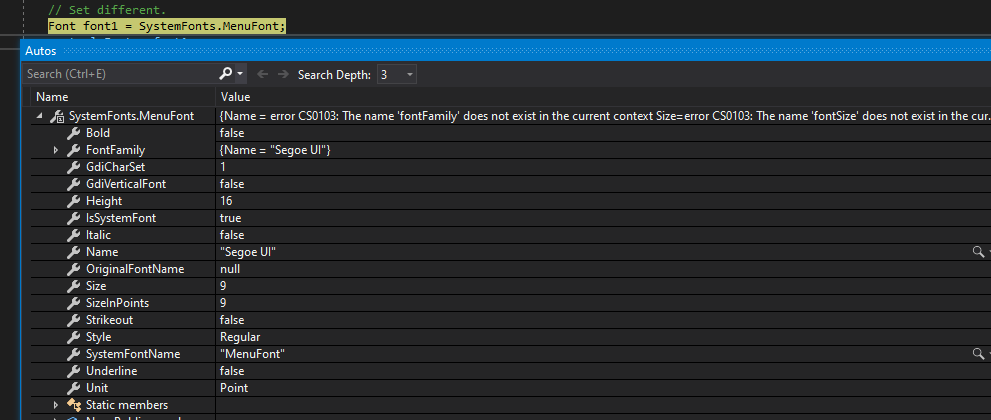
Calling ToString() produces the expected result:

Expected behavior:
The debugger should correct display the font name.
Minimal repro:
- Set a breakpoint in
Font_SetWithHandler_CallsFontChanged - Debug the test
- Check the value of
SystemFonts.MenuFont
About this issue
- Original URL
- State: closed
- Created 5 years ago
- Comments: 25 (22 by maintainers)
@r-ramesh this should do it. Several changed.
@danmosemsft we can test to see what the debugger prefers, not sure anyone has done that yet. Perhaps if it prefers an attribute on the type we could add one to fix this.