runtime: System.Net.Http NuGet broken for .NET 4.7.2

Hopefully this is the right place. If not, please let me know and I’ll create this elsewhere.

I created a net .NET 4.7.2 class library project and tried to reference the System.Net.Http 4.3.3 NuGet package and the entire System.Net.Http namespace is missing. I can’t reference HttpClient. I’m using PackageReference though I think packages.config is also broken. As soon as I change the library to .NET 4.7.1, it all works as expected.

About this issue

  • Original URL
  • State: closed
  • Created 6 years ago
  • Reactions: 13
  • Comments: 43 (22 by maintainers)

Most upvoted comments

Since you’re targeting .NET 4.7.2 and I assume using the latest Visual Studio 2017 Update 15.7.x, then either of these two are fine:

When I removed the redirect binding, it worked. When I changed the redirect binding to 4.0.0.0 (you can see that in web.config of the sample), it worked.

When I put in a binding redirect to 4.2.0.0, I got that issue.

You shouldn’t try to force redirect to 4.2.0.0.

In general, using the latest .NET and Visual Studio tools means you shouldn’t have to worry about the binding redirects. It should just ‘work’ without intervention when you build your app.

What you’re describing sounds a lot like this known issue.

I created a net .NET 4.7.2 class library project and tried to reference the System.Net.Http 4.3.3 NuGet package

Why did you want to reference "System.Net.Http 4.3.3 NuGet package? If you’re building a .NET Framework 4.7.2 class library, then you could just add a normal Framework reference to System.Net.Http.

In most cases, we don’t advise people use the separate System.Net.Http NuGet package anymore. See dotnet/runtime#18280 and dotnet/runtime#20777.

After upgrading my solution to .NET 4.7.2 in hope that I could finally get rid of System.Net.Http.dll hell, I got the same error:

Could not load file or assembly ‘System.Net.Http, Version=4.0.0.0, Culture=neutral, PublicKeyToken=b03f5f7f11d50a3a’ or one of its dependencies. The system cannot find the file specified.

I used Visual Studio -> Add reference and chose the dll from Framework: image
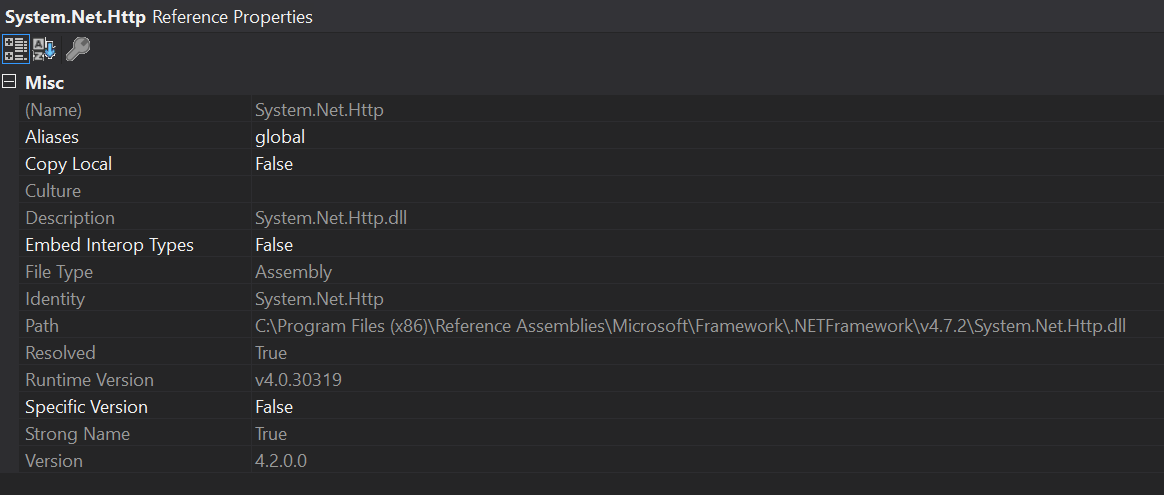
I checked my solution, all projects use <Reference Include="System.Net.Http" />

On all dev and test servers, I installed .NET 4.7.2 SDK. Fusion log gave me:

LOG: This bind starts in default load context. LOG: Using application configuration file: C:\Program Files\ProductName\SubProductName\Tenants\net472\runtime\web.config LOG: Using host configuration file: C:\Windows\Microsoft.NET\Framework64\v4.0.30319\aspnet.config LOG: Using machine configuration file from C:\Windows\Microsoft.NET\Framework64\v4.0.30319\config\machine.config. LOG: Redirect found in application configuration file: 4.2.0.0 redirected to 4.2.0.0. LOG: ProcessorArchitecture is locked to MSIL. LOG: Post-policy reference: System.Net.Http, Version=4.2.0.0, Culture=neutral, PublicKeyToken=b03f5f7f11d50a3a, processorArchitecture=MSIL LOG: GAC Lookup was unsuccessful. LOG: Attempting download of new URL file:///C:/Windows/Microsoft.NET/Framework64/v4.0.30319/Temporary ASP.NET Files/runtime/c22dfe60/788d17b5/System.Net.Http.DLL. LOG: Attempting download of new URL file:///C:/Windows/Microsoft.NET/Framework64/v4.0.30319/Temporary ASP.NET Files/runtime/c22dfe60/788d17b5/System.Net.Http/System.Net.Http.DLL. LOG: Attempting download of new URL file:///C:/Program Files/ProductName/SubProductName/Tenants/net472/runtime/bin/System.Net.Http.DLL. LOG: Attempting download of new URL file:///C:/Program Files/ProductName/SubProductName/Tenants/net472/runtime/bin/System.Net.Http/System.Net.Http.DLL. LOG: Attempting download of new URL file:///C:/Windows/Microsoft.NET/Framework64/v4.0.30319/Temporary ASP.NET Files/runtime/c22dfe60/788d17b5/System.Net.Http.EXE. LOG: Attempting download of new URL file:///C:/Windows/Microsoft.NET/Framework64/v4.0.30319/Temporary ASP.NET Files/runtime/c22dfe60/788d17b5/System.Net.Http/System.Net.Http.EXE. LOG: Attempting download of new URL file:///C:/Program Files/ProductName/SubProductName/Tenants/net472/runtime/bin/System.Net.Http.EXE. LOG: Attempting download of new URL file:///C:/Program Files/ProductName/SubProductName/Tenants/net472/runtime/bin/System.Net.Http/System.Net.Http.EXE. LOG: All probing URLs attempted and failed.

When I set “Copy local” setting of System.Net.Http.dll to true, I got another error:

Cannot load a reference assembly for execution. Description: An unhandled exception occurred during the execution of the current web request. Please review the stack trace for more information about the error and where it originated in the code. Exception Details: System.BadImageFormatException: Cannot load a reference assembly for execution.

Can you tell me what I should do now? I have run into dll load issues many times before, but this System.Net.Http.dll hell is the worst ever 😞

Hey @luisabreu so as I suspected you don’t really have a reference to the platform version of System.Net.Http, and instead are referencing one comming from a nuget package. To fix your issue, you should be able to just add to your project a simple <Reference Include="System.Net.Http" /> and that should fix your issue I believe.

Hello again.

Sorry for the late reply, but I was sick and was really in no condition to follow up on this thread.

Regarding your suggestion, I’ve tried doing that and it fixes the problem. I’ve taken a second look at the code and I’ve noticed that the web site didn’t have a dependency on MS’ Graph nuget package and that’s probably why it wasn’t working…now that I can see why it’s not working, I’m unsure on why it was working with .NET 4.7.1…

Anyways, what matters is that the problem is solved. Thanks again.

Yes, and I did try the work around, but I still had the error

Hello guys.

Just to confirm that package.config is broken.

In my case, I have a solution with several assemblies compiled against 4.7.1 (plain old full net assemblies which use Nuget packages through the package.config). One of these assemblies uses MS Graph in order to query an existing Azure AD (I’m only mentioning this here because adding the MS Graph nuget ref will automatically bring the System.Net.Http + other nuget packages). These helper assemblies are consumed by an ASP.NET MVC 5 web app.

All the packages have been updated to the latest stable releases and everything is working out well if the web site is compiled against version 4.7.1.

However, if I update the .NET version used by the web site, all hell breaks loose! Whenever I change the .net version to 4.7.2, the web app does compile, but I end up getting a runtime error complaining about a missing System.Net.Http reference (in this case, it’s generated by insights, but removing it ends up generating a similar error by the ms graph library):

[FileNotFoundException: Could not load file or assembly 'System.Net.Http, Version=4.0.0.0, Culture=neutral, PublicKeyToken=b03f5f7f11d50a3a' or one of its dependencies. The system cannot find the file specified.] Microsoft.AspNet.TelemetryCorrelation.ActivityExtensions.Extract(Activity activity, NameValueCollection requestHeaders) +0 Microsoft.AspNet.TelemetryCorrelation.ActivityHelper.CreateRootActivity(HttpContext context) +234 Microsoft.AspNet.TelemetryCorrelation.TelemetryCorrelationHttpModule.Application_BeginRequest(Object sender, EventArgs e) +130 System.Web.SyncEventExecutionStep.System.Web.HttpApplication.IExecutionStep.Execute() +223 System.Web.<>c__DisplayClass285_0.<ExecuteStepImpl>b__0() +37 System.Web.HttpApplication.ExecuteStepImpl(IExecutionStep step) +155 System.Web.HttpApplication.ExecuteStep(IExecutionStep step, Boolean& completedSynchronously) +91

So, can anyone help?

Thanks

Luis

@joperezr thank you for the suggestion. Changed it manually now in the .csproj I still think that this looks odd: ref I have messed too much with the csproj and moving frameworks and moving packagemanagement and nugets and redirect bindings in web.config etc… It would be better to start over fresh but I heard on the .net community standup that they are working on new templates and I am looking forward to it. Because I am lost with all the js/css packagemanagers. grunt, gulp, npm, nodejs, minify, uglyfy, compress, bundling, pakman, webpack, webcompiler etc.

I still have these messages during build:

1>  No way to resolve conflict between "System.Net.Http, Version=4.1.1.0, Culture=neutral, PublicKeyToken=b03f5f7f11d50a3a" and "System.Net.Http, Version=4.0.0.0, Culture=neutral, PublicKeyToken=b03f5f7f11d50a3a". Choosing "System.Net.Http, Version=4.1.1.0, Culture=neutral, PublicKeyToken=b03f5f7f11d50a3a" arbitrarily.
1>  Consider app.config remapping of assembly "System.Data.Common, Culture=neutral, PublicKeyToken=b03f5f7f11d50a3a" from Version "4.1.2.0" [C:\Program Files (x86)\Reference Assemblies\Microsoft\Framework\.NETFramework\v4.7.1\Facades\System.Data.Common.dll] to Version "4.2.0.0" [C:\Program Files (x86)\Microsoft Visual Studio\2017\Community\MSBuild\Microsoft\Microsoft.NET.Build.Extensions\net471\lib\System.Data.Common.dll] to solve conflict and get rid of warning.
1>  Consider app.config remapping of assembly "System.Diagnostics.StackTrace, Culture=neutral, PublicKeyToken=b03f5f7f11d50a3a" from Version "4.0.4.0" [C:\Program Files (x86)\Reference Assemblies\Microsoft\Framework\.NETFramework\v4.7.1\Facades\System.Diagnostics.StackTrace.dll] to Version "4.1.0.0" [C:\Program Files (x86)\Microsoft Visual Studio\2017\Community\MSBuild\Microsoft\Microsoft.NET.Build.Extensions\net471\lib\System.Diagnostics.StackTrace.dll] to solve conflict and get rid of warning.
1>  Consider app.config remapping of assembly "System.Diagnostics.Tracing, Culture=neutral, PublicKeyToken=b03f5f7f11d50a3a" from Version "4.1.2.0" [C:\Program Files (x86)\Reference Assemblies\Microsoft\Framework\.NETFramework\v4.7.1\System.Diagnostics.Tracing.dll] to Version "4.2.0.0" [C:\Program Files (x86)\Microsoft Visual Studio\2017\Community\MSBuild\Microsoft\Microsoft.NET.Build.Extensions\net471\lib\System.Diagnostics.Tracing.dll] to solve conflict and get rid of warning.
1>  Consider app.config remapping of assembly "System.Globalization.Extensions, Culture=neutral, PublicKeyToken=b03f5f7f11d50a3a" from Version "4.0.3.0" [C:\Program Files (x86)\Reference Assemblies\Microsoft\Framework\.NETFramework\v4.7.1\Facades\System.Globalization.Extensions.dll] to Version "4.1.0.0" [C:\Program Files (x86)\Microsoft Visual Studio\2017\Community\MSBuild\Microsoft\Microsoft.NET.Build.Extensions\net471\lib\System.Globalization.Extensions.dll] to solve conflict and get rid of warning.
1>  Consider app.config remapping of assembly "System.IO.Compression, Culture=neutral, PublicKeyToken=b77a5c561934e089" from Version "4.0.0.0" [C:\Program Files (x86)\Reference Assemblies\Microsoft\Framework\.NETFramework\v4.7.1\System.IO.Compression.dll] to Version "4.2.0.0" [C:\Program Files (x86)\Microsoft Visual Studio\2017\Community\MSBuild\Microsoft\Microsoft.NET.Build.Extensions\net471\lib\System.IO.Compression.dll] to solve conflict and get rid of warning.
1>  Consider app.config remapping of assembly "System.Net.Http, Culture=neutral, PublicKeyToken=b03f5f7f11d50a3a" from Version "4.1.1.0" [] to Version "4.2.0.0" [C:\Program Files (x86)\Microsoft Visual Studio\2017\Community\MSBuild\Microsoft\Microsoft.NET.Build.Extensions\net471\lib\System.Net.Http.dll] to solve conflict and get rid of warning.
1>  Consider app.config remapping of assembly "System.Net.Sockets, Culture=neutral, PublicKeyToken=b03f5f7f11d50a3a" from Version "4.1.2.0" [C:\Program Files (x86)\Reference Assemblies\Microsoft\Framework\.NETFramework\v4.7.1\Facades\System.Net.Sockets.dll] to Version "4.2.0.0" [C:\Program Files (x86)\Microsoft Visual Studio\2017\Community\MSBuild\Microsoft\Microsoft.NET.Build.Extensions\net471\lib\System.Net.Sockets.dll] to solve conflict and get rid of warning.
1>  Consider app.config remapping of assembly "System.Runtime.Serialization.Primitives, Culture=neutral, PublicKeyToken=b03f5f7f11d50a3a" from Version "4.1.3.0" [C:\Program Files (x86)\Reference Assemblies\Microsoft\Framework\.NETFramework\v4.7.1\Facades\System.Runtime.Serialization.Primitives.dll] to Version "4.2.0.0" [C:\Program Files (x86)\Microsoft Visual Studio\2017\Community\MSBuild\Microsoft\Microsoft.NET.Build.Extensions\net471\lib\System.Runtime.Serialization.Primitives.dll] to solve conflict and get rid of warning.
1>  Consider app.config remapping of assembly "System.Security.Cryptography.Algorithms, Culture=neutral, PublicKeyToken=b03f5f7f11d50a3a" from Version "4.2.2.0" [C:\Program Files (x86)\Reference Assemblies\Microsoft\Framework\.NETFramework\v4.7.1\Facades\System.Security.Cryptography.Algorithms.dll] to Version "4.3.0.0" [C:\Program Files (x86)\Microsoft Visual Studio\2017\Community\MSBuild\Microsoft\Microsoft.NET.Build.Extensions\net471\lib\System.Security.Cryptography.Algorithms.dll] to solve conflict and get rid of warning.
1>  Consider app.config remapping of assembly "System.Security.SecureString, Culture=neutral, PublicKeyToken=b03f5f7f11d50a3a" from Version "4.0.2.0" [C:\Program Files (x86)\Reference Assemblies\Microsoft\Framework\.NETFramework\v4.7.1\Facades\System.Security.SecureString.dll] to Version "4.1.0.0" [C:\Program Files (x86)\Microsoft Visual Studio\2017\Community\MSBuild\Microsoft\Microsoft.NET.Build.Extensions\net471\lib\System.Security.SecureString.dll] to solve conflict and get rid of warning.
1>  Consider app.config remapping of assembly "System.Threading.Overlapped, Culture=neutral, PublicKeyToken=b03f5f7f11d50a3a" from Version "4.0.3.0" [C:\Program Files (x86)\Reference Assemblies\Microsoft\Framework\.NETFramework\v4.7.1\Facades\System.Threading.Overlapped.dll] to Version "4.1.0.0" [C:\Program Files (x86)\Microsoft Visual Studio\2017\Community\MSBuild\Microsoft\Microsoft.NET.Build.Extensions\net471\lib\System.Threading.Overlapped.dll] to solve conflict and get rid of warning.
1>  Consider app.config remapping of assembly "System.Xml.XPath.XDocument, Culture=neutral, PublicKeyToken=b03f5f7f11d50a3a" from Version "4.0.3.0" [C:\Program Files (x86)\Reference Assemblies\Microsoft\Framework\.NETFramework\v4.7.1\Facades\System.Xml.XPath.XDocument.dll] to Version "4.1.0.0" [C:\Program Files (x86)\Microsoft Visual Studio\2017\Community\MSBuild\Microsoft\Microsoft.NET.Build.Extensions\net471\lib\System.Xml.XPath.XDocument.dll] to solve conflict and get rid of warning.

@jphellemons thanks for sharing. Your build seems to be green now so that’s great! One thing to note from just skimming it, looks like your main project (CsaaSignalR) is using the two different forms of nuget package restore available (legacy packages.config, and PackageReference) or at least did it once. I would remove the following lines:

    <Reference Include="EntityFramework, Version=6.0.0.0, Culture=neutral, PublicKeyToken=b77a5c561934e089, processorArchitecture=MSIL">
      <HintPath>..\packages\EntityFramework.6.2.0\lib\net45\EntityFramework.dll</HintPath>
    </Reference>
    <Reference Include="EntityFramework.SqlServer, Version=6.0.0.0, Culture=neutral, PublicKeyToken=b77a5c561934e089, processorArchitecture=MSIL">
      <HintPath>..\packages\EntityFramework.6.2.0\lib\net45\EntityFramework.SqlServer.dll</HintPath>
    </Reference>

and replace them with these:

    <PackageReference Include="EntityFramework">
      <Version>6.2.0</Version>
    </PackageReference>

That will ensure that your package closure is correct, and that your project can be built on other computers, since now you rely on having the ..\packages\EntityFramework.6.2.0.... on disk.

@ericstj No, this is fixed in VS 15.8

@nenadvicentic this sounds like a problem with conflict resolution. The SDK targets should be dropping the package reference in preference of the framework reference. @dsplaisted does VS 15.7.6 have your fix for https://github.com/dotnet/sdk/pull/2250?

@davidsh I have issue with lastest Visual Studio (15.7.6) and .NET Framework 4.7.2.

I had to put following in my ASP.NET Core (v2.1.2) MVC website *.csproj file, to force project to start correctly:

  <ItemGroup>
      <Reference Include="System.Net.Http, Version=4.2.0.0, Culture=neutral, PublicKeyToken=b03f5f7f11d50a3a">
          <HintPath>C:\Program Files (x86)\Reference Assemblies\Microsoft\Framework\.NETFramework\v4.7.2\System.Net.Http.dll</HintPath>
          <SpecificVersion>true</SpecificVersion>
      </Reference>
  </ItemGroup>

My website and my additional dll project are both targeting net472, not using packages.config and both have reference to Framework System.Net.Http dll, which should be version 4.2.0.0:

  <ItemGroup>
    <Reference Include="System.Net.Http" />
  </ItemGroup>

However, in my Website, reference is constantly downgraded, to 4.1.1.0 and path set to: C:\Program Files\dotnet\sdk\NuGetFallbackFolder\system.net.http\4.3.0\ref\net46\System.Net.Http.dll.

If I don’t use my workaround I’m getting following compilation error:

Error CS1705 Assembly ‘MyDLL’ with identity ‘MyDLL, Version=1.0.0.0, Culture=neutral, PublicKeyToken=null’ uses ‘System.Net.Http, Version=4.2.0.0, Culture=neutral, PublicKeyToken=b03f5f7f11d50a3a’ which has a higher version than referenced assembly ‘System.Net.Http’ with identity ‘System.Net.Http, Version=4.1.1.0, Culture=neutral, PublicKeyToken=b03f5f7f11d50a3a’ MyWebsite

My assumption is that this happens because some of the nuget packages in Website define dependencies for >= .NET 4.6 and has nothing specified for .NET 4.7

@davidsh thank you for clearing up my confusion 😄 happy weekend.