runtime: .NET Core 2.0 and 2.1 HTTP Client returns http 407 (Proxy Authentication Required) when attempting to authenticate with a proxy server
Our development team is working on a .NET Core 2.0 service that needs to access external services through a proxy server that requires NTLM authentication. First, we build a set of network credentials specifying a user, password, and domain that is valid for the proxy server, and assign the credentials to a credentials cache specifying the auth type as NTLM. When we create the http client handler, we create a new WebProxy and initialize it with the ProxyURL and credentials from the credentials cache.
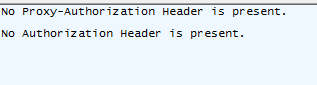
When we run the test app, the auth headers are not being sent/presented to the proxy server. The issue is not a Kerberos/NTLM negotiation handshake issue (as we’ve seen other teams post about) our issue seems to be that .NET Core 2.0 is not sending any auth header at all, regardless of authentication type. The proxy server consistently returns 407 Proxy Authentication Required, and when we capture the request in Fiddler, the auth headers are not present. Our target environment is a Linux container (where we initially encountered the issue during testing), but to simplify the investigation and help debug this issue, we built a very simple console app (running from within .NET Code in Windows). The issue seems to be the same whether running the service in a Linux container or the console app in Windows.
Below is the sample code from the console app using an HTTP Client handler specifying a WebProxy. Note: We’ve tried this in both .NET Core 2.0 and 2.1 and neither sends the auth headers. We also tried a sample app using a web request instead of an HTTP Client, but still no auth header.
using System;
using System.IO;
using System.Net;
using System.Net.Http;
using System.Security.Authentication;
namespace TestConsoleApp
{
    class Program
    {
        static void Main(string[] args)
        {
            string proxyUrl = @"http://127.0.0.1:8888";
            string proxyUsername = @"username";
            string proxyPassword = @"password";
            string proxyDomain = @"domain";
            string authType = "NTLM";
            string targetUrl = @"http://www.google.com";
            HttpClient httpClient;

            var credCache = new CredentialCache();
            var credentials = new NetworkCredential(proxyUsername, proxyPassword, proxyDomain);
            credCache.Add(new Uri(proxyUrl), authType, credentials);
            var handler = new HttpClientHandler
            {
                UseProxy = true,
                Proxy = new WebProxy
                {
                    Address = new Uri(proxyUrl),
                    Credentials = credCache
                },
            };

            httpClient = new HttpClient(handler);
            var httpRequest = new HttpRequestMessage(HttpMethod.Get, targetUrl);
            using (var httpResponse = httpClient.SendAsync(httpRequest).GetAwaiter().GetResult())
            {
                Console.WriteLine(httpResponse.Content);
            }
        }
    }
}
About this issue
- Original URL
- State: closed
- Created 6 years ago
- Comments: 19 (11 by maintainers)
.NET Core 2.1.5 has shipped as of today:
https://blogs.msdn.microsoft.com/dotnet/2018/10/02/net-core-october-2018-update/
I have no idea where we saw the missing mac version then. Must have been somewhere else than the links you posted as not even their history mentions any change. Thanks for your help karelz.
BTW: 2.0 and 2.1 seem to have the same Mac OS X support 10.12+:
Therefore, upgrade from 2.0 to 2.1 (2.1.5) should be ok. Additional changes to WinHttpHandler should not be needed.
Many of the proxy-related bugs fixed in master branch (3.0) have already been ported to the 2.1.x servicing branches. Those bugs were ones were the bug appeared in .NET Core 2.1 but were not present in .NET Core 2.0.
It’s possible that your bug is something different (although related to proxy auth scenario). But testing it against the very latest 3.0 daily build will help identify root cause.