runtime: MetadataTypeAttribute doesn't influence DataAnnotations validation result
Update by @SteveSandersonMS: please see the comment https://github.com/dotnet/runtime/issues/46678#issuecomment-747533844 for a description of the underlying issue/question.
Please ignore the parts of this thread that are specific to Blazor. That’s just how the issue was originally reported, but it looks like the underlying concern is about DataAnnotations itself.
Describe the bug
When I use the MetadataType attribute (from System.ComponentModel.DataAnnotations) on the class for the purpose of validation I get the following error in the console window
WASM: System.TypeLoadException: Could not resolve type with token 01000027 from typeref (expected class 'System.ComponentModel.DataAnnotations.MetadataTypeAttribute' in assembly 'System.ComponentModel.Annotations, Version=4.3.1.0, Culture=neutral, PublicKeyToken=b03f5f7f11d50a3a')
Greater details of the error are shown in this file…[console screenshot - validation error](https://user-images.githubusercontent.com/5938313/79199691-42595400-7e2d-11ea-95bc-3c2248d8b60e.png
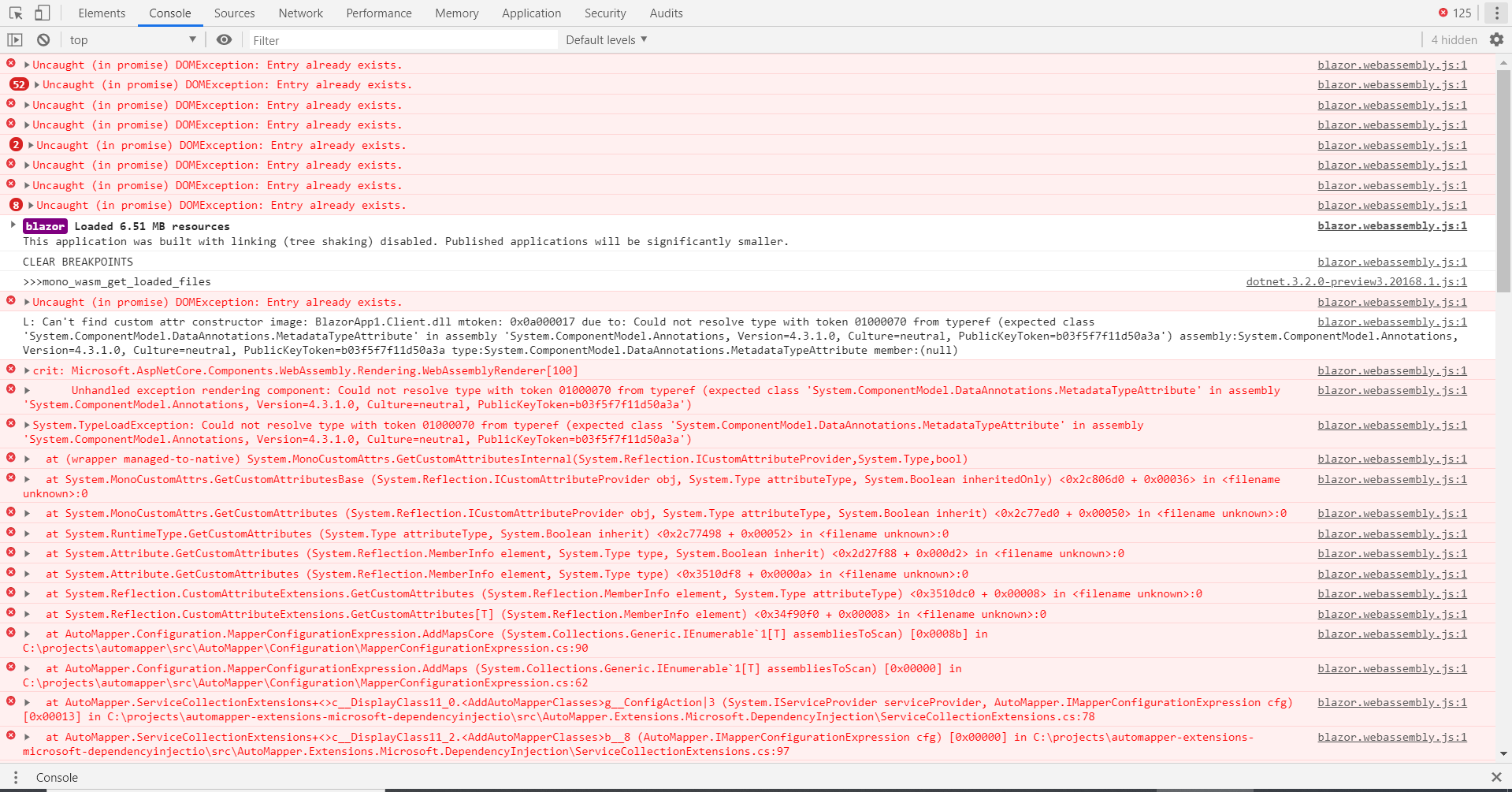
Please note my sample application does works when I put all validation attributes into main the class.
For clarity: This approach works…
public partial class PersonViewModel
{
    [Required(ErrorMessage = "First name is required.")]
    public string Fname { get; set; }
}
This approach fails…
public partial class PersonViewModel
{
    public string Fname { get; set; }
}

[MetadataType(typeof(PersonViewModelMetaData))]
public partial class PersonViewModel
{
}

public class PersonViewModelMetaData
{
    (ErrorMessage = "First name is required.")]
    public string Fname { get; set; }
}
To Reproduce
Please run the attached sample blazor application. To see the error please click the navigation link labelled “validation - failure”. On the page, just simply press the submit button to see the error. BlazorAppValidation.zip
Further technical details
- Include the output of
dotnet --info
.NET Core SDK (reflecting any global.json):
 Version:   3.1.300-preview-015048
 Commit:    13f19b4682

Runtime Environment:
 OS Name:     Windows
 OS Version:  10.0.18363
 OS Platform: Windows
 RID:         win10-x64
 Base Path:   C:\Program Files\dotnet\sdk\3.1.300-preview-015048\

Host (useful for support):
  Version: 3.1.3
  Commit:  4a9f85e9f8

.NET Core SDKs installed:
  3.1.101 [C:\Program Files\dotnet\sdk]
  3.1.201 [C:\Program Files\dotnet\sdk]
  3.1.300-preview-015048 [C:\Program Files\dotnet\sdk]

.NET Core runtimes installed:
  Microsoft.AspNetCore.All 2.1.16 [C:\Program Files\dotnet\shared\Microsoft.AspNetCore.All]
  Microsoft.AspNetCore.App 2.1.16 [C:\Program Files\dotnet\shared\Microsoft.AspNetCore.App]
  Microsoft.AspNetCore.App 3.1.1 [C:\Program Files\dotnet\shared\Microsoft.AspNetCore.App]
  Microsoft.AspNetCore.App 3.1.2 [C:\Program Files\dotnet\shared\Microsoft.AspNetCore.App]
  Microsoft.AspNetCore.App 3.1.3 [C:\Program Files\dotnet\shared\Microsoft.AspNetCore.App]
  Microsoft.NETCore.App 2.1.16 [C:\Program Files\dotnet\shared\Microsoft.NETCore.App]
  Microsoft.NETCore.App 3.1.1 [C:\Program Files\dotnet\shared\Microsoft.NETCore.App]
  Microsoft.NETCore.App 3.1.2 [C:\Program Files\dotnet\shared\Microsoft.NETCore.App]
  Microsoft.NETCore.App 3.1.3 [C:\Program Files\dotnet\shared\Microsoft.NETCore.App]
  Microsoft.WindowsDesktop.App 3.1.1 [C:\Program Files\dotnet\shared\Microsoft.WindowsDesktop.App]
  Microsoft.WindowsDesktop.App 3.1.2 [C:\Program Files\dotnet\shared\Microsoft.WindowsDesktop.App]
  Microsoft.WindowsDesktop.App 3.1.3 [C:\Program Files\dotnet\shared\Microsoft.WindowsDesktop.App]

To install additional .NET Core runtimes or SDKs:
  https://aka.ms/dotnet-download
About this issue
- Original URL
- State: closed
- Created 4 years ago
- Reactions: 14
- Comments: 45 (22 by maintainers)
Commits related to this issue
- MetadataType attribute class properties are now validated. Added tests to ensure behaviour. Fix #46678 — committed to Xaeco/runtime by Xaeco 3 years ago
- MetadataType attribute class properties are now validated. Fix #46678 — committed to Xaeco/runtime by Xaeco 3 years ago
- Add validation for MetadataType attribute - Issue #46678 (#51772) * MetadataType attribute class properties are now validated. Fix #46678 * Clean up PR #51772 Co-authored-by: Brice Lambson <brice@... — committed to dotnet/runtime by Xaeco 3 years ago
This is much needed as in case of scaff folding it just delete and recreates the class again, we would have to re-write everything again. please consider to implement it, need for real life project
I’ve just been checking this, and I don’t think this issue is Blazor-specific. I think it’s a more general point that
System.ComponentModel.DataAnnotations.MetadataTypeAttributedoesn’t actually do anything to influence the DataAnnotations validation result.To repro my findings, create a new .NET Core Console Application (so that’s neither Blazor nor WebAssembly), containing:
I would have expected this to say
isValid: Falsebut actually it saysisValid: True. I can only get it to respect the[Required]attribute by putting it directly ontoPerson, notPersonMetadata. Also notice that this has nothing to do withpartialclasses (I’m not using them above).@pranavkm Do we have any contacts who work on DataAnnotations? This seems like a weirdness that a lot of people have complained about all over StackOverflow etc. I can’t tell whether it used to work in the past (e.g. on .NET Framework) since some people say it does if you use
TypeDescriptor.AddProviderTransparent, but it certainly doesn’t appear to work now.So I have coded two working solutions.
Solution 1
TypeDescriptor.AddProviderTransparent()method.MetadataTypeattribute.MetadataTypeattribute would auto register theTypeDescriptor.AddProviderTransparent()method negating the need for code.Solution 2
MetadataTypeattributeTypeDescriptor.AddProviderTransparent()method.Both solutions require adding a couple of methods to the System.ComponentModel.Annotations.Validator class. This resides in .Net Standard 2.1. I’m guessing any fixes would come out in a .NET 6 beta and not to any older versions?
So I’m hoping for some assistance here on which implementation to use. Like to hear everyone’s vote?
I created a small test project to investigate the DataAnnotations behaviour. Attached zip has two projects with identical code. A .Net Framework project called DN and a .Net Core project called Core. TestMetadataTypeAttribute.zip
Some findings: To get the Metadata type to work in .Net Framework 4.5+ you need to ensure two things
Validator.TryValidateObject()you need to set thevalidateAllPropertiesparameter to True. Otherwise only theRequiredattribute gets checked.You don’t need to use
As it makes no difference to .Net Framework 4.5+
The Core project doesn’t produce the expected results.
I went through the .Net Core 5 code, specifically through the System.ComponentModel.Annotations solution. I couldn’t find any direct references to MetadataTypeAttribute or AssociatedMetadataType in the context of the TryValidateObject code.
I will keep digging.
this is a must have feature, especially in projects with automatic class generations like Entity Framework, to allow adding additional validation or business rules.
Hope it will be implemented as soon as possible
Just wanted to add a +1 for this - while we can setup a task to mix-in our data annotations after scaffolding for now, I feel this is a regression from MVC.
Agree, It would be really nice if MetadataType worked. It would allow us to add data annotations for validation to Models generated using Scaffold-DbContext
The listed owners of the
area-System.ComponentModel.DataAnnotationsarea are @lajones @ajcvickers.@Xaeco - can you try rebasing your change on the latest main? I merged #49901 last week, which resolved the existing ILLink warnings in that library. If you are still seeing warnings, can you send them to me, along with your change? I can assist in getting them resolved.
Thank you to all who have commented. It looks like solution 2 is preferred. I hope to get a pull request in today.
I’m going to have a go at fixing it
This is really an important issue. One of the main advantages of Blazor versus frameworks like Angular is the rapid development due to capability of reusing the ‘server code’ for validation or generation of models in the client. @mkArtakMSFT
See also (and upvote) https://github.com/dotnet/efcore/issues/14544
Still waiting on my pull request to be reviewed. No further progress.
Excellent. I will give it a go and let you know. Thank you> The listed owners of the
area-System.ComponentModel.DataAnnotationsarea are @lajones @ajcvickers.Thanks for the effort guys. Solution 2 would be the neater solution. As mentioned by others this issue has a considerable impacts. Any Idea, when can we expect the fix?
news on this issue?
Those “high-priority” features won’t matter if big corporates decline to use Blazor because its model-binding support sucks.
@ajcvickers any chance this fix could be back-ported to .NET 5?
If so what is the process?
Update. Option 1 has been approved. Not sure if it will land in a .NET 6 preview or the final release.
Hi Guys,
Any updates on this?
I’ve had a PR in for the fix for 29 days now but haven’t had anyone look at it yet. Not sure if I’ve missed part of the process or everyone is really busy and this is too low priority. Any assistance would be appreciated. Thanks.
@SteveSandersonMS I have two working solutions for this issue.
Solution 1. Is to replace two functions with their DN4.8 equivalents. They use TypeDescriptor, which as far as I can tell, is being avoided.
Solution 2. I wrote functions that work but when I do a full build I get an IL Linker error which I can’t suppress and I’m not sure I should.
I’d appreciate talking to someone re the best way forward.
I prefer Solution 2 , Its the same as old silverlight WCF RIA services used.
This seems to be generally the problem with decorating any autogenerated class with attributes. I am experiencing a similar issue with trying to add XmlElement and XmlAttribute to classes generated from a proto file that need to be deserialized from an xml payload. The MetadataType attribute seems to have no effect whatsoever.
I also tried to use MetadataType on a simple class and it seems to be just completely ignored, so it’s not something to do with autogenerated files or protobuf, it just seems to not work at all even in the simplest scenario.
(I am using .net standard 2.1 and System.ComponentModel.Annotations nuGet version 5.0.0)
Tagging subscribers to this area: @ajcvickers See info in area-owners.md if you want to be subscribed.
Issue Details
Describe the bug
When I use the MetadataType attribute (from System.ComponentModel.DataAnnotations) on the class for the purpose of validation I get the following error in the console window
WASM: System.TypeLoadException: Could not resolve type with token 01000027 from typeref (expected class 'System.ComponentModel.DataAnnotations.MetadataTypeAttribute' in assembly 'System.ComponentModel.Annotations, Version=4.3.1.0, Culture=neutral, PublicKeyToken=b03f5f7f11d50a3a')Greater details of the error are shown in this file…[console screenshot - validation error](https://user-images.githubusercontent.com/5938313/79199691-42595400-7e2d-11ea-95bc-3c2248d8b60e.png
Please note my sample application does works when I put all validation attributes into main the class.
For clarity: This approach works…
This approach fails…
To Reproduce
Please run the attached sample blazor application. To see the error please click the navigation link labelled “validation - failure”. On the page, just simply press the submit button to see the error. BlazorAppValidation.zip
Further technical details
dotnet --infoarea-System.ComponentModel.DataAnnotations,untriaged