runtime: Launch Without Debugging Doesn't Block BackgroundService and Whole App but Debug Does
Is there an existing issue for this?
- I have searched the existing issues
Describe the bug
I have a BackgroundService that looks like this
using RemoteMonitor.Classes;
using RemoteMonitor.DatabaseContexts;

namespace RemoteMonitor.Services;

public class MonitoringEventTriggeringService : BackgroundService
{
    private IServiceProvider ServiceProvider { get; }
    private ILogger<MonitoringEventTriggeringService> Logger { get; }

    private Queue<MonitoringEvent> EventQueue { get; }

    public MonitoringEventTriggeringService(IServiceProvider provider, ILogger<MonitoringEventTriggeringService> logger)
    {
        ServiceProvider = provider;
        Logger = logger;
        EventQueue = new Queue<MonitoringEvent>();
    }

    public void QueueEventTrigger(MonitoringEvent monitoringEvent)
    {
        EventQueue.Enqueue(monitoringEvent);
    }

    private Thread? _workerThread;
    private Task LongRunningTask;

    protected override async Task ExecuteAsync(CancellationToken stoppingToken)
    {
        if (LongRunningTask is not null) throw new InvalidOperationException("Already running");

        Logger.LogInformation("Monitoring Event Triggering Start");
        LongRunningTask = Task.Run(async () =>
            {
                Logger.LogInformation("Task Start");
                try
                {
                    while (!stoppingToken.IsCancellationRequested)
                    {
                        if (EventQueue.Count == 0)
                        {
                            continue;
                        }

                        var monitoringEvent = EventQueue.Dequeue();
                        using (var scope = ServiceProvider.CreateScope())
                        {
                            var db = scope.ServiceProvider.GetRequiredService<AppDbContext>();
                            await db.MonitoringEvents.AddAsync(monitoringEvent, stoppingToken);
                            await db.SaveChangesAsync(stoppingToken);
                        }

                        // TODO Trigger events, notifications
                        Logger.LogInformation($"{monitoringEvent.DateTime} Rule {monitoringEvent.Message} triggered");
                    }
                }
                catch (Exception ex)
                {
                    Logger.LogError(ex, "Something went wrong");
                }
            },
            stoppingToken
        );
        Logger.LogInformation("Task is running");
    }
}
I also commented out any other irrelevant things in my entry point
using RemoteMonitor.DatabaseContexts;
using RemoteMonitor.Services;

var builder = WebApplication.CreateBuilder(args);

builder.Services.AddControllersWithViews();
builder.Services.AddDbContext<AppDbContext>();
builder.Services.AddHostedService<MonitoringEventTriggeringService>();

var app = builder.Build();

if (!app.Environment.IsDevelopment())
{
    app.UseExceptionHandler("/Home/Error");
    app.UseHsts();
}

// app.UseHttpsRedirection();
app.UseStaticFiles();
app.UseRouting();
app.UseAuthorization();

app.MapControllerRoute(
    name: "default",
    pattern: "{controller=Home}/{action=Index}/{id?}"
);

app.Run();
The application seems to be stuck somewhere so that the Host doesn’t get to initialize the web service
Here’s the output
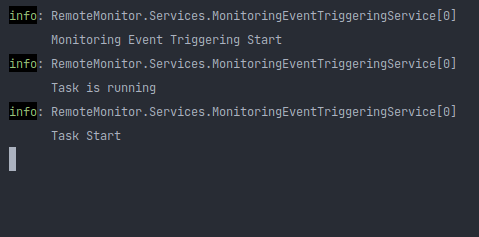
I have also tried it with using Thread with IsBackground set to true, and still no luck. I also tried putting Task.Yield() in the beginning of the task and in the while loop and once i got this:

I also tried stepping into Host.cs with Jetbrains Rider and the loop seems to be stuck after this statement
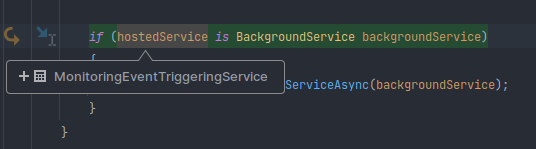
I am developing on Linux, and I tried on Windows with the same Jetbrains Rider version and .NET 6 SDK version and debugging works just normally, meanwhile on Linux everything runs normally only if started without debugging.
Expected Behavior
App initiation does not block, proceeds to initiate the next hosted services
Steps To Reproduce
Exceptions (if any)
No response
.NET Version
6.0.402
Anything else?
ASP.NET Core Version: 6.0.10 IDE: Jetbrains Rider 2022.2.3, similar behavior also happens on VSCode 1.72.2
Output of dotnet --info
.NET SDK (reflecting any global.json):
 Version:   6.0.402
 Commit:    6862418796

Runtime Environment:
 OS Name:     zorin
 OS Version:  16
 OS Platform: Linux
 RID:         linux-x64
 Base Path:   /usr/share/dotnet/sdk/6.0.402/

global.json file:
  Not found

Host:
  Version:      6.0.10
  Architecture: x64
  Commit:       5a400c212a

.NET SDKs installed:
  6.0.402 [/usr/share/dotnet/sdk]

.NET runtimes installed:
  Microsoft.AspNetCore.App 6.0.10 [/usr/share/dotnet/shared/Microsoft.AspNetCore.App]
  Microsoft.NETCore.App 6.0.10 [/usr/share/dotnet/shared/Microsoft.NETCore.App]

Download .NET:
  https://aka.ms/dotnet-download

Learn about .NET Runtimes and SDKs:
  https://aka.ms/dotnet/runtimes-sdk-info
About this issue
- Original URL
- State: closed
- Created 2 years ago
- Comments: 15 (9 by maintainers)
@seikosantana - thanks for putting this together! @hoyosjs - could you take a look at this?