maui: VS 17.3.4 Breaks Android build with - Manifest file at 'obj\Debug\net6.0-android\android-arm\staticwebassets.build.json' not found
Description
Since updating to VS 17.3.4 I can’t build any MAUI Android projects on my machine.
I have verified this on two devices running VS - before updating to VS 17.3.4 it was building ok - post update to 17.3.4 the build errors show for android.
I am unable to verify if this affects iOS but the build errors seem to point only at android.
This is happening on dotnet --version 6.0.401
Steps to Reproduce
- Update to VS 17.3.4
- Create a brand new MAUI project (I used MAUI blazor for testing)
- Attempt a build
- Fails
Link to public reproduction project repository
https://github.com/jordanwilcox/maui-build-error-android-17.3.4
Version with bug
SDK 6.0.401
Last version that worked well
SDK 6.0.400
Affected platforms
Android
Affected platform versions
All android platforms
Did you find any workaround?
Workaround found by @cupsos by changing global.json in solution to sdk version 6.0.400
Relevant log output
1>C:\Program Files\dotnet\sdk\6.0.401\Sdks\Microsoft.NET.Sdk.Razor\targets\Microsoft.NET.Sdk.Razor.StaticWebAssets.targets(680,7): error : Manifest file at 'obj\Debug\net6.0-android\android-arm\staticwebassets.build.json' not found.
1>C:\Program Files\dotnet\sdk\6.0.401\Sdks\Microsoft.NET.Sdk.Razor\targets\Microsoft.NET.Sdk.Razor.StaticWebAssets.targets(680,7): error : Manifest file at 'obj\Debug\net6.0-android\android-x86\staticwebassets.build.json' not found.
1>Done building project "MauiApp1.csproj" -- FAILED.
1>C:\Program Files\dotnet\sdk\6.0.401\Sdks\Microsoft.NET.Sdk.Razor\targets\Microsoft.NET.Sdk.Razor.StaticWebAssets.targets(680,7): error : Manifest file at 'obj\Debug\net6.0-android\android-x64\staticwebassets.build.json' not found.
1>Done building project "MauiApp1.csproj" -- FAILED.
1>C:\Program Files\dotnet\sdk\6.0.401\Sdks\Microsoft.NET.Sdk.Razor\targets\Microsoft.NET.Sdk.Razor.StaticWebAssets.targets(680,7): error : Manifest file at 'obj\Debug\net6.0-android\android-arm64\staticwebassets.build.json' not found.
1>Done building project "MauiApp1.csproj" -- FAILED.
About this issue
- Original URL
- State: closed
- Created 2 years ago
- Reactions: 35
- Comments: 70 (5 by maintainers)
obj\Debug\net6.0-android\staticwebassets.build.json Copy obj\Debug\net6.0-android\android-arm64\staticwebassets.build.json
Ok guys, for the meantime, I was able to make it to work, just did a search for file staticwebassets.build.json and found it at folder net6.0-android, so just copied it at folders where building was breaking and now it is working, cheers.
this work for me, download & install sdk 6.0.400 https://download.visualstudio.microsoft.com/download/pr/9a1d2e89-d785-4493-aaf3-73864627a1ea/245bdfaa9c46b87acfb2afbd10ecb0d0/dotnet-sdk-6.0.400-win-x64.exe
rename sdk 6.0.401 in C:\Program Files\dotnet\sdk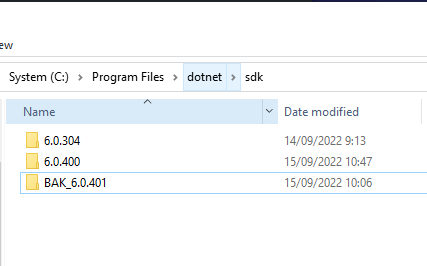
I’m on the same boat.
If you want to use VS 17.3.4 with MAUI now, try this.
6.0.400at global.jsonMaybe SDK issue?
Edit:
Windows update KB5017915 pushing SDK
6.0.400to6.0.401and will not work above. Do not installKB5017915if you want keep6.0.400.I just tried SDK
6.0.304but no luck.For who can’t find
6.0.400Can’t make a release even in the latest preview, Maui is a big joke, wonder if it’s a playhouse on Microsoft 😦 Xamarin:forms worked anyway, Maui really sucks
Thank you everyone for your patience! Please update to 17.3.5 if you haven’t already. This is now resolved!
@tb-mtg your workaround resolved this issue! Thank you. I modified little bit on you suggestion to support both Debug build and Release build.
<ItemGroup>section (basically at the end of file before</Project>)This may still fail especially with rebuild. Building once again should be successful though. I know it’s not the best but still better than being blocked by this issue I guess 😃 Hope this is cleaned up soon.
UPDATE:
dotnet workload install mauishould resolved the issue and no longer need to have customer PreBuildEvent as workaround.Thank you everyone for reporting the issue! We’re also tracking this at https://developercommunity.visualstudio.com/t/Build-failed-with-error-Manifest-file-a/10144594. This will be resolved very soon!
Don’t really understand why every MS tool update must break something. I updated hoping something else will be fixed, but something else got broken.
Reverting back.
The problem still remains!
What is this ridiculous game? No one from Microsoft has replied, please answer 😕
tried both the sdk and the file copy one. it still complains about missing dependencies now
Helped me! Just needed to add the global.json in the solution folder to use the SDK version 6.0.400. Thanks.
This is confirmed to be fixed in 17.3.5, can this issue be closed?
VS dropped a new release 17.3.5 yesterday that fixed the problem for me!
Tony Nicholls 705 543 1312
From: Leif Westman @.> Sent: Wednesday, September 28, 2022 8:29:57 AM To: dotnet/maui @.> Cc: Tony Nicholls @.>; Comment @.> Subject: Re: [dotnet/maui] VS 17.3.4 Breaks Android build with - Manifest file at ‘obj\Debug\net6.0-android\android-arm\staticwebassets.build.json’ not found (Issue #10102)
Prolly trolling on purpose, but just in case you’re not… Do you understand the meaning of preview?
I pay big money for my licence of visual studio 2022, after update nothing work, shall it be so?
Not use previews, but need to change to a preview to not stop my work, but I can not do a release build either in standard or the preview!
— Reply to this email directly, view it on GitHubhttps://github.com/dotnet/maui/issues/10102#issuecomment-1260832579, or unsubscribehttps://github.com/notifications/unsubscribe-auth/AR2UHSK2FIQMZGYMLOGTXDDWAQ24LANCNFSM6AAAAAAQL3O624. You are receiving this because you commented.Message ID: @.***>
I pay big money for my licence of visual studio 2022, after update nothing work, shall it be so?
@danroth27 @tb-mtg Yes I can confirm the suggested commend fixed the issue. I can build without the temporary workaround now.
FIX:
dotnet workload install mauiThanks @alexdbkim - I think doing the
workload install mauihas fixed my issue.@alexdbkim Did you try running
dotnet workload install mauito get the latest .NET MAUI servicing release, which should have a fix for this issue?@xiangnanscu There appears to be an issue with
dotnet workload updatewhen .NET MAUI was installed using VS. Instead, rundotnet workload install mauito bring back the templates and get the latest .NET MAUI bits that fix this issue. Note that this will only install .NET MAUI for the active .NET SDK. You can switch the active .NET SDK by creating a global.json file with the desired .NET SDK version.A temporary fix that worked for me was to add below to the .csproj file:
Update visual studio 2022 with a new version, rely hard to work with Microsoft tools, i’m stuck just know, rely bad !!!
Also worked for me. Thanks @transnity
For those who performed
dotnet workload updateand then deleted the still-failing-to-build project, preventingdotnet workload restore, trydotnet workload install mauiinstead.No the advised workaround is to run
dotnet workload restorein the project directory.Thank you this works for me too, I have updated the main ticket with this workaround to help others. 😊
Same issue. Uninstalled 17.3.4 and installed 17.3.2 again and now it’s totally bricked. Reinstalled 17.3.4, same errors again as @jordanwilcox stated in initial post.
Tried to install the 6.0.400 SDK and put it in the global.json but doesn’t work.
Global.json was in the wrong directory for some reason. Works again now with 6.0.400
Also seems like it’s rebuilding everytime you deploy to a local Android device. Takes ages to test things. Edit: fast deploy was automatically disabled after the update…