maui: Publishing new MAUI Blazor app fails for win-x64 on Windows 10 using net6.0-windows-10.0.19041
Description
I am running Visual Studio Community 2022 (64-bit) - Preview Version 17.1.0 Preview 1.1 On Windows 10, 20H2, 19042.1348
I created a new MAUI Blazor app.
I can build and run the app after switching the Framework to net6.0-windows-10.0.19041
However, if I try to publish the app to a folder using these settings:
Target Runtime: win-x64 Target Framework: net6.0-windows-10.0.19041 Deployment mode: Framework-dependent
It fails with this error:
Publish has encountered an error.
Publish has encountered an error. We were unable to determine the cause of the error. Check the output log for more details.
 message in the output: The RuntimeIdentifier 'win-x64' is invalid.

A diagnostic log has been written to the following location: <snip>
The tmpFFBA.tmp log file reports this:
21/11/2021 9:39:26 PM
System.AggregateException: One or more errors occurred. ---> Microsoft.WebTools.Shared.Exceptions.WebToolsException: Publish has encountered an error. We were unable to determine the cause of the error. Check the output log for more details.
   --- End of inner exception stack trace ---
---> (Inner Exception #0) Microsoft.WebTools.Shared.Exceptions.WebToolsException: Publish has encountered an error. We were unable to determine the cause of the error. Check the output log for more details. <---

Microsoft.WebTools.Shared.Exceptions.WebToolsException: Publish has encountered an error. We were unable to determine the cause of the error. Check the output log for more details.
Steps to Reproduce
- Create new MAUI Blazor app on Windows 10 using Visual Studio 2022 Preview 1.1
- Publish using runtime win-x64 and target net6.0-windows-10.0.19041
- Experience error
Version with bug
Unknown/Other (please specify)
Last version that worked well
Unknown/Other
Affected platforms
Windows
Affected platform versions
Windows SDK 10.0.19041.0
Did you find any workaround?
No response
Relevant log output
21/11/2021 9:39:26 PM
System.AggregateException: One or more errors occurred. ---> Microsoft.WebTools.Shared.Exceptions.WebToolsException: Publish has encountered an error. We were unable to determine the cause of the error. Check the output log for more details.
   --- End of inner exception stack trace ---
---> (Inner Exception #0) Microsoft.WebTools.Shared.Exceptions.WebToolsException: Publish has encountered an error. We were unable to determine the cause of the error. Check the output log for more details. <---

Microsoft.WebTools.Shared.Exceptions.WebToolsException: Publish has encountered an error. We were unableto determine the cause of the error. Check the output log for more details.
About this issue
- Original URL
- State: closed
- Created 3 years ago
- Reactions: 3
- Comments: 20 (2 by maintainers)
I am facing the same issue,
Visual Studio Community 2022 (64-bit) - Preview Version 17.1.0 Preview 2.0 Windows 10 1909 (OS Build 18363.1916)
I am trying to publish a windows executable application with “.Net MAUI App. (Preview)”, the app is the maui app example with a button and a counter.
I tried to kind of brute force it into working, I was able to proceed a little, but in the end I coundn’t make it work.
I hope this helps whoever is going to fix this error:
First error I got was this, it was happening for all runtime identifier I tried (win-86, win-64, win10-x64, etc)
Adding the below line to the project file would bypass the validation.
<_RuntimeIdentifierValidation>False</_RuntimeIdentifierValidation>Then this one started appearing
I just hardcoded in the file to ensure it passes this part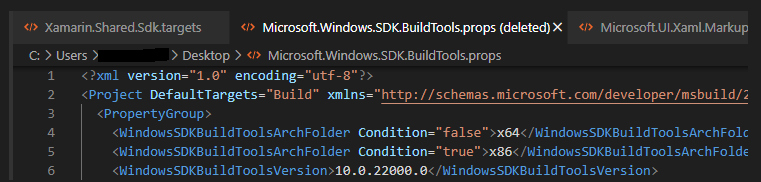
Then this one
Bypassed this one by using the below parameter
-p:AppxUseResourceIndexerApi=FalseThen I bumped into this one, and I coundn’t think of a workaround for it
Likewise… I’m upset that I can’t start doing a test project already.
Problem is still present. New MAUI Blazor app, no code changes fails on publish. Only thing I can publish is a nuget package.
Same here with .NET MAUI