maui: Pair to Mac failed with error "Workload manifest dependency 'Microsoft.NET.Workload.Emscripten' version '6.0.4' is lower..."
Description
Pair to Mac failed with error “Workload manifest dependency ‘Microsoft.NET.Workload.Emscripten’ version ‘6.0.4’ is lower than version ‘6.0.9’ required by manifest ‘microsoft.net.workload.mono.toolchain’”.
Steps to Reproduce
- Install the latest build of Dev17.4 Preview 2 and use the script to install the MAUI(6.0.517) workload from main branch
- On the Windows machine, create a new Blazor Hybrid project on the command line using the following:
dotnet new maui-blazor -o iOSWindowsProject - Open the iOSWindowsProject solution with Visual Studio.
- Select the “Pair to Mac” option in the Visual Studio toolbar.
- Select the mac OS device that is connected to the network and press “Connect”.
- In the next window, enter the username and password for the user account on the macOS machine.
- Connect the machine.
ACTUAL:
Pair to mac failed.
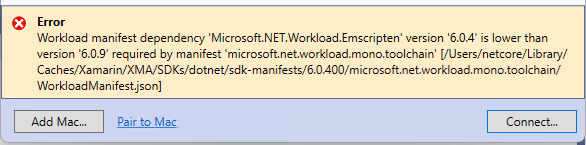
NOTE:
- This issue does not repro when only installing Dev17.4 Preview 2, which includes MAUI version is 6.0.486.
- This issue still repro after manually adding the following feeds in VS.
Version with bug
Unknown/Other (please specify)
Last version that worked well
Unknown/Other
Affected platforms
Windows
Affected platform versions
Windows SDK 6.0.400
Did you find any workaround?
No
Relevant log output
Workload manifest dependency 'Microsoft.NET.Workload.Emscripten' version '6.0.4' is lower than version '6.0.9' required by manifest 'microsoft.net.workload.mono.toolchain' [/Users/netcore/Library/Caches/Xamarin/XMA/SDKs/dotnet/sdk-manifests/6.0.400/microsoft.net.workload.mono.toolchain/WorkloadManifest.json]
About this issue
- Original URL
- State: closed
- Created 2 years ago
- Reactions: 1
- Comments: 68 (6 by maintainers)
I changed C:\Program Files\dotnet\sdk-manifests\6.0.300\microsoft.net.workload.mono.toolchain\WorkloadManifest file:
from:
to:
and it works and pair to mac correctly…
@samhouts Are you able to request that the VS tooling team tests that .NET MAUI development is functional before shipping?
Now fixed in VS 17.3.5 See: https://developercommunity.visualstudio.com/t/Failed-to-pair-to-Mac-with-error-Could-/10138259#T-N10159813
Same here, none of the workarounds listed here seem to do anything. 6.0.9 just appears on the mac no matter what.
Thanks a ton, that worked. I can’t believe how many hours I’ve wasted on this issue. Unbelievable that the VS team would ship broken toolchains and dependencies without testing first. I hope we get a proper fix soon, fingers crossed.
I believe we just made the VS feedback public so you can track it now. The issue is resolved and pending release very soon! Thank you for your patience!!
I have file a new VS Feedback ticket 10138259 for this bug.