maui: MAUI can't get file data from Windows Explorer by Drag&Drop and app will crash

Description

Try to allow users to drag and drop image files (jpg/png) from the WINDOWS desktop into the application. MAUI can’t get file data DragEventArgs.Data == null and app will crash application with UnhandledExceptionEventArgs (NullException)

Sample.dll!Sample.WinUI.App.InitializeComponent.AnonymousMethod__1_1(object sender, Microsoft.UI.Xaml.UnhandledExceptionEventArgs e) Snipaste_2022-04-14_03-31-21
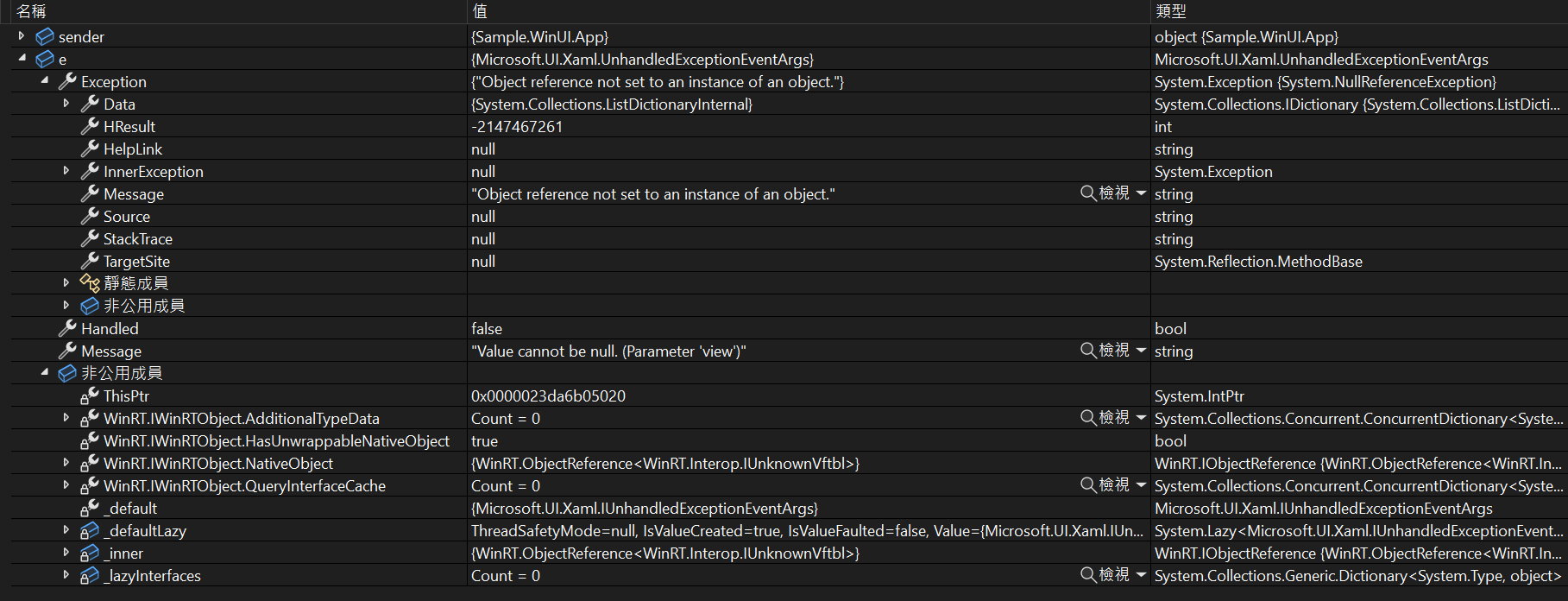
Also I noticed a similar question in Xamarin.Froms xamarin/xamarin-forms-samples#709 xamarin/Xamarin.Forms#15150

Steps to Reproduce

Just create new MAUI project with

MainPage.xaml

<?xml version="1.0" encoding="utf-8" ?>
<ContentPage xmlns="http://schemas.microsoft.com/dotnet/2021/maui"
             xmlns:x="http://schemas.microsoft.com/winfx/2009/xaml"
             x:Class="Sample.MainPage">
    <ScrollView>
        <Image BackgroundColor="Silver"
               HeightRequest="300"
               WidthRequest="250">
            <Image.GestureRecognizers>
                <DropGestureRecognizer  DragOver="OnDragOver" Drop="OnDrop"/>
            </Image.GestureRecognizers>
        </Image>
    </ScrollView>
</ContentPage>

MainPage.xaml.cs

using System.Diagnostics;

namespace Sample;

public partial class MainPage : ContentPage
{
    public MainPage() { InitializeComponent(); }

    void OnDragOver(object sender, DragEventArgs e) { Debug.Assert(e.Data == null); }

    void OnDrop(object sender, DropEventArgs e) {} // Never
}

Version with bug

Release Candidate 1 (current)

Last version that worked well

Unknown/Other

Affected platforms

Windows, I was not able test on other platforms

Affected platform versions

Windows 11 22593.1

Did you find any workaround?

No response

Relevant log output

No response

About this issue

  • Original URL
  • State: open
  • Created 2 years ago
  • Reactions: 2
  • Comments: 28 (6 by maintainers)

Commits related to this issue

Most upvoted comments

We are having the same issue as we want to move from WPF to MAUI but drag and drop for a File Explorer is holding us back.

Same issue here, drag and drop of files and folders is a must have for us and is preventing us to go with MAUI, do we have a workaround or a community produced solution?

Edit: attaching an event delegate to a page or any other control could possibly intercept the native drop event and the payload?

@theRealGupta I had the same issue as you with dropps into CollectionView not working on Mac.

The problem was the the blog post referenced above adds a UIDropInteractionDelegate to the view, but UICollectionView requires a UICollectionViewDropDelegate.

You can check out this project which works on both Windows and Mac

@sandreas I follow your solution

I am encountering an issue while attempting to import a file using the drag and drop feature in MAUI.

Although there are several known bugs in MAUI, a few developers have provided solutions for Windows and Mac platforms. I found that using a ScrollView, AbsoluteLayout, or StackLayout works fine. However, when attempting to use a CollectionView on a Mac machine, it doesn’t function properly.

If anyone has a solution for this issue, please provide your input. Solution Created By me:

https://github.com/theRealGupta/MAUI-FileDragAndDrop

When would Microsoft fix this? It’s been over a year.

I’m not sure, that this is working, but it seems like someone tried to work around the issue here:

So https://vladislavantonyuk.github.io/articles/Drag-and-Drop-any-content-to-a-.NET-MAUI-application/ seems to work at least for Windows (where I need it), here is an example:

MyApp/DragDropExtensions.cs

// MyApp/DragDropExtensions.cs
#if WINDOWS

using Microsoft.Maui.Controls.PlatformConfiguration;
using Microsoft.UI.Xaml;
using Windows.ApplicationModel.DataTransfer;
using Windows.Storage;
using DataPackageOperation = Windows.ApplicationModel.DataTransfer.DataPackageOperation;
using DragEventArgs = Microsoft.UI.Xaml.DragEventArgs;

using System.Diagnostics;
using Windows.Foundation;
using Microsoft.Maui.Platform;
#endif

namespace MyApp;

#if WINDOWS
public static partial class DragDropHelper
{
    public static void RegisterDrag(UIElement element, Func<CancellationToken, Task<Stream>> content)
    {
        element.CanDrag = true;
        element.DragStarting += async (s, e) =>
        {
            var stream = await content.Invoke(CancellationToken.None);
            var storageFile = await CreateStorageFile(stream);
            e.Data.SetStorageItems(new List<IStorageItem>()
        {
            storageFile
        });
        };
    }

    public static void RegisterDrop(UIElement element, Func<Stream, Task>? content)
    {
        element.AllowDrop = true;
        element.Drop += async (s, e) =>
        {
            if (e.DataView.Contains(StandardDataFormats.StorageItems))
            {
                var items = await e.DataView.GetStorageItemsAsync();
                foreach (var item in items)
                {
                    if (item is StorageFile file)
                    {
                        if (content is not null)
                        {
                            // content is a callback Func with a Stream argument
                            // you could also change its signature to string and use
                            // await content.Invoke(file.Path);
                            
                            var str = await file.OpenReadAsync();
                            await content.Invoke(str.AsStream());


                        }
                    }
                }
            }
        };
        element.DragOver += OnDragOver;
    }

    public static void UnRegisterDrag(UIElement element)
    {
        element.CanDrag = false;
    }

    public static void UnRegisterDrop(UIElement element)
    {
        element.AllowDrop = false;
        element.DragOver -= OnDragOver;
    }

    private static async void OnDragOver(object sender, DragEventArgs e)
    {
        if (e.DataView.Contains(StandardDataFormats.StorageItems))
        {
            var deferral = e.GetDeferral();
            var extensions = new List<string> { ".json" };
            var isAllowed = false;
            var items = await e.DataView.GetStorageItemsAsync();
            foreach (var item in items)
            {
                if (item is StorageFile file/* && extensions.Contains(file.FileType)*/)
                {
                    isAllowed = true;
                    break;
                }
            }

            e.AcceptedOperation = isAllowed ? DataPackageOperation.Copy : DataPackageOperation.None;
            deferral.Complete();
        }

        e.AcceptedOperation = DataPackageOperation.None;
    }

    private static IAsyncOperation<StorageFile> CreateStorageFile(Stream imageStream)
    {
        var filename = "SampleImage.jpg";
        return StorageFile.CreateStreamedFileAsync(filename, async stream => await StreamDataRequestedAsync(stream, imageStream), null);
    }

    private static async Task StreamDataRequestedAsync(StreamedFileDataRequest request, Stream imageDataStream)
    {
        try
        {
            await using (var outputStream = request.AsStreamForWrite())
            {
                await imageDataStream.CopyToAsync(outputStream);
                await outputStream.FlushAsync();
            }
            request.Dispose();
        }
        catch (Exception ex)
        {
            Debug.WriteLine(ex.Message);
            request.FailAndClose(StreamedFileFailureMode.Incomplete);
        }
    }
}
# endif

public static class DragDropExtensions
{
    public static void RegisterDrag(this IElement element, IMauiContext? mauiContext, Func<CancellationToken, Task<Stream>> content)
    {
#if WINDOWS
        ArgumentNullException.ThrowIfNull(mauiContext);
        var view = element.ToPlatform(mauiContext);
        DragDropHelper.RegisterDrag(view, content);
#endif

    }

    public static void UnRegisterDrag(this IElement element, IMauiContext? mauiContext)
    {
#if WINDOWS
        ArgumentNullException.ThrowIfNull(mauiContext);
        var view = element.ToPlatform(mauiContext);
        DragDropHelper.UnRegisterDrag(view);
#endif

    }

    public static void RegisterDrop(this IElement element, IMauiContext? mauiContext, Func<Stream, Task>? content)
    {
#if WINDOWS
        ArgumentNullException.ThrowIfNull(mauiContext);
        var view = element.ToPlatform(mauiContext);
        DragDropHelper.RegisterDrop(view, content);
#endif

    }

    public static void UnRegisterDrop(this IElement element, IMauiContext? mauiContext)
    {
#if WINDOWS
        ArgumentNullException.ThrowIfNull(mauiContext);
        var view = element.ToPlatform(mauiContext);
        DragDropHelper.UnRegisterDrop(view);
#endif
    }
}


Views/MyPage.xaml.cs

// Views/MyPage.xaml.cs
public partial class MyPage : ContentPage
{

    public MyPage(MyViewModel vm)
    {
        InitializeComponent();
        BindingContext = vm;
#if WINDOWS
		Loaded += (sender, args) =>
		{
			DropZone.RegisterDrop(Handler?.MauiContext, async stream =>
			{
                                await vm.FileDroppedAsync(stream);
			});
		};

		Unloaded += (sender, args) =>
		{
			DropZone.UnRegisterDrop(Handler?.MauiContext);
		};
#endif
    }


// ...
}

Views/MyPage.xaml

<!-- Views/MyPage.xaml -->
<ScrollView x:Name="DropZone">
<!-- ... -->
</ScrollView>

ViewModels/MyViewModel.cs

// ViewModels/MyViewModel.cs

public class MyViewModel {
// ...
    public async Task FileDroppedAsync(Stream fileStream)
    {
        // Handle the dropped file as stream
        // Maybe you prefer a path, see comments in DragDropHelper / file.Path
    }
// ...
}

Same issue here. I’m not sure, that this is working, but it seems like someone tried to work around the issue here:

https://vladislavantonyuk.github.io/articles/Drag-and-Drop-any-content-to-a-.NET-MAUI-application/

Basically he is re-implementing the Drag & Drop per platform. Maybe someone can confirm, this is working, even if this bug should be fixed asap.

I, too, have this as a DESKTOP requirement. I’ll state this once again (I’ve said it dozens of times already) the MAUI dev team completely dropped the ball on desktop functionality. Instead of starting with Xamarin use cases, you really, Really, REALLY should have looked at providing WPF functionality first or at a minimum, in parallel. You guys have left the desktop crowd very dissatisfied… 😦

We’ve built a new application in MAUI for MacCatalyst and Windows and this is fundamental to our app requirements, it would be great to consider having the ability to drop files into an application.