maui: MAUI Blazor app published as "a single (.exe) file app" cannot start
Discussed in https://github.com/dotnet/maui/discussions/6631
<div type='discussions-op-text'>Originally posted by DanJBower April 29, 2022 Is it possible to build a .exe from MAUI?
Currently, when I build an application targeting windows, it makes appears to make a windows app that it has to be installed.
Ideally the end goal would be to create a single executable file that can be shared without being installed. This is because my workplace has a range of restrictions on machines that makes it difficult to install normal applications and even more difficult to install windows apps, and more difficult still to install apps with self signed certificates. In the past I’ve made applications in WPF and have been able to make a single exe from that project. However, I’ve soon got to start a new project and would really like to transition to MAUI
</div>More detail about what happened at my side:
- We built a simple app with MAUI Blazor (hybrid app)
- We publish it (by using dotnet CLI) as “a single executable file application - only 1 .exe file for the whole application”
- Try to run the application as a normal Windows application (by double clicking on the .exe file)
- The app cannot start
- Take a look at Windows’s event viewer and here is what we get
- If target CPU arch is x86
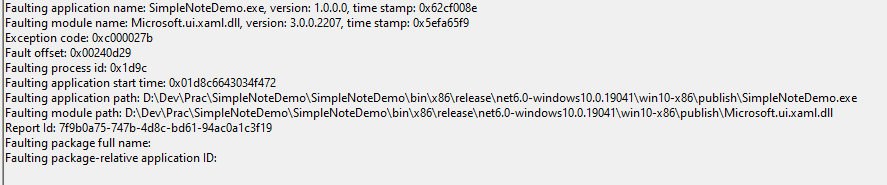
- If target CPU arch is x64
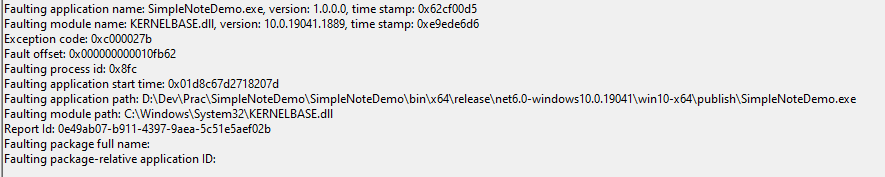
- Create a crash dump for the app
- Analyze the crash dump by Windbg and pde.dll as suggestion of @MagicAndre1981
- app’s target CPU arch and pde.dll are x64
************* Path validation summary **************
Response                         Time (ms)     Location
Deferred                                       srv*c:\symbols*https://msdl.microsoft.com/download/symbols
Symbol search path is: srv*c:\symbols*https://msdl.microsoft.com/download/symbols
Executable search path is:
Windows 10 Version 19044 MP (12 procs) Free x64
Product: WinNt, suite: SingleUserTS
Edition build lab: 19041.1.amd64fre.vb_release.191206-1406
Machine Name:
Debug session time: Tue Sep 13 10:35:55.000 2022 (UTC + 7:00)
System Uptime: not available
Process Uptime: 0 days 0:00:04.000
..............................

Press ctrl-c (cdb, kd, ntsd) or ctrl-break (windbg) to abort symbol loads that take too long.
Run !sym noisy before .reload to track down problems loading symbols.

..................................
........................................
Loading unloaded module list
.
This dump file has an exception of interest stored in it.
The stored exception information can be accessed via .ecxr.
(1864.2868): Unknown exception - code c000027b (first/second chance not available)
For analysis of this file, run !analyze -v
KERNELBASE!RaiseFailFastException+0x152:
00007fff`2862fb62 0f1f440000      nop     dword ptr [rax+rax]
0:000> .extpath "D:\Download\PDE\x64\winext"
Extension search path is: D:\Download\PDE\x64\winext
0:000> .load pde
=========================================================================================
 PDE v11.3 - Copyright 2017 Andrew Richards
=========================================================================================
0:000> !PDE.dpx -dse
Start memory scan  : 0x000000795b77c670 ($csp)
End memory scan    : 0x000000795b780000 (User Stack Base)
- app’s target CPU arch and pde.dll are x86
************* Path validation summary **************
Response                         Time (ms)     Location
Deferred                                       srv*c:\symbols*https://msdl.microsoft.com/download/symbols
Symbol search path is: srv*c:\symbols*https://msdl.microsoft.com/download/symbols
Executable search path is:
Windows 10 Version 19044 MP (12 procs) Free x86 compatible
Product: WinNt, suite: SingleUserTS
Edition build lab: 19041.1.amd64fre.vb_release.191206-1406
Machine Name:
Debug session time: Tue Sep 13 11:19:36.000 2022 (UTC + 7:00)
System Uptime: not available
Process Uptime: 0 days 0:00:03.000
...

Press ctrl-c (cdb, kd, ntsd) or ctrl-break (windbg) to abort symbol loads that take too long.
Run !sym noisy before .reload to track down problems loading symbols.

.............................................................
.........................................
Loading unloaded module list
.
This dump file has an exception of interest stored in it.
The stored exception information can be accessed via .ecxr.
(4bc4.436c): Unknown exception - code c000027b (first/second chance not available)
For analysis of this file, run !analyze -v
eax=037fde58 ebx=00000000 ecx=00000000 edx=00000000 esi=037fe1e0 edi=037fde58
eip=76873d95 esp=037fe13c ebp=037fe248 iopl=0         nv up ei pl nz ac pe nc
cs=0023  ss=002b  ds=002b  es=002b  fs=0053  gs=002b             efl=00200216
combase!RoFailFastWithErrorContextInternal2+0x3d5:
76873d95 833dc0e18a7605  cmp     dword ptr [combase!_Tlgg_hCombaseTraceLoggingProviderProv (768ae1c0)],5 ds:002b:768ae1c0=00000100
0:000> .unloadall
0:000> .extpath "D:\Download\PDE\x86\winext"
Extension search path is: D:\Download\PDE\x86\winext
0:000> .load pde
=========================================================================================
 PDE v11.3 - Copyright 2017 Andrew Richards
=========================================================================================
0:000> !PDE.dpx -dse
Start memory scan  : 0x037fe13c ($csp)
End memory scan    : 0x03800000 (User Stack Base)
Note:
- If we publish the app without “a single (.exe) file application” option (in that case, the app is published as multiple files, including a .exe file + multiple .dll files + others in the same directory), the app still works well as expected
- We followed this tutorial for publishing the app as “a single executable (.exe) file application”: https://dotnetcoretutorials.com/2021/11/10/single-file-apps-in-net-6/
About this issue
- Original URL
- State: open
- Created 2 years ago
- Reactions: 1
- Comments: 24 (9 by maintainers)
We’ve moved this issue to the Backlog milestone. This means that it is not going to be worked on for the coming release. We will reassess the backlog following the current release and consider this item at that time. To learn more about our issue management process and to have better expectation regarding different types of issues you can read our Triage Process.
Support for WinUI Unpackaged Apps is still in development
@MagicAndre1981 , thank you very much for your info. Can I know when this issue will be solved?
P/s: