maui: Can't build to local iOS device after updating MAUI workload with Hot Restart
Description
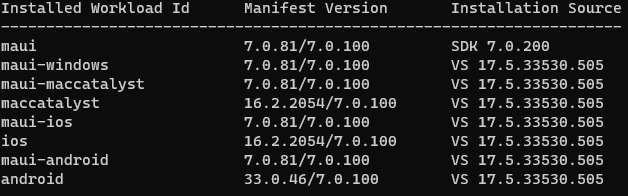
After updating the MAUI workload from version 7.0.59 to 7.0.81 I am no longer able to build to any local iOS devices using Hot Restart on Windows VS 2022. The build errors immediately with the following error: “The specified network password is not correct”. This occurs in both Debug and Release configurations. Automatic provisioning is enabled and I have no issues building to the iOS Simulators through Pair to Mac.
Relevant Infomation:
Steps to Reproduce
- Update MAUI workload to 7.0.81
- Attempt to build MAUI project to a local iOS device using Hot Restart
Link to public reproduction project repository
https://github.com/dotnet/maui
Version with bug
7.0.81 (current)
Last version that worked well
7.0.59
Affected platforms
iOS, I was not able test on other platforms
Affected platform versions
iOS 16.2
Did you find any workaround?
No workaround found.
Relevant log output
1>C:\Program Files\dotnet\packs\Microsoft.iOS.Windows.Sdk\16.2.2054\tools\msbuild\iOS\Xamarin.iOS.HotRestart.targets(20,3): error : The specified network password is not correct.
1>C:\Program Files\dotnet\packs\Microsoft.iOS.Windows.Sdk\16.2.2054\tools\msbuild\iOS\Xamarin.iOS.HotRestart.targets(20,3): error :
About this issue
- Original URL
- State: closed
- Created a year ago
- Reactions: 6
- Comments: 36 (8 by maintainers)
Good news! Maria from Microsoft just commented this on the developercommunity.microsoft.com thread:
A fix for this issue has been internally implemented and is being prepared for release. We'll update you once it becomes available for download.Thanks, everyone! We received the feedback ticket, and we’re on it!
Submitted one a couple days ago as well: https://developercommunity.visualstudio.com/t/net-MAUI-Unable-to-build-iOS-app:-Error/10341302
I just did: https://developercommunity.visualstudio.com/t/Cant-build-to-local-iOS-device-after-up/10344787?port=1025&fsid=c72fb983-a265-4c56-ba30-9ad2d9b52165
I have the same issue since my MAUI workload update yesterday. It doesn’t make sense that this is a Visual Studio issue as the problem wasn’t occurring before the update. This is a workload issue.
I have the same feeling of constant frustration. Myself I face too many issues and I waste a lot of time looking at how to fix things, use workarounds or close/open things multiple times. You install an upgrade and you hope for the best, you deploy to a device in release mode and you hope for the best. Vey hard to say this is a framework to use in production yet.
I can confirm that Visual Studio Build 17.6.0 Preview 7.0 has fixed the issue for me. The new build also comes with a MAUI workload update from 7.0.81 -> 7.0.86. Will go ahead and mark the issue as closed!
I was just able to build and deploy successfully with Preview Version 17.6.0 Preview 7.0.
The problem persists in VS 17.6.0 Preview 4.0
Just for clarification, I’m able to build to a local iOS device using VS for Mac and workload version 7.0.81 just fine, presumably because Hot Restart is not being used on the Mac…
Going back to the issue itself,
Just to weigh in, I’m having the same issue as well suddenly. I did update to Microsoft Visual Studio Community 2022 (64-bit) - Preview Version 17.6.0 Preview 3.0 a few days ago, but the problem seemed to come up after I setup a new project with HotReload on a new Apple Developer “Identifier” (that properly matches the Application ID). Now nothing builds for iOS including the old projects that were working fine before.
I’m getting a combination of the
"The specified network password is not correct"error and aError MSB4044 The "PrepareAppBundle" task was not given a value for the required parameter "SessionId".error inC:\Program Files\dotnet\packs\Microsoft.iOS.Windows.Sdk\16.2.2054\tools\msbuild\iOS\Xamarin.iOS.HotRestart.targets 331which as you can see is actually not part of the project. I only get one or the other, but sometimes it changes just by rebuilding. I have also tried clearing out everything I know how to and it’s stuck in this state. Obviously there is something locally cached that is causing the problem - I just don’t know how to clear out the magical things VS is doing to make this process so automagical.I have the same issue, 12 hours trying to fix it with no luck, even after reinstalling Visual Studio . I have removed all certificates and profiles from %LOCALAPPDATA%\Xamarin\iOS\Provisioning Creating new certificates throgh API from Visual Studio
When you trying to load manually the certificate which is created from Visual Studio API located in %LOCALAPPDATA%\Xamarin\iOS\Provisioning\Certificates when it asking for the password [%LOCALAPPDATA%\Xamarin\iOS\Provisioning\Certificates\xxxxxxxxx.pass] you will get the same massage “The specified network password is not correct”. It seems like Visual creating wrong password ,
I’m planning to generate new certificate from mac and uploaded to Visual Studio if it works I will update you
I updated your comment from “Hot Reload” to “Hot Restart”
“Hot Restart” is the feature where you can deploy a Xamarin.Forms or MAUI Application locally on Windows without a Mac.