ef6: Method not found: 'Boolean System.Data.Entity.Core.Common.DbProviderManifest.SupportsParameterOptimizationInSchemaQueries()'
Hi,
I’ve recently updated Visual Studio to version 15.7.1
Now, when trying to update model like this 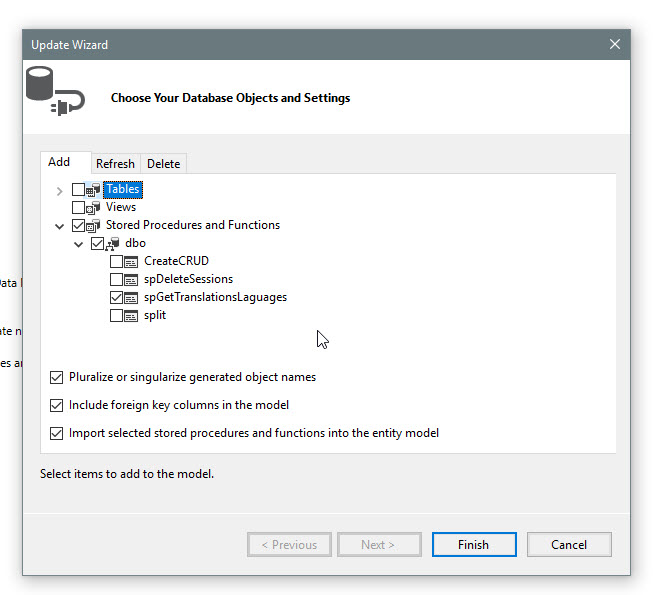 , after clicking “Finish” I get this

The output window has the following:
Unable to generate the model because of the following exception: ‘System.MissingMethodException: Method not found: ‘Boolean System.Data.Entity.Core.Common.DbProviderManifest.SupportsParameterOptimizationInSchemaQueries()’.
at Microsoft.Data.Entity.Design.VersioningFacade.ReverseEngineerDb.SchemaDiscovery.EntityStoreSchemaGeneratorDatabaseSchemaLoader.CreateFilteredCommand(String sql, String orderByClause, EntityStoreSchemaFilterObjectTypes queryTypes, List1 filters, String[] filterAliases) at Microsoft.Data.Entity.Design.VersioningFacade.ReverseEngineerDb.SchemaDiscovery.EntityStoreSchemaGeneratorDatabaseSchemaLoader.LoadDataTable[T](String sql, Func2 orderByFunc, DataTable table, EntityStoreSchemaFilterObjectTypes queryTypes, IEnumerable1 filters, String[] filterAliases) at Microsoft.Data.Entity.Design.VersioningFacade.ReverseEngineerDb.SchemaDiscovery.EntityStoreSchemaGeneratorDatabaseSchemaLoader.LoadTableDetails(IEnumerable1 filters)
at Microsoft.Data.Entity.Design.VersioningFacade.ReverseEngineerDb.SchemaDiscovery.EntityStoreSchemaGeneratorDatabaseSchemaLoader.LoadStoreSchemaDetails(IList1 filters) at Microsoft.Data.Entity.Design.VisualStudio.ModelWizard.Engine.ModelGenerator.GetStoreSchemaDetails(StoreSchemaConnectionFactory connectionFactory) at Microsoft.Data.Entity.Design.VisualStudio.ModelWizard.Engine.ModelGenerator.CreateStoreModel() at Microsoft.Data.Entity.Design.VisualStudio.ModelWizard.Engine.ModelGenerator.GenerateModel(List1 errors)
at Microsoft.Data.Entity.Design.VisualStudio.ModelWizard.Engine.ModelBuilderEngine.GenerateModels(String storeModelNamespace, ModelBuilderSettings settings, List`1 errors)
at Microsoft.Data.Entity.Design.VisualStudio.ModelWizard.Engine.ModelBuilderEngine.GenerateModel(ModelBuilderSettings settings, IVsUtils vsUtils, ModelBuilderEngineHostContext hostContext)’.
In this project:
- Windows 10 version 1803
- The EntityFramework version is 6.2.0
- The .Net version is 4.7.1
What I’ve tried:
- Clean
- Rebuild
- Reinstall EntityFramework (with removing leftover DLLs from the project)
- Change .Net version to earlier and back
Any help would be appreciated.
Thank you in advance.
About this issue
- Original URL
- State: closed
- Created 6 years ago
- Comments: 19 (9 by maintainers)
Edit: Problem solved!
I deleted the folders:
Close VS before doing this.
Hi, same problem here! Updated yesterday from 15.7.0 to 15.7.3 and now i get the same error… 😦 This is very annoying because i have urgent development work to do!
OS: Windows 10 Version under C:\Program Files (x86)\Microsoft Visual Studio 14.0\Common7\IDE is 6.1.3 ??!!
I have this in the GAC too… and i’m unable to uninstall…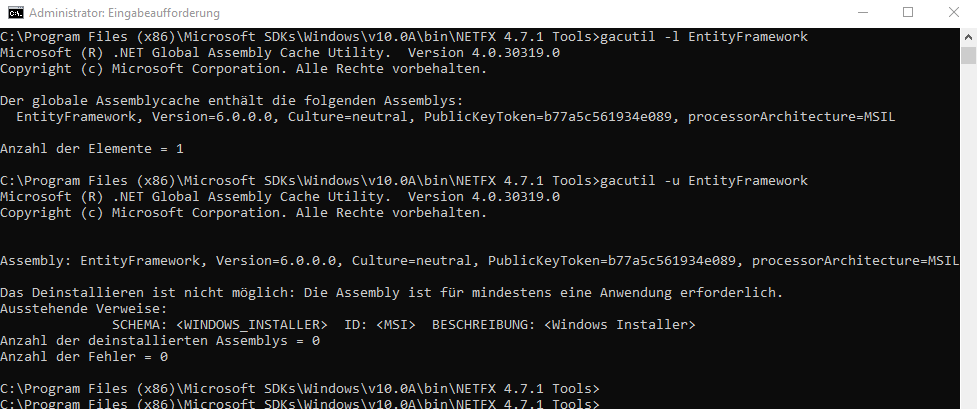
Has anybody a solution to this problem? Thanks!
@divega , Hi, Thank you so much!!! gacutil /u EntityFramework worked like a charm. I don’t know how it got to the GAC if it shouldn’t be there at first place and if there’s a program that installed it and it will seize working - so be it. On this machine I only care about being able to use Visual Studio… 😃
Another approach that you can use to identify the exact copy of entityframework.dll being used by the EF tools in Visual Studio is to attach a debugger to Visual Studio, before this exception happens, for example while showing the “Choose Your Database Objects and Settings” step in the Update Wizard. Here are some steps you can use to do this using another instance of Visual Studio:
@miromakh to your specific question: If you have confirmed that the EF assemblies are in the GAC, I would normally recommend uninstalling them from the GAC using ‘gacutil /u <assembly_display_name>’. EF6 was not designed to run from the GAC and installing it on the GAC can cause issues, like the one you are experiencing now.
That said, (always assuming that you confirmed they are already in the GAC) unless you remember installing the EF assemblies in the GAC manually, it is possible that some application installer did it. And now there is a chance that such application will not work without it. EF6 is designed to be deployed alongside application binaries, so a workaround would be to copy the right version of the EF6 to the application’s directory.
As a last resort, you could attempt updating the assemblies in the GAC (again, assuming that you confirmed they are already in the GAC) using the 6.2 version, using ‘gacutil /i <assembly_path>’ from a developer command prompt, but as I said before this is not recommended and it can cause similar problems with other applications in the future.
I have faced this issue using VS 2017. Below are the steps I have taken to get rid of this issue.
Hope this will helps. Thanks.
@srednasoft this is working fine using Visual Studio 2017 15.7.1 on my machine (besides the fact that we tested this scenario before we released the updated EF Tools in 15.7).
So the problem is rather specific to your machine setup, and we are trying to find the root cause in case this can help other customers.
As @lajones mentioned previously in this issue it is likely that for some reason you have an older version of EntityFramework.dll and EntityFramework.SqlServer.dll that for some reason are being preferred over the correct versions when Visual Studio needs to use the EF6 runtime.
I understand that having to uninstall and reinstalling Visual Studio can be a real hassle, but if you install version 15.7.1 again, please try the steps I described in my previous comment to identify the actual copy of the EF6 assemblies that are being loaded by Visual Studio.
For what it is worth, the correct versions of EntityFramework.dll and EntityFramework.SqlServer.dll are normally located on the Visual Studio application directory, under common7\ide, and the product version should be 6.2.0-61023.
Note that this is the correct version for the EF Tools contained in Visual Studio 2017 15.7.1 regardless of what version of EF your projects are using.