aspnetcore: Microsoft Visual Studio Failed to launch debug adapter 'Microsoft.VisualStudio.Shared.VSCodeDebugProtocol.ProtocolException
Describe the bug
I am trying to upgrade my .net core 3.1 based solution to .net 5.0. I am seeing this error with:
- Microsoft Visual Studio Professional 2019 Version 16.8.2
- Microsoft Visual Studio 2019 Community version 16.9 Preview 1
Attempting to launch my asp.net core project with visual studio debugger fails:
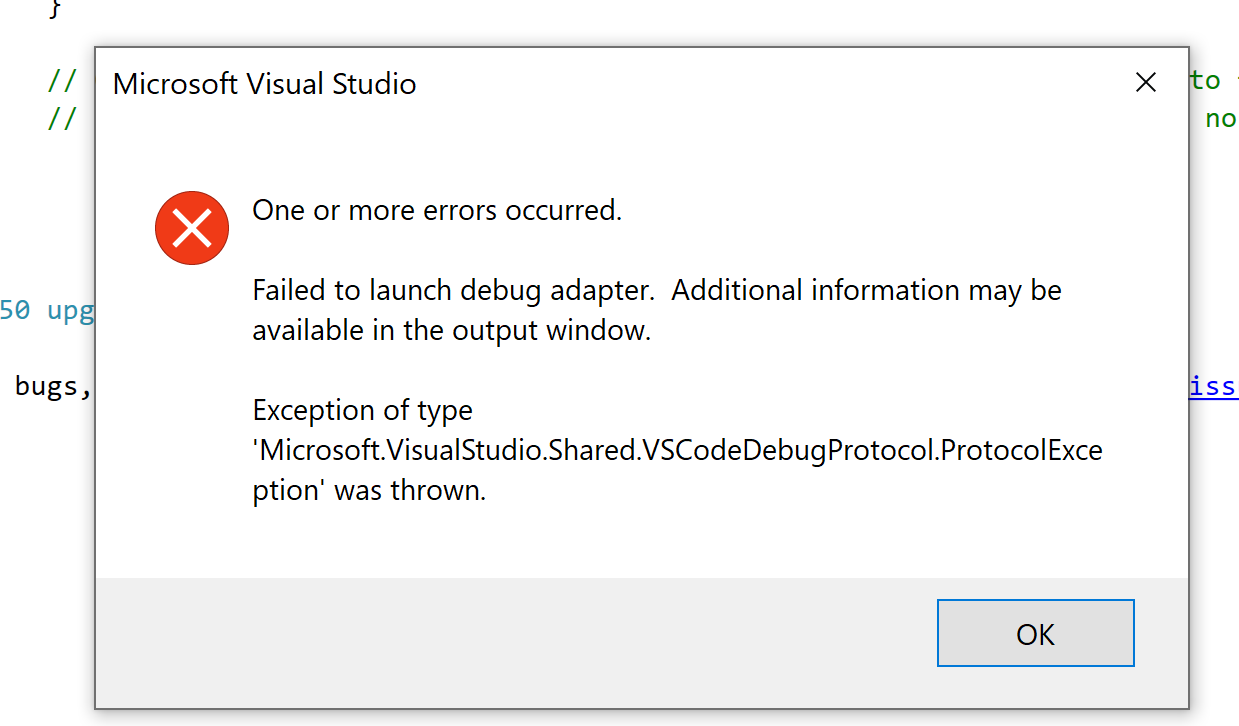
Looking in output window I got a path to the verbose output log, and here is the relevent info:
{"tag":"runtime.launch","timestamp":1606227038803,"message":"Launch returned error","metadata":{"error":{"message":"Unable to launch browser: \"Failed to launch browser!\n\n\nTROUBLESHOOTING: https://github.com/GoogleChrome/puppeteer/blob/master/docs/troubleshooting.md\n\"","stack":"Error: Unable to launch browser: \"Failed to launch browser!\n\n\nTROUBLESHOOTING: https://github.com/GoogleChrome/puppeteer/blob/master/docs/troubleshooting.md\n\"\n at k.prepareLaunch (c:\\program files (x86)\\microsoft visual studio\\2019\\preview\\common7\\ide\\commonextensions\\microsoft\\jsdiagnostics\\debugger\\debugAdapter\\out\\src\\targets\\browser\\browserLauncher.js:102:19)\n at processTicksAndRejections (internal/process/task_queues.js:97:5)"},"wasCancelled":false,"name":"k"},"level":2} {"tag":"dap.send","timestamp":1606227041361,"metadata":{"connectionId":0,"message":{"seq":16,"type":"response","request_seq":2,"command":"launch","success":false,"body":{"error":{"id":9240,"format":"Unable to launch browser: \"Failed to launch browser!\n\n\nTROUBLESHOOTING: https://github.com/GoogleChrome/puppeteer/blob/master/docs/troubleshooting.md\n\"","showUser":false}}}},"level":0} {"tag":"dap.send","timestamp":1606227043301,"metadata":{"connectionId":0,"message":{"seq":17,"type":"event","event":"output","body":{"category":"telemetry","output":"js-debug/dap/operation","data":{"errors":[],"initialize":{"operation":"initialize","totalTime":4.5,"max":4.5,"avg":4.5,"stddev":null,"count":1,"failed":0},"!initialize.errors":[],"initialize.errors":[],"setBreakpoints":{"operation":"setBreakpoints","totalTime":11.3,"max":2,"avg":1.3,"stddev":0.5,"count":9,"failed":0},"!setBreakpoints.errors":[],"setBreakpoints.errors":[],"setExceptionBreakpoints":{"operation":"setExceptionBreakpoints","totalTime":0.5,"max":0.5,"avg":0.5,"stddev":null,"count":1,"failed":0},"!setExceptionBreakpoints.errors":[],"setExceptionBreakpoints.errors":[],"configurationDone":{"operation":"configurationDone","totalTime":0.5,"max":0.5,"avg":0.5,"stddev":null,"count":1,"failed":0},"!configurationDone.errors":[],"configurationDone.errors":[],"launch":{"operation":"launch","totalTime":2932.4,"max":2932.4,"avg":2932.4,"stddev":null,"count":1,"failed":1},"!launch.errors":[{"error":{"message":"Unable to launch browser: \"Failed to launch browser!\n\n\nTROUBLESHOOTING: https://github.com/GoogleChrome/puppeteer/blob/master/docs/troubleshooting.md\n\"","name":"Error","stack":"Error: Unable to launch browser: \"Failed to launch browser!\n\n\nTROUBLESHOOTING: httptroubleshooting.md\n\"\n at k.prepareLaunch (c:browserLauncher.js:102:19)\n at processTicksAndRejections (internaltask_queues.js:97:5)"}}],"launch.errors":[{"error":{"message":"Unable to launch browser: \"Failed to launch browser!\n\n\nTROUBLESHOOTING: https://github.com/GoogleChrome/puppeteer/blob/master/docs/troubleshooting.md\n\"","name":"Error","stack":"Error: Unable to launch browser: \"Failed to launch browser!\n\n\nTROUBLESHOOTING: httptroubleshooting.md\n\"\n at k.prepareLaunch (c:browserLauncher.js:102:19)\n at processTicksAndRejections (internaltask_queues.js:97:5)"}}]}}}},"level":0} {"tag":"dap.send","timestamp":1606227043419,"metadata":{"connectionId":0,"message":{"seq":18,"type":"event","event":"output","body":{"category":"telemetry","output":"js-debug/error","data":{"!error":{"error":{"message":"read ECONNRESET","name":"Error","stack":"Error: read ECONNRESET\n at TCP.onStreamRead (internal/stream_base_commons.js:205:27)"}},"error":{"error":{"message":"read ECONNRESET","name":"Error","stack":"Error: read ECONNRESET\n at TCP.onStreamRead (internal/stream_base_commons.js:205:27)"}},"exceptionType":"uncaughtException"}}}},"level":0} {"tag":"dap.send","timestamp":1606227043419,"message":"Message not sent. Connection was closed.","level":2} {"tag":"runtime.exception","timestamp":1606227043419,"message":"Unhandled error in debug adapter","metadata":{"message":"read ECONNRESET","stack":"Error: read ECONNRESET\n at TCP.onStreamRead (internal/stream_base_commons.js:205:27)"},"level":3}
Here is the relevent section from my launchProfiles.json:
 "MyHost": {
      "commandName": "Project",
      "launchBrowser": true,
      "launchUrl": "https://localhost:62808/",
      "inspectUri": "{wsProtocol}://{url.hostname}:{url.port}/_framework/debug/ws-proxy?browser={browserInspectUri}",
      "applicationUrl": "http://localhost:62807/;https://localhost:62808/;",
      "environmentVariables": {
        "ASPNETCORE_ENVIRONMENT": "Development"
      }
    },
Note: if I change launchBrowser to false I can successfully start the project, and then open the browser and navigate to the url manually.
Other Note:
Edge is my default browser. When this error occurs, it seems a new empty Edge window is created:

To Reproduce
As per above that’s the best I can do at present.
Exceptions (if any)
See screenshots and logs above.
Further technical details
- ASP.NET Core version: .net 50
- Include the output of
dotnet --info
.NET SDK (reflecting any global.json):
 Version:   5.0.100
 Commit:    5044b93829

Runtime Environment:
 OS Name:     Windows
 OS Version:  10.0.19042
 OS Platform: Windows
 RID:         win10-x64
 Base Path:   C:\Program Files\dotnet\sdk\5.0.100\

Host (useful for support):
  Version: 5.0.0
  Commit:  cf258a14b7

.NET SDKs installed:
  1.1.13 [C:\Program Files\dotnet\sdk]
  2.1.502 [C:\Program Files\dotnet\sdk]
  2.1.503 [C:\Program Files\dotnet\sdk]
  2.1.504 [C:\Program Files\dotnet\sdk]
  2.1.505 [C:\Program Files\dotnet\sdk]
  2.1.507 [C:\Program Files\dotnet\sdk]
  2.1.508 [C:\Program Files\dotnet\sdk]
  2.1.509 [C:\Program Files\dotnet\sdk]
  2.1.511 [C:\Program Files\dotnet\sdk]
  2.1.512 [C:\Program Files\dotnet\sdk]
  2.1.513 [C:\Program Files\dotnet\sdk]
  2.1.514 [C:\Program Files\dotnet\sdk]
  2.1.515 [C:\Program Files\dotnet\sdk]
  2.1.516 [C:\Program Files\dotnet\sdk]
  2.1.519 [C:\Program Files\dotnet\sdk]
  2.1.600 [C:\Program Files\dotnet\sdk]
  2.1.602 [C:\Program Files\dotnet\sdk]
  2.1.800 [C:\Program Files\dotnet\sdk]
  2.2.101 [C:\Program Files\dotnet\sdk]
  3.0.100 [C:\Program Files\dotnet\sdk]
  3.1.102 [C:\Program Files\dotnet\sdk]
  3.1.201 [C:\Program Files\dotnet\sdk]
  3.1.402 [C:\Program Files\dotnet\sdk]
  5.0.100-rc.1.20452.10 [C:\Program Files\dotnet\sdk]
  5.0.100 [C:\Program Files\dotnet\sdk]

.NET runtimes installed:
  Microsoft.AspNetCore.All 2.1.6 [C:\Program Files\dotnet\shared\Microsoft.AspNetCore.All]
  Microsoft.AspNetCore.All 2.1.7 [C:\Program Files\dotnet\shared\Microsoft.AspNetCore.All]
  Microsoft.AspNetCore.All 2.1.8 [C:\Program Files\dotnet\shared\Microsoft.AspNetCore.All]
  Microsoft.AspNetCore.All 2.1.9 [C:\Program Files\dotnet\shared\Microsoft.AspNetCore.All]
  Microsoft.AspNetCore.All 2.1.11 [C:\Program Files\dotnet\shared\Microsoft.AspNetCore.All]
  Microsoft.AspNetCore.All 2.1.12 [C:\Program Files\dotnet\shared\Microsoft.AspNetCore.All]
  Microsoft.AspNetCore.All 2.1.13 [C:\Program Files\dotnet\shared\Microsoft.AspNetCore.All]
  Microsoft.AspNetCore.All 2.1.15 [C:\Program Files\dotnet\shared\Microsoft.AspNetCore.All]
  Microsoft.AspNetCore.All 2.1.16 [C:\Program Files\dotnet\shared\Microsoft.AspNetCore.All]
  Microsoft.AspNetCore.All 2.1.17 [C:\Program Files\dotnet\shared\Microsoft.AspNetCore.All]
  Microsoft.AspNetCore.All 2.1.18 [C:\Program Files\dotnet\shared\Microsoft.AspNetCore.All]
  Microsoft.AspNetCore.All 2.1.19 [C:\Program Files\dotnet\shared\Microsoft.AspNetCore.All]
  Microsoft.AspNetCore.All 2.1.20 [C:\Program Files\dotnet\shared\Microsoft.AspNetCore.All]
  Microsoft.AspNetCore.All 2.1.23 [C:\Program Files\dotnet\shared\Microsoft.AspNetCore.All]
  Microsoft.AspNetCore.All 2.2.0 [C:\Program Files\dotnet\shared\Microsoft.AspNetCore.All]
  Microsoft.AspNetCore.App 2.1.6 [C:\Program Files\dotnet\shared\Microsoft.AspNetCore.App]
  Microsoft.AspNetCore.App 2.1.7 [C:\Program Files\dotnet\shared\Microsoft.AspNetCore.App]
  Microsoft.AspNetCore.App 2.1.8 [C:\Program Files\dotnet\shared\Microsoft.AspNetCore.App]
  Microsoft.AspNetCore.App 2.1.9 [C:\Program Files\dotnet\shared\Microsoft.AspNetCore.App]
  Microsoft.AspNetCore.App 2.1.11 [C:\Program Files\dotnet\shared\Microsoft.AspNetCore.App]
  Microsoft.AspNetCore.App 2.1.12 [C:\Program Files\dotnet\shared\Microsoft.AspNetCore.App]
  Microsoft.AspNetCore.App 2.1.13 [C:\Program Files\dotnet\shared\Microsoft.AspNetCore.App]
  Microsoft.AspNetCore.App 2.1.15 [C:\Program Files\dotnet\shared\Microsoft.AspNetCore.App]
  Microsoft.AspNetCore.App 2.1.16 [C:\Program Files\dotnet\shared\Microsoft.AspNetCore.App]
  Microsoft.AspNetCore.App 2.1.17 [C:\Program Files\dotnet\shared\Microsoft.AspNetCore.App]
  Microsoft.AspNetCore.App 2.1.18 [C:\Program Files\dotnet\shared\Microsoft.AspNetCore.App]
  Microsoft.AspNetCore.App 2.1.19 [C:\Program Files\dotnet\shared\Microsoft.AspNetCore.App]
  Microsoft.AspNetCore.App 2.1.20 [C:\Program Files\dotnet\shared\Microsoft.AspNetCore.App]
  Microsoft.AspNetCore.App 2.1.23 [C:\Program Files\dotnet\shared\Microsoft.AspNetCore.App]
  Microsoft.AspNetCore.App 2.2.0 [C:\Program Files\dotnet\shared\Microsoft.AspNetCore.App]
  Microsoft.AspNetCore.App 3.1.2 [C:\Program Files\dotnet\shared\Microsoft.AspNetCore.App]
  Microsoft.AspNetCore.App 3.1.3 [C:\Program Files\dotnet\shared\Microsoft.AspNetCore.App]
  Microsoft.AspNetCore.App 3.1.9 [C:\Program Files\dotnet\shared\Microsoft.AspNetCore.App]
  Microsoft.AspNetCore.App 5.0.0-rc.1.20451.17 [C:\Program Files\dotnet\shared\Microsoft.AspNetCore.App]
  Microsoft.AspNetCore.App 5.0.0 [C:\Program Files\dotnet\shared\Microsoft.AspNetCore.App]
  Microsoft.NETCore.App 1.0.15 [C:\Program Files\dotnet\shared\Microsoft.NETCore.App]
  Microsoft.NETCore.App 1.1.12 [C:\Program Files\dotnet\shared\Microsoft.NETCore.App]
  Microsoft.NETCore.App 2.1.6 [C:\Program Files\dotnet\shared\Microsoft.NETCore.App]
  Microsoft.NETCore.App 2.1.7 [C:\Program Files\dotnet\shared\Microsoft.NETCore.App]
  Microsoft.NETCore.App 2.1.8 [C:\Program Files\dotnet\shared\Microsoft.NETCore.App]
  Microsoft.NETCore.App 2.1.9 [C:\Program Files\dotnet\shared\Microsoft.NETCore.App]
  Microsoft.NETCore.App 2.1.11 [C:\Program Files\dotnet\shared\Microsoft.NETCore.App]
  Microsoft.NETCore.App 2.1.12 [C:\Program Files\dotnet\shared\Microsoft.NETCore.App]
  Microsoft.NETCore.App 2.1.13 [C:\Program Files\dotnet\shared\Microsoft.NETCore.App]
  Microsoft.NETCore.App 2.1.15 [C:\Program Files\dotnet\shared\Microsoft.NETCore.App]
  Microsoft.NETCore.App 2.1.16 [C:\Program Files\dotnet\shared\Microsoft.NETCore.App]
  Microsoft.NETCore.App 2.1.17 [C:\Program Files\dotnet\shared\Microsoft.NETCore.App]
  Microsoft.NETCore.App 2.1.18 [C:\Program Files\dotnet\shared\Microsoft.NETCore.App]
  Microsoft.NETCore.App 2.1.19 [C:\Program Files\dotnet\shared\Microsoft.NETCore.App]
  Microsoft.NETCore.App 2.1.20 [C:\Program Files\dotnet\shared\Microsoft.NETCore.App]
  Microsoft.NETCore.App 2.1.23 [C:\Program Files\dotnet\shared\Microsoft.NETCore.App]
  Microsoft.NETCore.App 2.2.0 [C:\Program Files\dotnet\shared\Microsoft.NETCore.App]
  Microsoft.NETCore.App 3.1.2 [C:\Program Files\dotnet\shared\Microsoft.NETCore.App]
  Microsoft.NETCore.App 3.1.3 [C:\Program Files\dotnet\shared\Microsoft.NETCore.App]
  Microsoft.NETCore.App 3.1.9 [C:\Program Files\dotnet\shared\Microsoft.NETCore.App]
  Microsoft.NETCore.App 5.0.0-rc.1.20451.14 [C:\Program Files\dotnet\shared\Microsoft.NETCore.App]
  Microsoft.NETCore.App 5.0.0 [C:\Program Files\dotnet\shared\Microsoft.NETCore.App]
  Microsoft.WindowsDesktop.App 3.1.2 [C:\Program Files\dotnet\shared\Microsoft.WindowsDesktop.App]
  Microsoft.WindowsDesktop.App 3.1.3 [C:\Program Files\dotnet\shared\Microsoft.WindowsDesktop.App]
  Microsoft.WindowsDesktop.App 3.1.9 [C:\Program Files\dotnet\shared\Microsoft.WindowsDesktop.App]
  Microsoft.WindowsDesktop.App 5.0.0-rc.1.20452.2 [C:\Program Files\dotnet\shared\Microsoft.WindowsDesktop.App]
  Microsoft.WindowsDesktop.App 5.0.0 [C:\Program Files\dotnet\shared\Microsoft.WindowsDesktop.App]

To install additional .NET runtimes or SDKs:
  https://aka.ms/dotnet-download
- The IDE (VS / VS Code/ VS4Mac) as per above
About this issue
- Original URL
- State: closed
- Created 4 years ago
- Reactions: 25
- Comments: 113 (9 by maintainers)
I’ve tried all the above solutions and nothing worked for me.
However, Disabling “Script Debugging” seems to fix the issue for me. Update: as mentioned by RNONGFU001, make sure to end the active task for your browser first (chrome, edge…etc.).
What fixes this for me is:
Hello everyone!
Huge apologies to all of you for the bad experiences. The error dialog box posted by the author of this issue is a generic one and can pop up due to a number of underlying issues. Due to this, it appears there are multiple bugs/issues in play on this thread.
We have identified some of these issues and are in the process of fixing them in the next VS Preview (16.10 Preview 2). I would like to mention some of the prominent ones here for some clarity:
We have identified an issue with the latest version of Edge which is causing the VS JavaScript debugger to display that error. To fix this, please follow the workaround mentioned here.
There is another issue with the blazor and some other dotnet apps created through the command line and trying to launch the debugger. This only happens with an “unsaved solution”. The command line apps sometimes do not have a .sln file (VS solution file) created with it and this again causes this error to pop up. To fix this, please save your solution from inside VS to create the .sln file and try again.
If you are not interested in debugging JavaScript, you can disable ‘Script Debugging’ as mentioned in one of the above comments. This should also get rid of this error.
Once 16.10 Preview 2 is out, please enable the new debugger by selecting this Tools->Option. This has some other bug fixes too.
Lastly, if there are still other debugging issues even after trying out the next preview, please report the problem from inside VS. This provides us the right logs and diagnostics to address them.
Had the same problem with Chrome/Edge and netcoreapp3.1 (not 5!). Changing to Firefox worked. It appeared suddenly during work, so I thought my changes in code or the new Resharper feature DPA, which I turned on shortly before, is responsible, but it turned out that deleting the .suo file solved the problem. HTH.
Long story short. None of the things suggested so far worked for me. One thing I noticed though, if you have many projects, you may think having your WASM project set as the Startup is enough. Well, let me tell you, I bet your debugger is set to IIS Express. In the debugger dropdown change from IIS Express to
{Your WASM project name}and voila! you got it running.Confirm the isuse with Edge Chromium 87.0.664.47, Chrome 86.0.4240.198, but Firefox 82.03 runs.
Got the same exception with chrome
Cause: I found setting my default browser (on windows 10, under default apps) to “Chrome” instead of “Edge”, and then restarting VS, fixes this issue.
It seems Chrome is a pre-requisite of debugging - perhaps because I have a blazor wasm project in the solution? I think if this is the case, more should be done to pre-empt this and prompt the user to check their default browser or something similar - in lieu of actually supporting Edge (or other browsers)
try this solution! It work with me!
None of these suggestions worked for me. But this did: https://developercommunity.visualstudio.com/t/exception-of-type-microsoftvisualstudiosharedvscod/1262285#T-N1315474
“I face the same issue here. If I close all browsers instance and delete file /.vs/[project name]/config/debuggerConfiguration-{guid}.json it works.”
Deleting that debuggerConfiguration file was the solution for me
yes, disable script debugging, above mentioned by andrewsmalek works for me. That is great, finally get rid of this annoying bug, before that, had to end the processes of edge first in Task Manager…
I encountered this problem after installing Visual Studio 2019 Community Preview (16.9.0 Preview 3 and later Preview 4, which didn’t solve it) next to my VS 2019 Professional Install (16.8.5) already present. No information present in Output window, …\Local\Temp\VSTelem.Out or event logs.
Deleting the .vs folder from the problematic solution worked for me.
Same exception with Edge (Chromium based)
In my case, it was helpful to clear cached files
Just upgraded to VS 16.10.1 and I’m still getting this error frequently when launching a debug session. It happens on both Core (Blazor WebAssembly) projects and older Asp.Net Framework (4.x) projects. I’ve tried all the usual – delete .vs folder, delete bin/obj folders, etc. There seems to be no pattern to it in my case.
Same issue here.
vsfolder and switching to Chrome and still get the same error.I seem to get this each time I update VS (most recently to 16.9.1)
Deleting the debuggerConfiguration file works for me
please see the resmonitor (resmon.exe) Visual Studio for a unknown reason will launch the browser twice for the configured port.
see and this https://stackoverflow.com/questions/66456892/failed-to-launch-debug-adapter-vs-tries-to-connect-to-a-random-port
Why does it start twice the process (on the same port)?
I’ve been suffering with this issue for a while after upgrading to .NET 5. It can come and go, but it’s still super annoying. Tried deleting .VC, turning off SSL… the only temporary fix is clearing the browser cache of Chrome and Edge and switching between the two. It is worth noting everything is a lot more stable on Firefox due to the lack of WASM debugging support. It is also worth noting it seems to take up a lot less memory too, starting my solution (ASP.NET, IdentityServer, Blazor WASM) with Firefox as well.
This is a VS specific issue, and we will be following-up internally with the appropriate teams to get them to handle this. Thanks everyone for all the information.
Not for me unfortunately
Wasn’t working in Chrome or Edge (Chromium) and this fixed it! Thanks @vnbaaij!!!
I just ran into the same issue- Seemingly randomly as I haven’t made any major updates since yesterday. Doing something similar to what @vnbaaij suggested fixed the problem. In my case I deleted the entire .vs folder, cleaned the solution, rebuilt and launched it again.
@mkArtakMSFT New chromium based one
I should also mention that, I have seen a few references to this issue, and apparently it was fixed in RC2 - but for me, this does not appear to be the case 😕