aspnetcore: Memory Leak in new ASPNET 2.2 routing?
Describe the bug
I was editing some Razor Pages (the Project\Pages kind) then refreshing the changes in Chrome (Version 71.0.3578.98). My dev loop is tight, so I make a small edit then refresh the page, and the change is visible in Chrome.
Eventually, I noticed my edits were not making their way to the browser. On a few occasions, I noticed waiting a longer time delay before refreshing the browser sometimes helped the situation. Eventually, though, edits would no longer make their way to the browser.
Originally, I was using InProcess but decided to switch to OutOfProcess, rebooted PC, and the same problem occurred. Somewhere between 15 minutes to 1 hour of constantly editing Razor Pages in Visual Studio, I begin to notice my edits not showing up in the browser.
With out of OutOfProcess enabled, I noticed, a massive 9.7 GB memory usage in dotnet.exe

(later, trying to debug dotnet.exe, we’re up at 27GB)

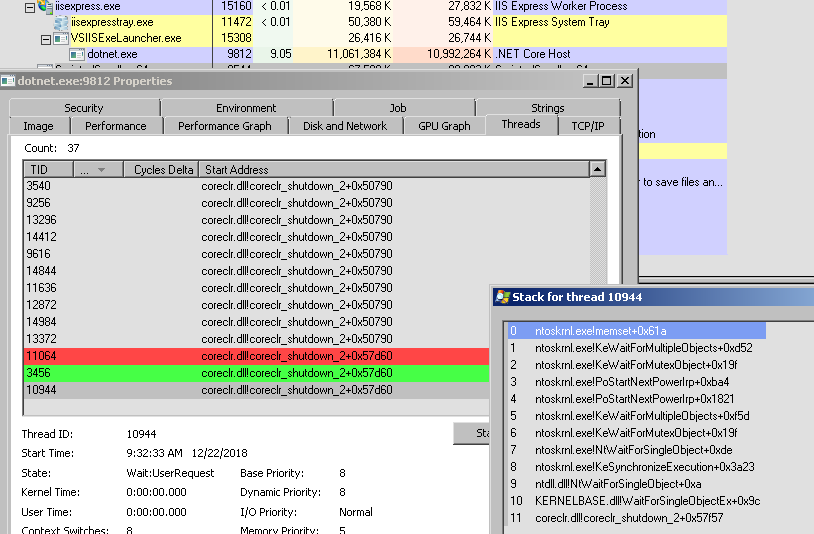
dotnet.exe:

As dotnet.exe consumes memory, there appears to be a few threads that pop off coreclr_shutdown. Not much to discern, but worth noting.
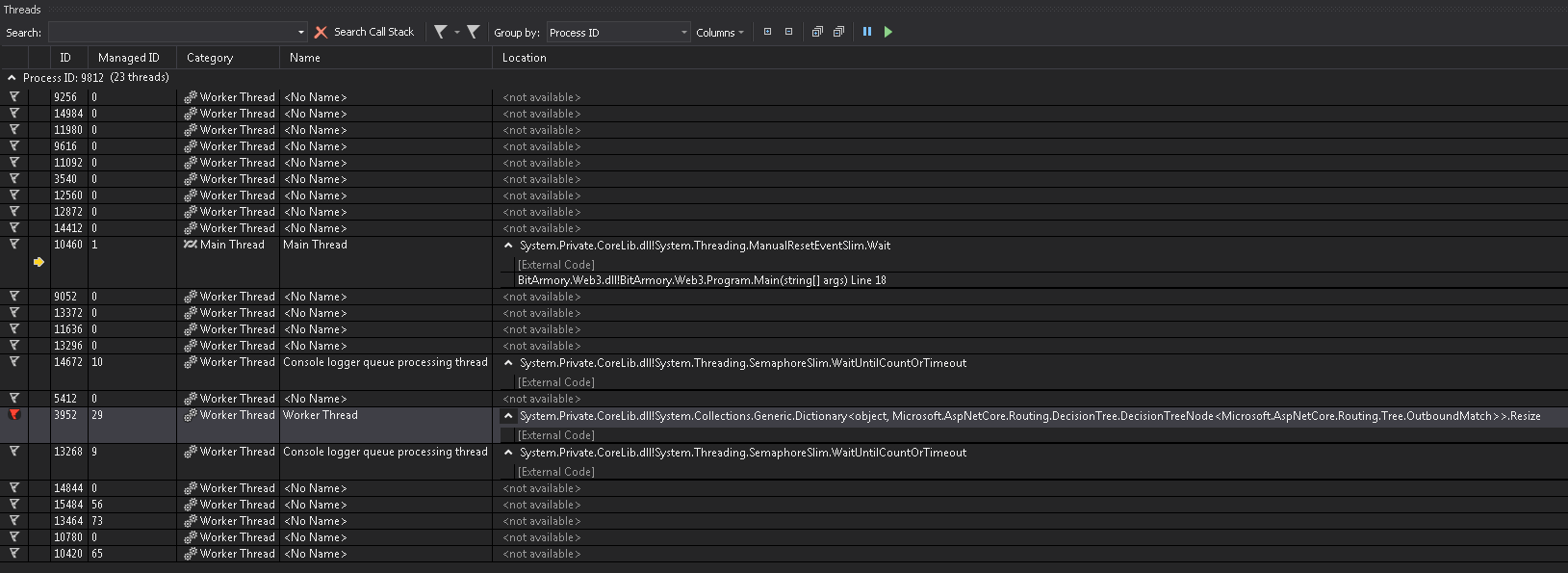
Next, I attached a VS debugger to dotnet.exe, broke into the debugger and landed in Program.Main(). None of my user code was running. Continue & Pausing the debugger multiple times did show one thread standing out. Specifically, Thread 3952 playing around in the new ASPNET Core 22 routing code? Microsoft.AspNetCore.Routing.DecisionTree.
Specifically, Array.Copy, DecisionTree.Resize and Capacity.set seem to be popular destinations with Thread 3952. Thread 3952 is the only thread that appears to be active during this memory leak.


To Reproduce
Steps to reproduce the behavior:
- Using this version of ASP.NET Core ‘2.2’
- Edit somewhat complex Razor Pages for about 15 minutes to 1 hour in a tight dev loop.
Expected behavior
I should be able to make edits in Razor Pages and see my changes in the browser without having to restart IISExpress or kill dotnet.exe manually or experience a memory leak during the editing experience.
Additional context
Operating System
- Windows 7
IDE
- Visual Studio 15.9.4
C:\>dotnet --info
.NET Core SDK (reflecting any global.json):
 Version:   2.2.101
 Commit:    236713b0b7

Runtime Environment:
 OS Name:     Windows
 OS Version:  6.1.7601
 OS Platform: Windows
 RID:         win7-x64
 Base Path:   C:\Program Files\dotnet\sdk\2.2.101\

Host (useful for support):
  Version: 2.2.0
  Commit:  1249f08fed

.NET Core SDKs installed:
  1.0.0 [C:\Program Files\dotnet\sdk]
  1.0.1 [C:\Program Files\dotnet\sdk]
  1.0.2 [C:\Program Files\dotnet\sdk]
  1.0.3 [C:\Program Files\dotnet\sdk]
  1.0.4 [C:\Program Files\dotnet\sdk]
  1.1.0 [C:\Program Files\dotnet\sdk]
  2.0.0 [C:\Program Files\dotnet\sdk]
  2.0.3 [C:\Program Files\dotnet\sdk]
  2.1.4 [C:\Program Files\dotnet\sdk]
  2.1.101 [C:\Program Files\dotnet\sdk]
  2.1.103 [C:\Program Files\dotnet\sdk]
  2.1.104 [C:\Program Files\dotnet\sdk]
  2.1.200 [C:\Program Files\dotnet\sdk]
  2.1.201 [C:\Program Files\dotnet\sdk]
  2.1.202 [C:\Program Files\dotnet\sdk]
  2.1.300 [C:\Program Files\dotnet\sdk]
  2.1.302 [C:\Program Files\dotnet\sdk]
  2.1.401 [C:\Program Files\dotnet\sdk]
  2.1.402 [C:\Program Files\dotnet\sdk]
  2.1.403 [C:\Program Files\dotnet\sdk]
  2.1.500 [C:\Program Files\dotnet\sdk]
  2.1.502 [C:\Program Files\dotnet\sdk]
  2.2.100 [C:\Program Files\dotnet\sdk]
  2.2.101 [C:\Program Files\dotnet\sdk]

.NET Core runtimes installed:
  Microsoft.AspNetCore.All 2.1.0 [C:\Program Files\dotnet\shared\Microsoft.AspNetCore.All]
  Microsoft.AspNetCore.All 2.1.2 [C:\Program Files\dotnet\shared\Microsoft.AspNetCore.All]
  Microsoft.AspNetCore.All 2.1.3 [C:\Program Files\dotnet\shared\Microsoft.AspNetCore.All]
  Microsoft.AspNetCore.All 2.1.4 [C:\Program Files\dotnet\shared\Microsoft.AspNetCore.All]
  Microsoft.AspNetCore.All 2.1.5 [C:\Program Files\dotnet\shared\Microsoft.AspNetCore.All]
  Microsoft.AspNetCore.All 2.1.6 [C:\Program Files\dotnet\shared\Microsoft.AspNetCore.All]
  Microsoft.AspNetCore.All 2.2.0 [C:\Program Files\dotnet\shared\Microsoft.AspNetCore.All]
  Microsoft.AspNetCore.App 2.1.0 [C:\Program Files\dotnet\shared\Microsoft.AspNetCore.App]
  Microsoft.AspNetCore.App 2.1.2 [C:\Program Files\dotnet\shared\Microsoft.AspNetCore.App]
  Microsoft.AspNetCore.App 2.1.3 [C:\Program Files\dotnet\shared\Microsoft.AspNetCore.App]
  Microsoft.AspNetCore.App 2.1.4 [C:\Program Files\dotnet\shared\Microsoft.AspNetCore.App]
  Microsoft.AspNetCore.App 2.1.5 [C:\Program Files\dotnet\shared\Microsoft.AspNetCore.App]
  Microsoft.AspNetCore.App 2.1.6 [C:\Program Files\dotnet\shared\Microsoft.AspNetCore.App]
  Microsoft.AspNetCore.App 2.2.0 [C:\Program Files\dotnet\shared\Microsoft.AspNetCore.App]
  Microsoft.NETCore.App 1.0.4 [C:\Program Files\dotnet\shared\Microsoft.NETCore.App]
  Microsoft.NETCore.App 1.0.5 [C:\Program Files\dotnet\shared\Microsoft.NETCore.App]
  Microsoft.NETCore.App 1.1.1 [C:\Program Files\dotnet\shared\Microsoft.NETCore.App]
  Microsoft.NETCore.App 1.1.2 [C:\Program Files\dotnet\shared\Microsoft.NETCore.App]
  Microsoft.NETCore.App 2.0.0 [C:\Program Files\dotnet\shared\Microsoft.NETCore.App]
  Microsoft.NETCore.App 2.0.3 [C:\Program Files\dotnet\shared\Microsoft.NETCore.App]
  Microsoft.NETCore.App 2.0.5 [C:\Program Files\dotnet\shared\Microsoft.NETCore.App]
  Microsoft.NETCore.App 2.0.6 [C:\Program Files\dotnet\shared\Microsoft.NETCore.App]
  Microsoft.NETCore.App 2.0.7 [C:\Program Files\dotnet\shared\Microsoft.NETCore.App]
  Microsoft.NETCore.App 2.0.9 [C:\Program Files\dotnet\shared\Microsoft.NETCore.App]
  Microsoft.NETCore.App 2.1.0 [C:\Program Files\dotnet\shared\Microsoft.NETCore.App]
  Microsoft.NETCore.App 2.1.2 [C:\Program Files\dotnet\shared\Microsoft.NETCore.App]
  Microsoft.NETCore.App 2.1.3-servicing-26724-03 [C:\Program Files\dotnet\shared\Microsoft.NETCore.App]
  Microsoft.NETCore.App 2.1.3 [C:\Program Files\dotnet\shared\Microsoft.NETCore.App]
  Microsoft.NETCore.App 2.1.4 [C:\Program Files\dotnet\shared\Microsoft.NETCore.App]
  Microsoft.NETCore.App 2.1.5 [C:\Program Files\dotnet\shared\Microsoft.NETCore.App]
  Microsoft.NETCore.App 2.1.6 [C:\Program Files\dotnet\shared\Microsoft.NETCore.App]
  Microsoft.NETCore.App 2.2.0 [C:\Program Files\dotnet\shared\Microsoft.NETCore.App]

To install additional .NET Core runtimes or SDKs:
  https://aka.ms/dotnet-download
Also, here is Process Monitor monitoring file access during the memory leak event:

I will continue to do more testing to see if I can narrow down the issue. Thanks for your help in advance.
Thanks, Brian Chavez
About this issue
- Original URL
- State: closed
- Created 6 years ago
- Reactions: 2
- Comments: 20 (17 by maintainers)
Commits related to this issue
- Fix #6102 - Intense CPU utilization on page change The issue here was that every time a Razor Page changed, we would subscribe an additional time to the endpoint change notifications. This means that... — committed to dotnet/aspnetcore by rynowak 5 years ago
- Fix #6102 - Intense CPU utilization on page change The issue here was that every time a Razor Page changed, we would subscribe an additional time to the endpoint change notifications. This means that... — committed to dotnet/aspnetcore by rynowak 5 years ago
- Fix #6102 - Intense CPU utilization on page change (#6542) * Fix #6102 - Intense CPU utilization on page change The issue here was that every time a Razor Page changed, we would subscribe an additio... — committed to dotnet/aspnetcore by rynowak 5 years ago
- Fix #6102 - Intense CPU utilization on page change (#6542) * Fix #6102 - Intense CPU utilization on page change The issue here was that every time a Razor Page changed, we would subscribe an additio... — committed to dotnet/aspnetcore by rynowak 5 years ago
- Fix #6102 - Intense CPU utilization on page change (#6542) * Fix #6102 - Intense CPU utilization on page change The issue here was that every time a Razor Page changed, we would subscribe an additio... — committed to dotnet/aspnetcore by rynowak 5 years ago
I have the same issue in .net core 3.0. I cannot see changes when I refresh the .cshtml page… (Markup and javascript changes.). I need to re-run the project.
Visual Studio version - 2019 preview .Net Core 3.0 Windows 10 professional latest
Thank you
Wow thanks for the investigation here Brian. That’s definitely a bug.
Just throwing this in here that I’m also having the same issue. My dotnet.exe reached 3 GB’s of RAM after wondering for like 15 minutes why my cshtml edits weren’t even making it to the browser (browser kept reloading a very old copy!). I learned a lot reading this thread. Keep it up guys!
@abdulkareemnalband Change 3e5b37f22cd7ba2c81b1ac69d55ffae7ea09423f is included since version v2.2.2.