aspnetcore: Blazor WASM: File Upload - MultipartFormDataContent.Add() throws internal Invalid JSON exception

Is there an existing issue for this?

  • I have searched the existing issues

Describe the bug

Uploading a file results in Invalid JSON in internal code.

ImageUploader.razor:

<InputFile OnChange="UploadFiles" multiple  />

ImageUploader.razor.cs:

using BlazorTests.Shared;
using Microsoft.AspNetCore.Components;
using Microsoft.AspNetCore.Components.Forms;
using System.Net.Http.Headers;
using System.Net.Http.Json;
using System.Text.Json;

namespace BlazorTests.Client.Shared
{
    public partial class ImageUploader : ComponentBase
    {
        private List<File> files = new();
        private List<UploadResult> uploadResults = new();
        private int maxAllowedFiles = 10;

        private bool shouldRender;

        protected override bool ShouldRender() => shouldRender;

        private void UploadFiles(InputFileChangeEventArgs e)
        {
            shouldRender = false;
            long maxFileSize = 1024 * 1024 * 15;
            var upload = false;

            using var content = new MultipartFormDataContent();


            foreach (var file in e.GetMultipleFiles(maxAllowedFiles))
            {
                if (uploadResults.SingleOrDefault(
                    f => f.FileName == file.Name) is null)
                {
                    try
                    {
                        var fileContent =
                            new StreamContent(file.OpenReadStream(maxFileSize));

                        fileContent.Headers.ContentType =
                            new MediaTypeHeaderValue(file.ContentType);

                        files.Add(new() { Name = file.Name });
                        try // This is the block that throws. Note that the exception is not catched and the app breaks.
                        {
                            content.Add(
                            content: fileContent,
                            name: "\"files\"",
                            fileName: file.Name);
                        }catch(JsonException ex)
                        {
                            Console.WriteLine(ex.Message);
                        }

                        upload = true;
                    }
                    catch (Exception)
                    {
                        uploadResults.Add(
                            new()
                            {
                                FileName = file.Name,
                                ErrorCode = 6,
                                Uploaded = false
                            });
                    }
                }
            }

            shouldRender = true;
        }

        private class File
        {
            public string Name { get; set; }
        }
    }
}

The code is taken from documentation.

Expected Behavior

No exception, obviously.

Steps To Reproduce

https://github.com/Grizzlly/BlazorTests

Exceptions (if any)

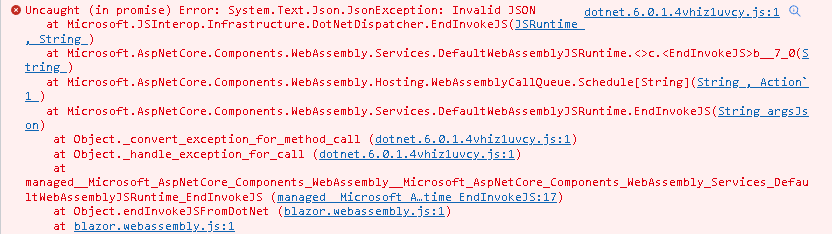
When I debug and try to upload a file, I get this: image

.NET Version

6.0.100

Anything else?

.NET SDK (reflecting any global.json): Version: 6.0.100 Commit: 9e8b04bbff

Runtime Environment: OS Name: Windows OS Version: 10.0.22000 OS Platform: Windows RID: win10-x64 Base Path: C:\Program Files\dotnet\sdk\6.0.100\

Host (useful for support): Version: 6.0.0 Commit: 4822e3c3aa

.NET SDKs installed: 3.1.415 [C:\Program Files\dotnet\sdk] 5.0.104 [C:\Program Files\dotnet\sdk] 5.0.209 [C:\Program Files\dotnet\sdk] 5.0.303 [C:\Program Files\dotnet\sdk] 5.0.403 [C:\Program Files\dotnet\sdk] 6.0.100 [C:\Program Files\dotnet\sdk]

.NET runtimes installed: Microsoft.AspNetCore.All 2.1.30 [C:\Program Files\dotnet\shared\Microsoft.AspNetCore.All] Microsoft.AspNetCore.App 2.1.30 [C:\Program Files\dotnet\shared\Microsoft.AspNetCore.App] Microsoft.AspNetCore.App 3.1.21 [C:\Program Files\dotnet\shared\Microsoft.AspNetCore.App] Microsoft.AspNetCore.App 5.0.4 [C:\Program Files\dotnet\shared\Microsoft.AspNetCore.App] Microsoft.AspNetCore.App 5.0.9 [C:\Program Files\dotnet\shared\Microsoft.AspNetCore.App] Microsoft.AspNetCore.App 5.0.11 [C:\Program Files\dotnet\shared\Microsoft.AspNetCore.App] Microsoft.AspNetCore.App 5.0.12 [C:\Program Files\dotnet\shared\Microsoft.AspNetCore.App] Microsoft.AspNetCore.App 6.0.0 [C:\Program Files\dotnet\shared\Microsoft.AspNetCore.App] Microsoft.NETCore.App 2.1.30 [C:\Program Files\dotnet\shared\Microsoft.NETCore.App] Microsoft.NETCore.App 3.1.21 [C:\Program Files\dotnet\shared\Microsoft.NETCore.App] Microsoft.NETCore.App 5.0.4 [C:\Program Files\dotnet\shared\Microsoft.NETCore.App] Microsoft.NETCore.App 5.0.9 [C:\Program Files\dotnet\shared\Microsoft.NETCore.App] Microsoft.NETCore.App 5.0.11 [C:\Program Files\dotnet\shared\Microsoft.NETCore.App] Microsoft.NETCore.App 5.0.12 [C:\Program Files\dotnet\shared\Microsoft.NETCore.App] Microsoft.NETCore.App 6.0.0-rc.1.21451.13 [C:\Program Files\dotnet\shared\Microsoft.NETCore.App] Microsoft.NETCore.App 6.0.0 [C:\Program Files\dotnet\shared\Microsoft.NETCore.App] Microsoft.WindowsDesktop.App 3.1.21 [C:\Program Files\dotnet\shared\Microsoft.WindowsDesktop.App] Microsoft.WindowsDesktop.App 5.0.4 [C:\Program Files\dotnet\shared\Microsoft.WindowsDesktop.App] Microsoft.WindowsDesktop.App 5.0.9 [C:\Program Files\dotnet\shared\Microsoft.WindowsDesktop.App] Microsoft.WindowsDesktop.App 5.0.11 [C:\Program Files\dotnet\shared\Microsoft.WindowsDesktop.App] Microsoft.WindowsDesktop.App 5.0.12 [C:\Program Files\dotnet\shared\Microsoft.WindowsDesktop.App] Microsoft.WindowsDesktop.App 6.0.0-rc.1.21451.3 [C:\Program Files\dotnet\shared\Microsoft.WindowsDesktop.App] Microsoft.WindowsDesktop.App 6.0.0 [C:\Program Files\dotnet\shared\Microsoft.WindowsDesktop.App]

To install additional .NET runtimes or SDKs: https://aka.ms/dotnet-download

About this issue

  • Original URL
  • State: closed
  • Created 3 years ago
  • Reactions: 1
  • Comments: 36 (22 by maintainers)

Most upvoted comments

Just to clarify: The workaround is to use StringContent with application/octet-stream?

Yes. The reason why that works isn’t because of StringContent but rather because await fileContent.ReadAsStringAsync() ensures we await the streaming initialization.

content: new StringContent(await fileContent.ReadAsStringAsync(), Encoding.UTF8, "application/octet-stream")

Also, I think you should reconsider and update #39075 as I think it affects everyone that implements file upload.

Yes we’ll be discussing potentially bringing this into a future patch release in the new year once team members return from seasonal holidays. Fortunately it won’t affect everyone as those who do the actual upload end up reading the stream as well per the sample:

        if (upload)
        {
            var response = await Http.PostAsync("/Filesave", content);

            var newUploadResults = await response.Content
                .ReadFromJsonAsync<IList<UploadResult>>();

            if (newUploadResults is not null)
            {
                uploadResults = uploadResults.Concat(newUploadResults).ToList();
            }
        }

This is present in the official docs (but not in the sample you provided). This is likely also the explanation for why you and I were seeing this error reproduce, however Luke was not (as Luke was likely using the FileUpload2 component exactly as documented with the upload section).

https://github.com/dotnet/aspnetcore/pull/39060 will ensure we don’t get the un-necessary exceptions, however the fact that we threw an exception in the first place in .NET 6 and not .NET 5 was bothering me. I wanted to make sure this wasn’t indicative of a deeper issue. Fortunately it’s not.

  • We’re reading a stream, and before processing the stream request in .NET we’re cancelling the request.
  • In .NET 6 we introduced streaming, and the streaming mechanism is what’s sending the initial “prep” request that’s being cancelled. This is why we don’t get this error in .NET 5.
    • Specifically, in .NET we call e.File.OpenReadStream() which requests the stream, and JS sends back the __jsStreamReferenceLength and __jsObjectId. However in between the request and response, we cancel (ex. end of function or a variety of other reasons).

I’ve minimized the repro to the following.

@page "/"
@using Microsoft.AspNetCore.Components.Forms
@using System.Linq
@using System.Net.Http
@using System.Net.Http.Headers
@using Microsoft.Extensions.Logging

<PageTitle>Index</PageTitle>


<p>
    <label>
        <InputFile OnChange="@OnInputFileChange" multiple />
    </label>
</p>

@code {
    private void OnInputFileChange(InputFileChangeEventArgs e)
    {
        using var content = new MultipartFormDataContent();

        var fileContent = new StreamContent(e.File.OpenReadStream());

        content.Add(fileContent);

        // await Task.Delay(10_000); // Uncomment to stop exception (as we no longer cancel before the response is interpreted)
        Console.WriteLine("Hi I'm here without fail");
    }
}
Exceptions from investigation

Stack trace on what’s removing the pending task:

       Uncaught (in promise) Error: System.Exception:    at System.Environment.get_StackTrace()
   at Microsoft.JSInterop.JSRuntime.CleanupTasksAndRegistrations(Int64 taskId) in /workspaces/aspnetcore/src/JSInterop/Microsoft.JSInterop/src/JSRuntime.cs:line 144
   at Microsoft.JSInterop.JSRuntime.<>c__DisplayClass18_0`1[[Microsoft.JSInterop.IJSStreamReference, Microsoft.JSInterop, Version=7.0.0.0, Culture=neutral, PublicKeyToken=adb9793829ddae60]].<InvokeAsync>b__0() in /workspaces/aspnetcore/src/JSInterop/Microsoft.JSInterop/src/JSRuntime.cs:line 111
   at System.Threading.CancellationToken.<>c.<Register>b__12_0(Object obj)
   at System.Threading.CancellationTokenSource.Invoke(Delegate d, Object state, CancellationTokenSource source)
   at System.Threading.CancellationTokenSource.CallbackNode.<>c.<ExecuteCallback>b__9_0(Object s)
   at System.Threading.ExecutionContext.RunInternal(ExecutionContext executionContext, ContextCallback callback, Object state)
   at System.Threading.CancellationTokenSource.CallbackNode.ExecuteCallback()
   at System.Threading.CancellationTokenSource.ExecuteCallbackHandlers(Boolean throwOnFirstException)
   at System.Threading.CancellationTokenSource.NotifyCancellation(Boolean throwOnFirstException)
   at System.Threading.CancellationTokenSource.Cancel(Boolean throwOnFirstException)
   at System.Threading.CancellationTokenSource.Cancel()
   at Microsoft.AspNetCore.Components.Forms.BrowserFileStream.Dispose(Boolean disposing) in /workspaces/aspnetcore/src/Components/Web/src/Forms/InputFile/BrowserFileStream.cs:line 119
   at System.IO.Stream.Close()
   at System.IO.Stream.Dispose()
   at System.Net.Http.StreamContent.Dispose(Boolean disposing)
   at System.Net.Http.HttpContent.Dispose()
   at System.Net.Http.MultipartContent.Dispose(Boolean disposing)
   at System.Net.Http.HttpContent.Dispose()
   at BasicTestApp.FormsTest.InputFileComponent.OnInputFileChange(InputFileChangeEventArgs e) in /workspaces/aspnetcore/src/Components/test/testassets/BasicTestApp/FormsTest/InputFileComponent.razor:line 119
   at System.Reflection.RuntimeMethodInfo.InternalInvoke(RuntimeMethodInfo , Object , Span`1& , Exception& )
   at System.Reflection.RuntimeMethodInfo.Invoke(Object obj, BindingFlags invokeAttr, Binder binder, Object[] parameters, CultureInfo culture)
   at System.Reflection.MethodBase.Invoke(Object obj, Object[] parameters)
   at System.Delegate.DynamicInvokeImpl(Object[] args)
   at System.MulticastDelegate.DynamicInvokeImpl(Object[] args)
   at System.Delegate.DynamicInvoke(Object[] args)
   at Microsoft.AspNetCore.Components.EventCallbackWorkItem.InvokeAsync[Object](MulticastDelegate delegate, Object arg) in /workspaces/aspnetcore/src/Components/Components/src/EventCallbackWorkItem.cs:line 66
   at Microsoft.AspNetCore.Components.EventCallbackWorkItem.InvokeAsync(Object arg) in /workspaces/aspnetcore/src/Components/Components/src/EventCallbackWorkItem.cs:line 38
   at Microsoft.AspNetCore.Components.ComponentBase.Microsoft.AspNetCore.Components.IHandleEvent.HandleEventAsync(EventCallbackWorkItem callback, Object arg) in /workspaces/aspnetcore/src/Components/Components/src/ComponentBase.cs:line 303
   at Microsoft.AspNetCore.Components.EventCallback`1[[Microsoft.AspNetCore.Components.Forms.InputFileChangeEventArgs, Microsoft.AspNetCore.Components.Web, Version=7.0.0.0, Culture=neutral, PublicKeyToken=adb9793829ddae60]].InvokeAsync(InputFileChangeEventArgs arg) in /workspaces/aspnetcore/src/Components/Components/src/EventCallbackOfT.cs:line 57
   at Microsoft.AspNetCore.Components.Forms.InputFile.Microsoft.AspNetCore.Components.Forms.IInputFileJsCallbacks.NotifyChange(BrowserFile[] files) in /workspaces/aspnetcore/src/Components/Web/src/Forms/InputFile.cs:line 110
   at Microsoft.AspNetCore.Components.Forms.InputFileJsCallbacksRelay.NotifyChange(BrowserFile[] files) in /workspaces/aspnetcore/src/Components/Web/src/Forms/InputFile/InputFileJsCallbacksRelay.cs:line 27
   at System.Reflection.RuntimeMethodInfo.InternalInvoke(RuntimeMethodInfo , Object , Span`1& , Exception& )
   at System.Reflection.RuntimeMethodInfo.Invoke(Object obj, BindingFlags invokeAttr, Binder binder, Object[] parameters, CultureInfo culture)
   at System.Reflection.MethodBase.Invoke(Object obj, Object[] parameters)
   at Microsoft.JSInterop.Infrastructure.DotNetDispatcher.InvokeSynchronously(JSRuntime jsRuntime, DotNetInvocationInfo& callInfo, IDotNetObjectReference objectReference, String argsJson) in /workspaces/aspnetcore/src/JSInterop/Microsoft.JSInterop/src/Infrastructure/DotNetDispatcher.cs:line 172
   at Microsoft.JSInterop.Infrastructure.DotNetDispatcher.BeginInvokeDotNet(JSRuntime jsRuntime, DotNetInvocationInfo invocationInfo, String argsJson) in /workspaces/aspnetcore/src/JSInterop/Microsoft.JSInterop/src/Infrastructure/DotNetDispatcher.cs:line 92
   at Microsoft.AspNetCore.Components.WebAssembly.Services.DefaultWebAssemblyJSRuntime.<>c.<BeginInvokeDotNet>b__8_0(ValueTuple`2 state) in /workspaces/aspnetcore/src/Components/WebAssembly/WebAssembly/src/Services/DefaultWebAssemblyJSRuntime.cs:line 79
   at Microsoft.AspNetCore.Components.WebAssembly.Hosting.WebAssemblyCallQueue.Schedule[ValueTuple`2](ValueTuple`2 state, Action`1 callback) in /workspaces/aspnetcore/src/Components/WebAssembly/WebAssembly/src/Hosting/WebAssemblyCallQueue.cs:line 58
   at Microsoft.AspNetCore.Components.WebAssembly.Services.DefaultWebAssemblyJSRuntime.BeginInvokeDotNet(String callId, String assemblyNameOrDotNetObjectId, String methodIdentifier, String argsJson) in /workspaces/aspnetcore/src/Components/WebAssembly/WebAssembly/src/Services/DefaultWebAssemblyJSRuntime.cs:line 75
   at Microsoft.JSInterop.JSRuntime.EndInvokeJS(Int64 taskId, Boolean succeeded, Utf8JsonReader& jsonReader) in /workspaces/aspnetcore/src/JSInterop/Microsoft.JSInterop/src/JSRuntime.cs:line 238
   at Microsoft.JSInterop.Infrastructure.DotNetDispatcher.EndInvokeJS(JSRuntime jsRuntime, String arguments) in /workspaces/aspnetcore/src/JSInterop/Microsoft.JSInterop/src/Infrastructure/DotNetDispatcher.cs:line 309
   at Microsoft.AspNetCore.Components.WebAssembly.Services.DefaultWebAssemblyJSRuntime.<>c.<EndInvokeJS>b__7_0(String argsJson) in /workspaces/aspnetcore/src/Components/WebAssembly/WebAssembly/src/Services/DefaultWebAssemblyJSRuntime.cs:line 51
   at Microsoft.AspNetCore.Components.WebAssembly.Hosting.WebAssemblyCallQueue.Schedule[String](String state, Action`1 callback) in /workspaces/aspnetcore/src/Components/WebAssembly/WebAssembly/src/Hosting/WebAssemblyCallQueue.cs:line 58
   at Microsoft.AspNetCore.Components.WebAssembly.Services.DefaultWebAssemblyJSRuntime.EndInvokeJS(String argsJson) in /workspaces/aspnetcore/src/Components/WebAssembly/WebAssembly/src/Services/DefaultWebAssemblyJSRuntime.cs:line 53
    at _convert_exception_for_method_call (dotnet.7.0.0-alpha.1.21618.4.hp2ca9myzh.js:3)
    at _handle_exception_for_call (dotnet.7.0.0-alpha.1.21618.4.hp2ca9myzh.js:3)
    at _Microsoft_AspNetCore_Components_WebAssembly__Microsoft_AspNetCore_Components_WebAssembly_Services_DefaultWebAssemblyJSRuntime_EndInvokeJS (_Microsoft_AspNetCore_Components_WebAssembly__Microsoft_AspNetCore_Components_WebAssembly_Services_DefaultWebAssemblyJSRuntime_EndInvokeJS:24)
    at Object.endInvokeJSFromDotNet (MonoPlatform.ts:538)
    at Microsoft.JSInterop.js:303

Stack trace with args:

       Uncaught (in promise) Error: System.Text.Json.JsonException: Invalid JSON [5,true,{"__jsStreamReferenceLength":198598,"__jsObjectId":1}], Token: PropertyName, Position: 0
   at Microsoft.JSInterop.Infrastructure.DotNetDispatcher.EndInvokeJS(JSRuntime jsRuntime, String arguments) in /workspaces/aspnetcore/src/JSInterop/Microsoft.JSInterop/src/Infrastructure/DotNetDispatcher.cs:line 313
   at Microsoft.AspNetCore.Components.WebAssembly.Services.DefaultWebAssemblyJSRuntime.<>c.<EndInvokeJS>b__7_0(String argsJson) in /workspaces/aspnetcore/src/Components/WebAssembly/WebAssembly/src/Services/DefaultWebAssemblyJSRuntime.cs:line 51
   at Microsoft.AspNetCore.Components.WebAssembly.Hosting.WebAssemblyCallQueue.Schedule[String](String state, Action`1 callback) in /workspaces/aspnetcore/src/Components/WebAssembly/WebAssembly/src/Hosting/WebAssemblyCallQueue.cs:line 58
   at Microsoft.AspNetCore.Components.WebAssembly.Services.DefaultWebAssemblyJSRuntime.EndInvokeJS(String argsJson) in /workspaces/aspnetcore/src/Components/WebAssembly/WebAssembly/src/Services/DefaultWebAssemblyJSRuntime.cs:line 53
    at _convert_exception_for_method_call (dotnet.7.0.0-alpha.1.21618.4.hp2ca9myzh.js:3)
    at _handle_exception_for_call (dotnet.7.0.0-alpha.1.21618.4.hp2ca9myzh.js:3)
    at _Microsoft_AspNetCore_Components_WebAssembly__Microsoft_AspNetCore_Components_WebAssembly_Services_DefaultWebAssemblyJSRuntime_EndInvokeJS (_Microsoft_AspNetCore_Components_WebAssembly__Microsoft_AspNetCore_Components_WebAssembly_Services_DefaultWebAssemblyJSRuntime_EndInvokeJS:24)
    at Object.endInvokeJSFromDotNet (MonoPlatform.ts:538)
    at Microsoft.JSInterop.js:303

keep the browser files in a list and only add them to the DataContent before sending the request?

The issue is not with the DataContent, but rather calling file.OpenReadStream and then immediately cancelling the request (by not doing anything with the stream / letting the function terminate). If you don’t call file.OpenReadStream (until you’re actually ready to read from the stream) you shouldn’t have this issue.

From your original example:

                        try // This is the block that throws. Note that the exception is not catched and the app breaks.
                        {
                            content.Add(
                            content: fileContent,
                            name: "\"files\"",
                            fileName: file.Name);
                        }catch(JsonException ex)
                        {
                            Console.WriteLine(ex.Message);
                        }

This is not the block that throws (and hence why no exception is caught). The exception is thrown at the end of the function when things are GC’d.

Hmm this repro shouldn’t require MVC at all. You should just be able to do something in a clean wasm app (dotnet new blazorwasm).

Thank you! It is a bummer that this broke out of the blue as my app kinda depends on this… Let me know if you need any more info.

When published, even with offline mode enabled, I get this: image
I will test without PWA (only HTTPS and ASP.NET Core hosted) tonight (in about 3-4 hours) and post the results.