android: AXML-Designer broken since VS Update 15.7.3
Steps to Reproduce
- Create a new Xamarin.Android Project or open an existing one
- Try to open an .axml layout file
- VS is freezing with high CPU Load and is unusable
Expected Behavior
A working Layout-Designer / Sourcecode View
Actual Behavior
VS is Freezing and unusable
Version Information
VS 2017 15.7.3 Xamarin 4.10.10.1 Xamarin.Designer 4.12.1 Xamarin.Android SDK 8.3.3.2
Log: AndroidDesigner-2018-06-01__14-00-02.14800.log
[2018-06-01 14:00:12.9] ERROR: : Couldn’t retrieve open document content System.ArgumentException: bufferAdapter is not a VsTextDocData bei Microsoft.VisualStudio.Editor.Implementation.VsEditorAdaptersFactoryService.GetAdapter(IVsTextBuffer bufferAdapter) bei Microsoft.VisualStudio.Editor.Implementation.VsEditorAdaptersFactoryService.GetDocumentBuffer(IVsTextBuffer bufferAdapter) bei Xamarin.VisualStudio.Android.Designer.VisualStudioProjectFile.RetrieveDocument() in E:\A_work\1\s\Xamarin.Designer.VisualStudio\src\VisualStudio.Android.Designer\VisualStudioFileProvider.cs:Zeile 174.
Comment
I don’t understand how VS on Release channel can be crippled and bugged more and more on every Update (I had to update to 15.7.3 because of the great issue #1651 )?! A Coworker of mine has the same Bug btw. so it’s not related specially to my setup.
@ Microsoft: Please get a proper QA-Team checking at least major features of VS before pushing out an update. The Xamarin.Android Layout Designer is a major function used by a lot of people in any edition of VS
VS bug #625851
About this issue
- Original URL
- State: closed
- Created 8 years ago
- Comments: 46 (7 by maintainers)
We might have identified the change elsewhere that caused this. We are generating updated builds right now which I will share here (after we validate them on our end) and if all goes well we’ll try to put out a service release swiftly as well.
Thanks everyone for your patience.
Build is available at https://dl.xamarin.com/uploads/tk44zhobdbd/Xamarin.VisualStudio.Alpha.4.10.10.1749615-d7e587e.vsix
This build will only work for Visual Studio 15.7.3 (aka the current stable). It would be great if anyone experiencing the issue currently can confirm this does indeed fix it. In parallel we have started the service release process as well.
For people on the current preview I will spin up a separate build today and we will have the fix in preview 3.
If you haven’t used alpha packs before, to install double-click on the downloaded VSIX file then in the dialog that pops up select your stable Visual Studio instance and confirm:
If everything goes well, you should be seeing the following in the “Tools > Extension and Updates” dialog in Visual Studio:
NB The VSIX installer seems to take a bit of time to install towards the middle of the progress bar but don’t worry it does work behind the scenes.
Our initial testing of the new build is positive, we are going to do a smoke test pass tonight and if that goes well too I will put it here in the morning.
Not using the Designer is not a fix for the designer freezing though. Btw you can also just Right-click->
Open with...on the file. Which is what I’ve been doing as workaround.As the freeze is causing a high CPU-Load. I took the time to profile VS with a second VS instance. I clicked onto a axml on 10seconds. And it opened at about 35 and then hangs on “loading layout” and at 1:08 I switched tabs and VS was very laggy. At 1:30 it got finished loading the layout and is displaying it and now constantly loads down the CPU at 100% load on a single core and VS is veeery laggy.
Here is the full diag session: https://s.sqf.ovh/Bericht20180605-1410.diagsession
Heaviest functions: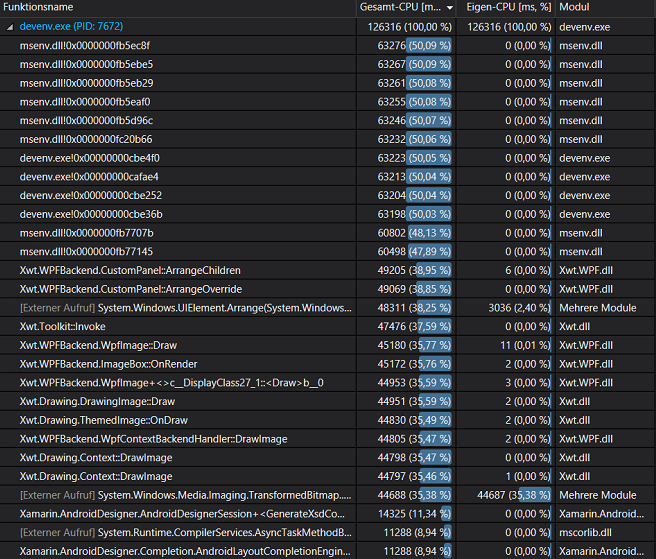
Here are the heaviest functions in the full 1-core CPU load time while rendering the layout:
Here is the hotpath: Looks like the issue is the TransformedBitmap constructor. Doesn’t have to mean it’s slow though. Could be that it is called too often.
There is a vslog.dll at the end. Does anyone know what that is? Is that maybe writing a logfile somewhere that is getting spammed with errors? I don’t know where to look for that file and I don’t have anymore time to waste on that with ProcessMonitor or ProcessExplorer to try to find the logfile.
My layout: Resources.zip
Also this is how viewing the axml source looks like when using the designer instead of non-designer XML editor.
Same layout file in VS Preview on my Work PC which doesn’t have the lags: The designer finishes loading at about 13seconds. You can see at 18seconds the CPU load just goes to 0. Whereas on the bugged install on my Home PC it stays at maximum. This is the rendering "hot"path on my work pc: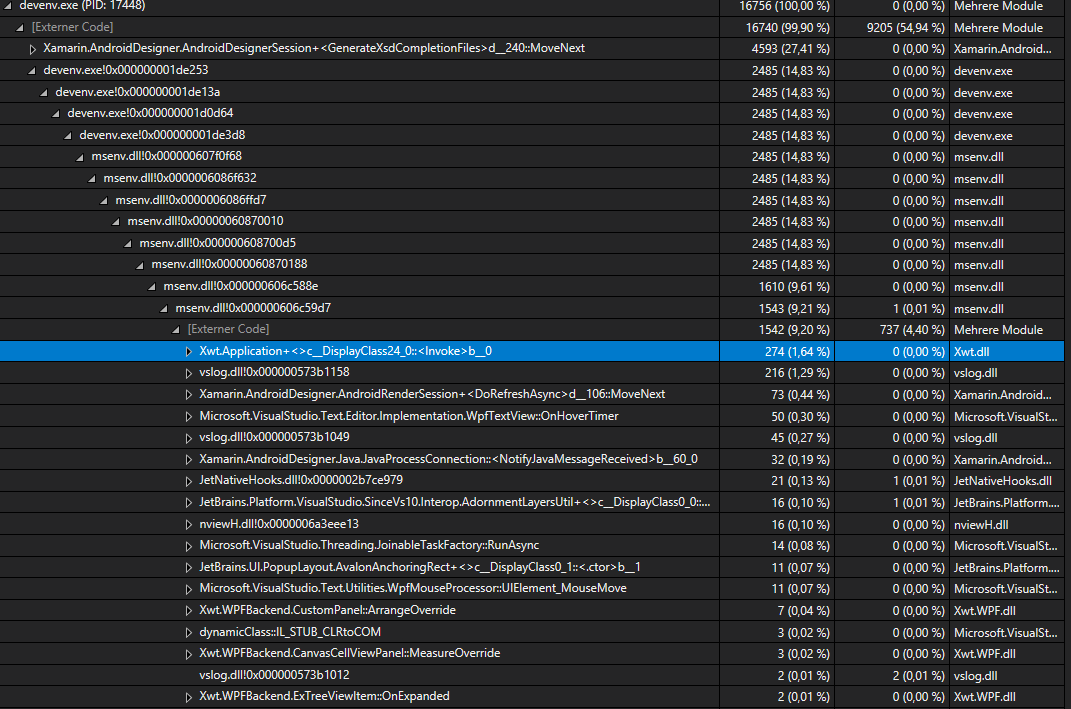 And here my work PC’s diagsession:
https://s.sqf.ovh/Bericht20180605-1424.diagsession
I’d be happy if it would be just lagging, but it’s not working anymore at all…
@aixiaozi It’s easier to right-click then and use “open with” 😉
I had to follow these steps to downgrade to 15.6.7 which is stable on the designer; https://docs.microsoft.com/en-us/visualstudio/productinfo/installing-an-earlier-release-of-vs2017
I have now confirmed we will be doing a 15.7.4 service release which will contain the fix. This should come early next week.
If you are working on the preview version of Visual Studio, the next one (preview 3) will also have the fix.
Again we are very sorry for the inconvenience.
Here is a workaround: If you need to open a
.axmlfile in VS 15.7.3, you could change its extension name to.xmlthen open it.Just a temporary solution, waiting for Xamarin Team to fix it. 😃
Thanks @dedmen and every one else for reporting.
I’m still not able to reproduce this on my end even with other people giving me access to their machine. I’m waiting for extra diagnostics/telemetry data from one of our service (which conveniently is currently experiencing issues) to see if I can detect something there.
What makes this problem especially puzzling on our end is that we haven’t changed anything on our side between 15.7.3 and 15.7.2, so we are left combing through the rest of the platform to see what may have happened. I’ll go double check if anything changed in WPF.
Okey. I said I don’t have time to run ProcessMonitor… I want this crap to get fixed soo… https://s.sqf.ovh/Logfile.7z here is the ProcessMonitor log of file accesses together with my Xamarin logs. Starting at opening the designer on my layout. Can’t see anything suspicious in the logs.
If the VS profiling is insufficient I could also offer vTune. But I don’t know if vTune can handle .Net binaries properly.
I changed the axml default editor to “XML (Text) Editor”, and it doesn’t freeze now.
http://blog.spinthemoose.com/2013/03/24/disable-the-xaml-designer-in-visual-studio/
Same issue when I create a .axml file in VS 15.7.3.
I have the same issue here with a new installation of VS 15.7.3 and a simple new test project.
I have the same problem here with VS 15.7.3 and OOTB Android projects
I don’t think the CPU caused the problem,my PC base on Intel Core,and I have the same problem both on v15.7.3 and v15.8 preview,here is my xamarin logs: xamarin_logs.zip
I have the exact same issue. And I just did an update. Now my project is stock. Its like microsoft wants every one to be using xamarin.forms. I dont want to for this project. This bugs are annoying. Any one able to resolve this. 4days behind on a project already.
The .vsix took ages to install (after I upgraded to 15.7.3 again), but now the axml-Designer is working again, thank you! Do I need to manually remove the .vsix again before doing the next regular Update of VS 2017?
Thank you very much!
@daniels7 , thx for your suggestion, another workaround 😃
I have the same issue, VS Community 2017 Android AXML Designer does not load documents and freezes Visual Studio, right after applying 15.7.3 update.
On my Home PC I have the problem on 15.7.3 and on 15.8 Preview 2. But on my Work PC I run 15.8 Preview 2 without any problems. AMD CPU at home and Intel at work. That’s the only difference I can make out.
Here’s my error logs from version 15.7.3 with the same issue:
xamarinerrorlog.zip
Concerning the AXML-Designer my VS is broken as well since version 15.7.3 Pls fix this ASAP THX
i upgraded from 15.6.(x). Errors are on AndroidDesigner-2018-06-04__15-01-41.16336 xamerrors.zip its in english
I noticed the same symptoms after upgrading from 15.7.2 on June 3, 2018. I tried the Preview 15.8.2 and I had the same issues. I ended up downgrading to 15.6.7 as well. I’ll upload my Xamarin-Logs when I get home tonight.
Sorry for the inconvenience everyone,
I cannot reproduce the issue on my end with a new project, the exception mentioned in the original report is not a problem and wouldn’t cause any hang.
If you are affected by the issue could you attach your last 7 days zipped log bundle (Help > Xamarin > Zip logs (last 7 days)…) so that we can investigate.
To confirm, did the issue appear after upgrading to 15.7.3 from another 15.7 release?