react-native-iap: The sku was not found. Please fetch products first by calling getItems
I have this error for some users. Looks like an edge case.
For 99% of the users works without an issue.
The items are Consumable and I don’t use getItems
Environment:
- react-native-iap: 12.5.1,
- react-native: 0.70.6
- Platforms (iOS, Android, emulator, simulator, device): Android (Samsung S20, A13 and more)
To Reproduce Steps to reproduce the behavior:
I use this code
try {
	const remoteProducts = await getProducts({ skus: skuIds });
        this.setState({ remoteProducts });
} catch (error) {
}
and
try {
	await requestPurchase(Platform.OS === 'ios' ? { sku: skuId} : { skus: [skuId] });
} catch (error) {
}
I have the “skuIds” and “skuId” all the time, I check them first.
About this issue
- Original URL
- State: closed
- Created a year ago
- Comments: 20
Thank you for your clarification. Good to know that nothing is cached as described above.
Still the reference has no clue with this issue: it says Google take a while to process applications, but those are totally other situation than this issue.
We are adding an in-app-purchase on Google Play Console, and before seeing it with getProducts() sometimes we should wait seconds, sometime we should wait hours, sometimes it takes a day.
We could assume this is an intended behavior, still without any specific reference. We’ll test it in as much condition as possible, and update here for future reference is anyone is experiencing the same issue.
Too often per user
@davide-desio-eleva
getProducts(skus:['test002','test003])has to begetProducts({ skus:['test002','test003] }). I’m missing something?Hi all, we are facing the same situation on Android, calling getProducts passing an array of skus will result in missing products. I could explain it a little better, adding some screenshot.
Android: using 12.7.1 iap (latest) - tested on Samsung Galaxy Tab S6 Calling
getProducts({skus:['test002','test003']})will result in adding only ‘test002’ in products, ignoring ‘test003’ Calling useIAP().products give us only ‘test002’. All products are consumables.See screenshot below.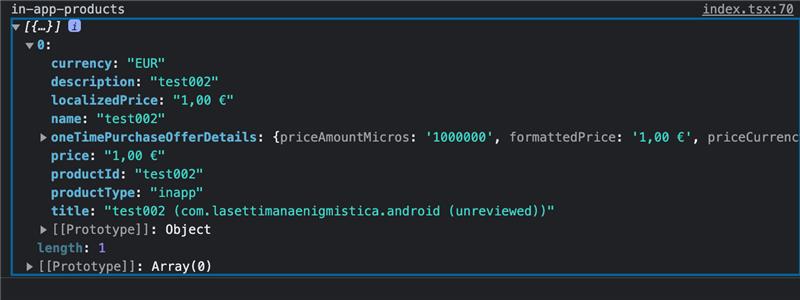
So when calling
requestPurchase({skus: ['test003']}), we get the error ‘The sku was not found. Please fetch products first by calling getItems’ because actually ‘test003’ is missing in products.IOS: using 12.7.1 iap (latest) - tested on Ipad Air 6th generation While on IOS everything seems to be fine, Calling
getProducts({skus:['test002','test003']})will result in adding both ‘test002’ and ‘test003’ in products and so, callingrequestPurchase({skus: ['test003']}), result in a successful request purchase and we can also finish it by callingfinishTransaction({...})Calling useIAP().products give us ‘test002’ and ‘test003’. All products are consumables.See screenshot below.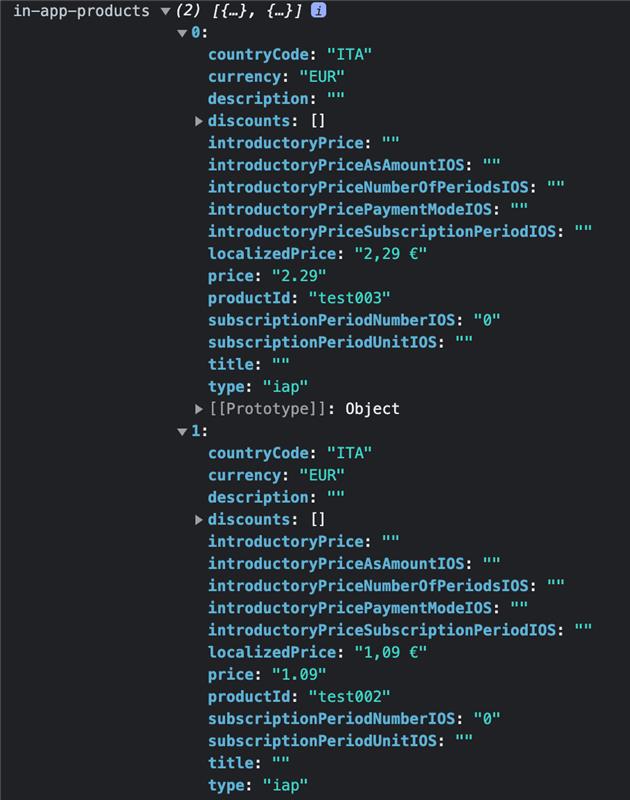
Hope this help in debugging. @andresesfm let me know if I can give you further details