docz: v1.0.0-rc.* Compiled with errors: Module parse failed: Unexpected token
Bug Report
Describe the bug
When I try to run docz dev I get multiple errors regarding an appropriate loader
✖ Docz
  Compiled with some errors in 29.12s


 ERROR  Failed to compile with 3 errors              12:00:39 PM

 error  in ./node_modules/docz/dist/index.esm.js

Module parse failed: Unexpected token (15:38)
You may need an appropriate loader to handle this file type.
| import { MDXProvider } from '@mdx-js/tag';
|
> const BasePlayground = loadable(() => import('./chunk.esm2.js'));
| const Playground = props => typeof window !== 'undefined' ? (createElement(Suspense, { fallback: null },
|     createElement(BasePlayground, Object.assign({}, props)))) : null;

 @ ./.docz/app/root.jsx 9:0-59 17:2-15 20:19-23 27:25-31
 @ ./.docz/app/index.jsx
 @ multi ./node_modules/react-dev-utils/webpackHotDevClient.js ./.docz/app/index.jsx

 error  in ./node_modules/docz-theme-default/dist/index.esm.js

Module parse failed: Unexpected token (245:30)
You may need an appropriate loader to handle this file type.
| `;
|
> const CodeMirror = lazy(() => import('./chunk.esm2.js'));
| const getLanguage = (children) => {
|     const defaultLanguage = 'jsx';

 @ ./.docz/app/root.jsx 11:0-39 18:29-34
 @ ./.docz/app/index.jsx
 @ multi ./node_modules/react-dev-utils/webpackHotDevClient.js ./.docz/app/index.jsx

 error  in ./.docz/app/imports.js

Module parse failed: Unexpected token (8:11)
You may need an appropriate loader to handle this file type.
| export var imports = {
|   'src/index.mdx': function srcIndexMdx() {
>     return import(
|     /* webpackPrefetch: true, webpackChunkName: "src-index" */
|     'src/index.mdx');

 @ ./.docz/app/root.jsx 12:0-36 28:13-20
 @ ./.docz/app/index.jsx
 @ multi ./node_modules/react-dev-utils/webpackHotDevClient.js ./.docz/app/index.jsx
Environment
- node v10.15.1
- npm v6.8.0
- react v16.8.4
- npm ls webpack ├─┬ docz@1.0.0-rc.3 │ └─┬ docz-core@1.0.0-rc.3 │ └── webpack@4.29.6 └─┬ react-scripts@2.1.8 └── webpack@4.28.3
Additional context/Screenshots

About this issue
- Original URL
- State: closed
- Created 5 years ago
- Reactions: 12
- Comments: 35 (6 by maintainers)
Also instead of installing
webpack@4.28.2, you can specify it inresolutionsinpackage.jsonNo need to add those comments, the maintainer is doing a great job and does not deserve comments like that.
@pedronauck why this is closed?
I’m use CRA and installed docz@1.2.0, but after run the script there error ocurred:
This issue should not be closed.
I’ll pin
acornto the right dependency version on docz, but if you want some solution, try this:acorn@6.0.5as a devDependency as well:This could work 👍
Still broken for me as well, reverted back to version 0.13.7 for now.
@pedronauck But #596 doesn’t show the same error and the solution is not the same
Having the same issue. Though it was similar to #596, but I couldn’t fix it by downgrading webpack
I’ve tried the solutions above, but no one works, still not solved this problem. Anyone have a perfect solution? help me…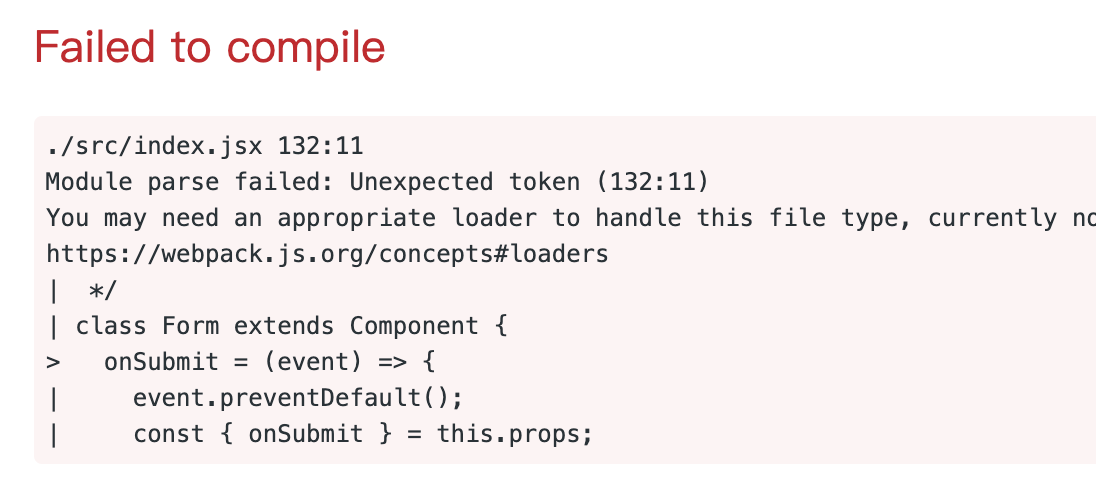
I was facing this issue with 1.2.0. It took me an entire day, but upgrading all of my babel-related and webpack packages fixed it for me.
I tried pretty much everything in this thread, related threads, and Webpack issues and none of them worked.
After playing around with different combinations of package versions, I think the one that fixed it for me was upgrading webpack to 4.31.0.
apparently this does not work when using workspaces
I’ll close this issue in order do #596
Digging into this, I saw that has a problem related to the way that npm solves dependencies, you can see more details about this here: https://github.com/webpack/webpack/issues/8656
I’ll try to find some solution and release in the next version.
For me, use yarn solves the problem, but it’s a temporal solution because I need to use npm.
+1
@sanohin Adding above resolution and clean yarn install after that works for me. Thanks
Downgrading webpack or setting
acornto 6.0.5 didn’t helpDo you have an ideas what else can be an issue?
Cleaning
.docz,yarn.lock,package-lock.json,node_modulesbetween attempts:👍 Works
npm installnpm run docz:dev👎 Fails
yarn installyarn run docz:devSolution
yarn installyarn add -D webpack@4.28.4yarn run docz:devThanks for your help, @pedronauck 👍 I know answering questions like this one aren’t fun, but I do really, really appreciate your time ❤️
Did you try to downgrade webpack @dannyrb?
Unfortunately I’m still getting the issue with yarn and a clean project:
Still getting the same error.