docker-mailserver: Desktop mail client unable to connect to mailserver
Subject
I would like to contribute to the project I would like to configure a not documented mail server use case I would like some feedback concerning a use case I have questions about TLS/SSL/STARTTLS/OpenSSL Other
Description
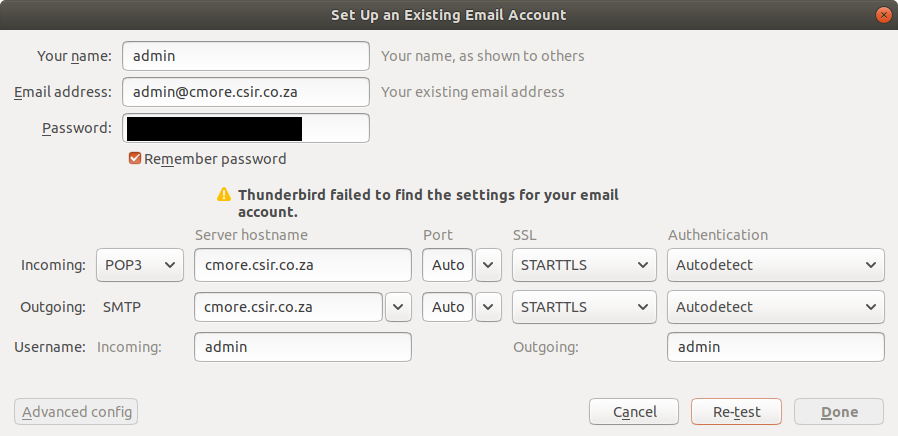
My desktop mail client (Mozilla Thunderbird) cannot connect to mailserver: “Thunderbird failed to find the settings for your email account”. I have verified that the email account exists using: ./setup.sh -i tvial/docker-mailserver:latest email list. I’m using a bare domain (host name = domain name) - followed these instructions. What’s causing the issue and how can it be resolved?
Mailserver output:
.
docker-compose.yml:
version: '2'
services:
  mail:
    image: tvial/docker-mailserver:latest
    hostname: ${HOSTNAME}
    domainname: ${DOMAINNAME}
    container_name: ${CONTAINER_NAME}
    ports:
    - "25:25"
    - "143:143"
    - "587:587"
    - "993:993"
    - "465:465"
    - "995:995"
    - "110:110"
    environment:
    - SSL_TYPE=manual
    - SSL_CERT_PATH=/tmp/ssl/certs/cert.crt
    - SSL_KEY_PATH=/tmp/ssl/private/cert.key
    - ENABLE_POP3=1
    - ENABLE_CLAMAV=0
    - ENABLE_FAIL2BAN=1
    - ENABLE_SPAMASSASSIN=0

    volumes:
    - /etc/ssl:/tmp/ssl:ro
    - maildata:/var/mail
    - mailstate:/var/mail-state
    - maillogs:/var/log/mail
    - ./config/:/tmp/docker-mailserver/
    env_file:
    - .env
    - env-mailserver
    cap_add:
    - NET_ADMIN
    - SYS_PTRACE
    restart: always
volumes:
  maildata:
    driver: local
  mailstate:
    driver: local
  maillogs:
    driver: local
About this issue
- Original URL
- State: closed
- Created 3 years ago
- Comments: 33 (16 by maintainers)
For receiving emails, a valid MX DNS record is mandatory. Also, at least port tcp/25 must be reachable from the internet (forwarding that port to your VM), which isn’t the case at the moment. If you want to send/receive mails using some client over the internet, you also have to forward the corresponding ports like tcp/995 etc.
fyi: The IP address is not responding to ICMP ping requests from the internet. At least from the locations I tried. There are plenty of online tools, you can use to verify that. However, ICMP replys are not necessary for a mailserver setup.
You can always refer to our documentation, if you are unsure about certain points:
Thanks a lot! Will try to resolve
If it’s running on your local workstation, you can try “localhost” instead of
cmore.csir.co.za. But that’s for testing only. You won’t be able to receive any external mails.I guess you are running the mailserver locally behind your private internet connection? There are no valid MX records for
cmore.csir.co.za. Nevertheless I just tried to connect on tcp/25 which failed (most providers block tcp/25, or you don’t have a port forwarding configured on your router.). So I don’t think this is going to work.That is the problem. The warning is raised, when $SSL_TYPE is not set.
Check your
docker-compose.ymlfor syntax errors and correct indentation. Your lists (e.g. environment) are missing two leading spaces for example.See https://github.com/docker-mailserver/docker-mailserver/blob/master/docker-compose.yml for comparison.
Not related to your issue 😉
BTW, we should include the image version in the startup output.
Looks like you have not yet updated to the latest image, as @casperklein suggested. Do that first.
fyi:
Your are not using the latest image:
image: tvial/docker-mailserver:latestCorrect is
image: docker.io/mailserver/docker-mailserver:latest, see also https://github.com/docker-mailserver/docker-mailserver/blob/master/docker-compose.yml(I masked some IPs inside the logs)
There are multiple issues:
Not a dovecot expert, but please check that the user admin@XXX.XXX exists and include the domain as part of the login name, see also: https://github.com/docker-mailserver/docker-mailserver/blob/master/target/dovecot/10-auth.conf#L51 The string “%Lu” means lowercase including domain. See also: https://wiki.dovecot.org/DomainLost
The hostname you are using to connect is not a proper DNS name, tough this is likely a minor issue here as I assume you try to connect via a virtualbox machine. I’m generally suspicious about your network DNS settings, specifically your rDNS name might not be correctly mapped if - and I assume - you are using a desktop system to run this mailserver. Please check this if you want to send mails to external servers. The configured domain also lacks the MX record so you might be less likely to receive external mails (the A record is a viable fallback, but somewhat unusual - also some providers might increase the spam score for sending as well). In general not having proper DNS settings will either put you on external spam lists and/or prevent receiving or sending emails.