doccano: Okta OIDC social login is not available
Problem
The documentation for activating Okta OIDC social authentication indicates that when I set the three following environment variables, the login screen will have an option to authenticate using Okta OIDC:
OAUTH_OKTA_OPENIDCONNECT_KEYOAUTH_OKTA_OPENIDCONNECT_SECRETOAUTH_OKTA_OPENIDCONNECT_API_URL
This is not happening.
How to reproduce the behaviour
- Run
doccano:1.2.1image with the following command:
docker run --rm --interactive --tty
    --env SECRET_KEY=REDACTED \
    --env ADMIN_EMAIL=noreply@example.com \
    --env ADMIN_PASSWORD=REDACTED \
    --env ADMIN_USERNAME=admin \
    --env OAUTH_OKTA_OPENIDCONNECT_KEY=REDACTED \
    --env OAUTH_OKTA_OPENIDCONNECT_SECRET=REDACTED \
    --env OAUTH_OKTA_OPENIDCONNECT_API_URL=https://my-identity.okta.com/api \
    --publish 8000:8000 \
    doccano/doccano:1.2.1
- Navigate to
doccanoin your browser at: http://locahost:8000 - Select the “login” button at the top-right of the page
Expected behavior
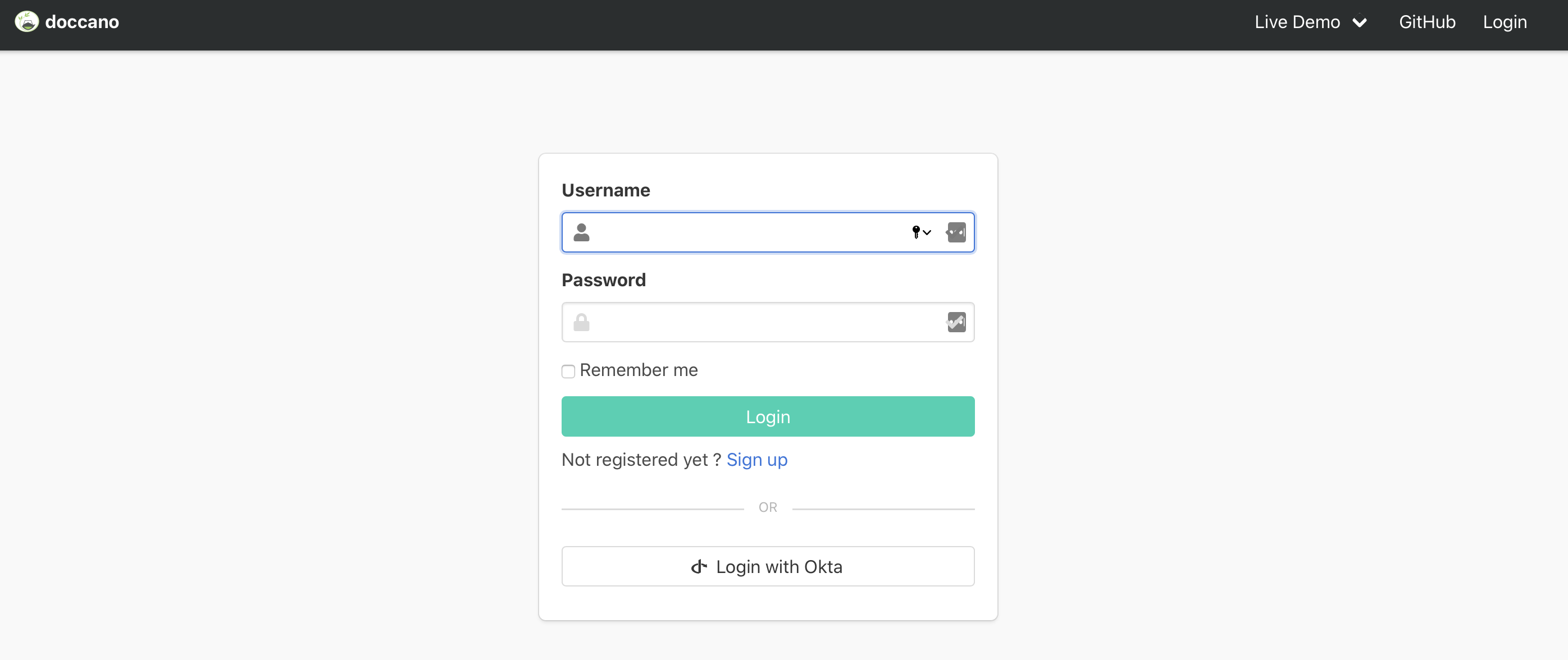
I expect to see the “Login with Okta” option as depicted in this image
Actual behavior
I end up seeing the same login screen/options that I get when I do not configure Okta OIDC social authentication.
My environment
- I am running the
doccano/doccano:1.2.1Docker image - I am running behind a enterprise firewall with a SSL packet inspection and enterprise certificate authority. Other applications can perform Okta OIDC SSO in this environment, but app eventually needs to recognize system installed trusted CA chain. I do not expect this to be the source of this problem before we actually submit login credentials, however - there is a possibility.
docker-desktopv20.10.5 on Windows 10- Above command issued from WSL version 1, running WSL (version 1 with Ubuntu 18.04 LTS) bash:
$ uname -a
Linux MY-PC 4.4.0-18362-Microsoft #1049-Microsoft Thu Aug 14 12:01:00 PST 2020 x86_64 x86_64 x86_64 GNU/Linux
About this issue
- Original URL
- State: closed
- Created 3 years ago
- Reactions: 3
- Comments: 21 (7 by maintainers)
Please reopen this issue.
Tried running this with latest…
When speaking directly to the backend I get a 500 server error, when speaking to the frontend I get a 404 at
social/complete/okta-openidconnect/+1 to this. Would love to be able to use OIDC on the new login.
The project since that older commit has a lot of improvements that I’d rather keep, and I’m also not familiar enough with Nuxt / Vue. If I have the bandwidth maybe I’ll try to work on it in the future if it’s not resolved by then.
Our team has put together a PR that adds Okta Login to Doccano (#2079). Currently the login button is hard-coded due to the fact that the Django system and Nuxt.js frontend are separated. But it is working fine on our end so we would like to work with the contributors to get this merged if it helps other people.
This should also help with other social logins as well.
Cheers!
Hi @setu4993, No worries I was able to resolve the issue by adding the missing scope -‘groups’ in the okta admin dashboard
Thanks for your work on this!
I think it is more or less obvious, but just to mention it: The “Login with Active Directory” button is also missing. Our workaround is to use the endpoint
/social/login/azuread-tenant-oauth2/directly. I don’t know if this will work for Octa or Google though.Related: https://github.com/doccano/doccano/issues/989
@Vydruth : Hey, sorry, I haven’t had a lot of time to look at this over the last few days. The last version that works for me (and I have set up for) is 6d5bff4bd03c63babe2c7164579d77ff4f0597d1.
I haven’t seen that error before, but from the truncated traceback my guess is it’s likely a configuration / permissions issue. Happy to help you through this if you can share a more detailed traceback.
I’d recommend reaching out over email (see my GitHub profile) to avoid the issue going off-topic.
@yoshiya8 : Thanks for flagging. I don’t think this is a problem at your end, I can reproduce it.
The backend correctly identifies and sets flags for the Okta / other social auth, but unfortunately, it cannot be used with the current version of the Doccano frontend.
What I had built was an integration with the previously used Doccano frontend (that is still under
app/server). I can see that since https://github.com/doccano/doccano/commit/362df6373af833bb16ee02a4708db5a811f03d5c the frontend is being pointed to the new Nuxt.JS frontend. That version doesn’t appear to have the ability to use the social auth and doesn’t thus have all of the features that the old UI did. I am not familiar with Nuxt / Vue enough to be able to contribute the changes that’d be required, but if someone can point me to the file(s) that’d need to be touched, I’m happy to take a stab (cc @Hironsan, @icoxfog417).Additionally, a workaround right now might be to build the Docker container from source, while checking out to an older commit. I tried building the container for 6e76b9586b9c95f27e9432a456f4213d2febef53 and got it to work. (One other change is required in
requirements.txtthere for it to build and run successfully: pin the max version ofpyjwtaspyjwt>=1.7.1,<2.0).