Dnn.Platform: Portal.CSS is not loading last overriding all other stylesheets
Description of bug
When editing Portal.CSS you have to pretty much use !important to get any CSS changes to take effect. This is due to the load order of the css stylesheets
Steps to reproduce
ONE EXAMPLE:
try to change logo size using Page.css.
1 create a page 2 upload a pagename.css to the root site directory 3 include the following in the pagename.css file
.navbar .brand {max-width:50px;}
4 Add pagename.css as Page Stylesheet in PersonaBar Page Settings editor 5 Refresh the page notice nothing happens 6 put the same code in Portal.css and it works however other CSS stylesheets load after Portal.css taking priority. I had to really dig to find where “CustomStylesheet” or Page Stylesheet was located. Funny part is Portal.css is called “Custom CSS” while Page.css files are “CustomStylesheet” and load way before default CSS loads with NO priority it just loads.
Current behavior
Portal.CSS styles are loaded prior to module extensions CSS
Expected behavior
Portal.css is loaded last and overrides all other styles as needed
Screenshots
Error information
Additional context
Changing the load order of style sheets should fix the issue
Affected version
- [x ] 10.0.0 alpha build
- [x ] 9.5.0 alpha build
- [x ] 9.4.4 latest supported release
Affected browser
- Chrome
- Firefox
- Safari
- Internet Explorer 11
- Microsoft Edge (Classic)
- Microsoft Edge Chromium
About this issue
- Original URL
- State: closed
- Created 4 years ago
- Comments: 32 (32 by maintainers)
Ok, I am going to try to re-iterate a couple of key points:
Breaking Changes We try to avoid breaking changes unless they are absolutely required.
How is this a breaking change We have to think about working sites and not only the platform, people upgrading might have a lot of css in many places and changing the load order will affect them on upgrades, it is not just about not breaking what is on the platform or new sites, we need to make upgrades easy and non-breaking.
About CSS load order and specificity In CSS, the load order is really the last thing considered. First each rules is assigned a number representing the specificity of the rule, it gets 1000 points for an inline rule, 100 points for each id in the selector, 10 points for each class or pseudo-class in the selector and 1 point for each element in the selector. I have this slide from my “Consistent styles everywhere” presentation at Dnn Summit that might help illustrate this: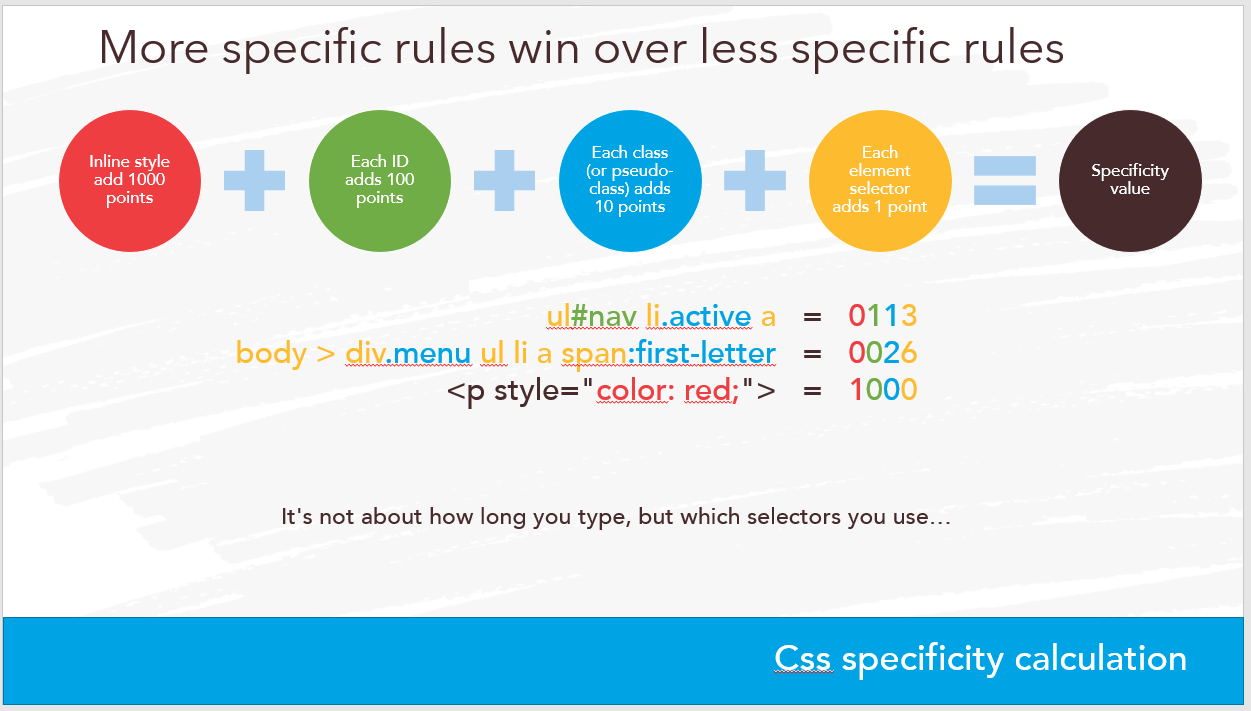 Only when that number is exactly the same does the load order makes one or the other conflicting rule win. For that reason, changing the load order will only affect those cases of the same specificity rules, it is not really a fix, but just a change since it will not make the whole stylesheet stick only by it’s load order. So in other words, it has a potential to break existing sites but it would ONLY improve behaviour on new sites.
About !important !important should be avoided at all costs unless it is a last resort thing. This is one of the reasons I hate bootstrap, but also 3rd party developers do tend to use it more than they should.
Bad documentation As far as I know the load order has not changed ever, if there is conflicting documentation about it, then I think that documentation needs a change to match the source code and not the other way around.
I can totally reproduce as explained, but I would not do it this way, if I wanted to replace a rule for the whole portal as a developer, I would duplicated the theme and implement my customizations on that one. If I was not a developer but a designer with css knowledge, I would do my rules with at least one more level of specificity, thus not having this issue.
Absolutely, I never use !important unless I do not have enough access to do proper CSS. A feature was added to not load default.css and provide your own implementation, something NvQuickTheme for instance does by default. Also I am soon working on a revamp/simplification of default.css to help there. And again if I do really have to override something, I just go one level more specific.
That is true, but it is wrong from those who do that 😃 IMO modules should have a container with a unique class and the module styles should use that scope to prevent conflicts with things that are important to not be styled by the theme in some way. Another way to fix this is to use ShadowDom in modules to isolate them as components so their styles do not leak out and the environment styles do not break them. I had a whole session about this, working on something for Dnn10 to help having consistent styles everywhere… Still have to polish some rough edges but I hope to get that in in April or some such.
3rd parties can also provide their own order for each css file they add (default 100), so changing any priority could change their load order unexpectedly, say one module declares 100 and another declares nothing, their order would swap because we changed the default to 99, or if one has 99 to begin with, it might change order with portal.css, hard to know. But this is totally not bad practice, it is provided on purpose to allow developers to inject their css in between any of the standard declared orders, hence why changing them would be a breaking change.
@thabaum where did you see that please, as far as I know this has a priority of 35 and the default priority is 100, so to say it loads last would be wrong and a fix in where you read that would be needed.
In the spirit of cleaning the backlog with only actionable items “developable”, I gonna close this issue which does not mean the discussion needs to stop. It is just that as described here it is by design and not something that needs development but maybe just more css knowledge or corrections to any documentation that might be wrong (if it’s the case)…
Just my 2 cents but changing the file load order could have severe consequences on both themes and modules. Can we get a use case here to explain why such a change would be needed? The load order is the last thing considered when css rules are applied, if a rule is just one level more specific, it is easy to override anything no matter the load order…
IMO this is not about something new at all. And IMO the current solution leads to a lot of !important being used not less. It does not influence met personally as it’s just one extra line in less/scss to overruling these (or I’ll just force my CSS files to a higher state), but I’m convinced that especially new or less experienced users will think “Huh?”. IMO it’s just not logical the way it is now.
Portal.css is not made for the CSS pros, it is in general used by people with limited CSS knowledge that bought or “inherited” a skin. We are making things more complex than needed for those users. Also if the order does not matter and you favor people who “do CSS properly”, it’s not a breaking change for those that are more knowledgeable 😉 I really wonder if this change would have a lot of impact on existing installations due to the fact that the existing CSS now must be more specific than needed after the change.
This is one of things were I really don’t see how one can explain why it works this way: If a module developer uses a module.css it gets loaded automatically and ends up with order: 10 Now if that same module developer renames the file and loads it using CRM, it gets order 100. Can someone explain met “the logic” behind that?
I just checked and even nvQuicktheme sets the order of it’s Style sheets to a higher value than the “regular” Skin.css value. https://github.com/nvisionative/nvQuickTheme/blob/59cc6cf1303c8c74976ccfca8385f5172acda94e/partials/_includes.ascx#L4
That’s a way to avoid this too, but if you continue like that Portal.css will be the first Style Sheet being loaded in the end.
BTW, my current solution is this: https://www.40fingers.net/Blog/ID/148/Fixing-DNN-StyleSheet-load-order-using-StyleHelper-020905
I think (I did not take time to dig into it) that page.css does not go though the content delivery framework (CDF) and as such has no priority. Any extension can load css using the CDF using a priority to place it before or after other declared priorities. Developers can define their own priority but for those who do not define it, they get the default of 100, which loads last (100). What is important to know is that the proper way to override css rules is to use specificity and not load order, load order only affect rules that have exactly the same specificity, it is an unreliable an non-future-proof way to do it, say for instance that an improvement comes in the future that removes duplicate rules or other situations.
The major issue is that unlike c# code, this type of breaking change is very hard to properly deprecate in one version so 3rd parties know about it 2 version before it changes. It is an instant breaking change and we try to avoid them as much as possible. Css is very flexible and overrides can usually be done using other things than just the load order (IE specificity).
@sleupold it is currently possible for theme developers to do pretty much anything they can do in a module, which includes loading any css they want, directly or using the CDF and even building a dll if they want to.
I noticed the wrong order of CSS files loaded in client projects as well. AFAIR the proper order should be: