discord.js: Random "Unknown interaction" errors sometimes
Issue description
I have a bot with clicks on buttons every second and people executing commands. This generally goes very well, but sometimes I get an “Unknown Interaction” when I defer to it.
I’ve been debugging for the past three days and can’t seem to understand why it’s happening. My last possible explanation is an error in Discord.js or on the side of Discord.
I have attached a few screenshots describing the error

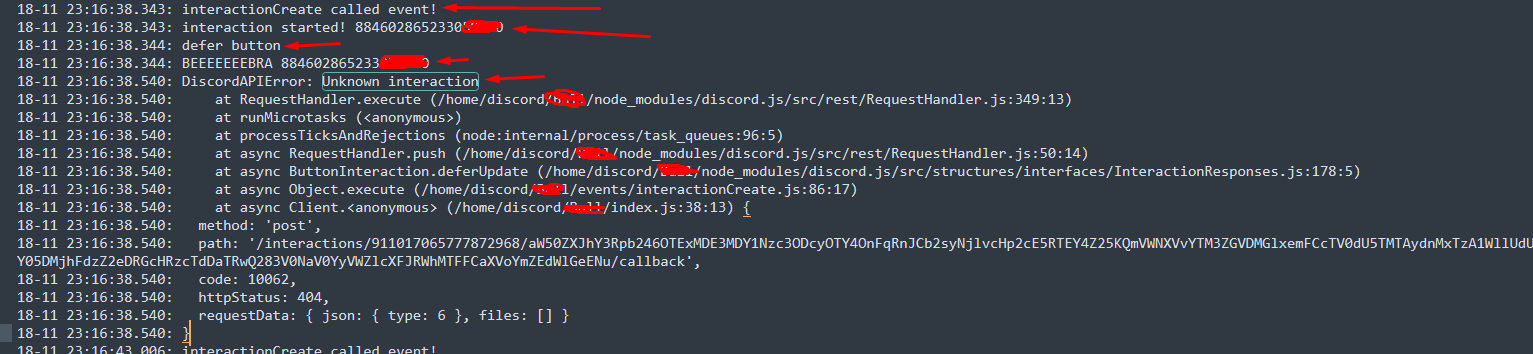
I would prefer to know if this is due to my code, or Discord.js or Discord itself.
Code sample
// Button Handler
        if(interaction.isButton()) {
            console.log(customId);
            const button = client.buttons.get(customId);
            if(!button) return;

            let {
                cooldown = -1,
                deferUpdate = false
            } = button;

            if(deferUpdate) {
                console.error('defer button');
                const testHook = interaction;
                console.error(interaction.member.user.username, interaction.member.id)
                await interaction.deferUpdate();
                console.error("doei", interaction.member.user.username, interaction.member.id)

            }

            let buttonName = (customId.startsWith('games-all-')) ? "btn-games-all" : "btn-" + customId;
            console.log(buttonName);
            if(!cooldownButtons.has(buttonName)) {
                console.log(buttonName, 'add cooldown')
                cooldownButtons.set(buttonName, new Collection());
            }

            const currentBtnTime = Date.now();
            const timestamps = await cooldownButtons.get(buttonName);
            const cooldownAmount = (cooldown) * 1000;

            if(timestamps.has(member.id)) {
                console.log(member.id, 'heeft cooldown')
                const expirationTime = timestamps.get(member.id) + cooldownAmount;

                if(currentBtnTime < expirationTime) {
                    console.log(member.id, 'heeft cooldown')
                    const time_left = (expirationTime - currentBtnTime) / 1000;

                    if(deferUpdate) {
                        return interaction.followUp({content: `**Cooldown:** You have to wait ${time_left.toFixed(1)} seconds.`, ephemeral: true});
                    }else{
                        return interaction.followUp({content: `**Cooldown:** You have to wait ${time_left.toFixed(1)} seconds.`, ephemeral: true});
                    }
                }
            }else{
                timestamps.set(member.id, currentBtnTime);
                setTimeout(() => timestamps.delete(member.id), cooldownAmount);

                try{
                    await button.execute(interaction);
                }catch(error) {
                    console.error(error);
                }
            }
        }
discord.js version
13.3.1
Node.js version
16.13.0
Operating system
Debian 10
Priority this issue should have
Medium (should be fixed soon)
Which partials do you have configured?
CHANNEL, GUILD_MEMBER, MESSAGE, REACTION
Which gateway intents are you subscribing to?
GUILDS, GUILD_MEMBERS, GUILD_INVITES, GUILD_VOICE_STATES, GUILD_MESSAGES, GUILD_MESSAGE_REACTIONS, DIRECT_MESSAGES
I have tested this issue on a development release
No response
About this issue
- Original URL
- State: closed
- Created 3 years ago
- Reactions: 12
- Comments: 64 (27 by maintainers)
Defer won’t fix it. Most of my commands defer and they still randomly throw this error from time to time
I found out much later that the reason why I was getting these problems was the fact that I was running my bot locally when I was testing in addition to in production on Heroku (turns out maintenance mode “offline” doesn’t really mean shutting down the bot). Which meant that the Heroku bot would catch the interactions first and my local bot would give errors.
Could you provide a minimal, reproducible code sample?
I also have this issue, and I don’t do anything with the bot’s status.
I had the same issue for a quite while and I fixed it this night, yeah! It was a painful debugging but now I have a better understanding of why this is happening. The “fix” was just stopping calling
client.user.setActivityevery minute. I’ll try to explain it:The
client.user.setActivitycall is causing the client to not receive anything from the API for many seconds. Why? idk. After this delay, the client receive all the interactions at once. A good chunk of these interactions are now too old and replying to them will cause aDiscordAPIError: Unknown interaction. For the user, it displaysThis interaction failed.Why is this issue hard to reproduce in the dev env? Because you have to send your interaction just before a
client.user.setActivitycall. In production, with users interacting constantly with the bot, it happens very often (every minute in my case).I’ve attached a ZIP with some CPU profiles. You can open them with Chrome or Chromium: go to
chrome://inspect/>Open dedicated DevTools for Node>Profiler>Loadand then choose to display the chart.As you can see on the charts, there is a 4s blank when nothing happen. Just before the blank you can see the call to
setActivity. If you pay attention, you can even see a call toLogger.errorafter the blank, during aonInteractioncall.Hope this helps!
I too am seeing this error at random intervals. I’ve properly awaited all my defers. The most frustrating thing for me is that it seems impossible to catch this error. It just closes down the app with Exit Code 1.
@ChrisTalman
I agree with you, but the frustrating thing is that I can’t find documentation on this. The users in the community where I work are crazy, and the operation frequency is too high, and they often complain to me about the failure of the interaction, and I can’t do anything. In addition, I think it is necessary to have a message queue, but the button should not give the wrong response.
I said this already but I’ll repeat it. The error is thrown on the first line of code that is executed, there are no promises before that, only 2 if statements that only do boolean comparisons, the issue is not the code because if it was it would be happening every time and not once every few hours
There’s no code sample I could possibly give you since this is triggered by a deferReply with nothing before it, or any interaction response for that matter. Like I said the issue is not consistent and thus it’s impossible to replicate without leaving a bot on for hours and waiting for it to happen. I suspect it’s related to when the ws reconnects but I can’t be sure
I don’t understand why this issue was closed because no real solution was found. I’m having the same problem where I’m responding in time, either with a modal or deferring the reply yet I randomly get this error every few hours. I asked in DDevs and they said it could be related to the WebSocket connection and, since that part is done by discord.js alone, I think this should be looked into because, despite it not being something everyone experiences, it’s quite annoying for the ones that do as we cannot find a reason for it
I had this problem for a very long time with my bots. The more the bots grew, the more often I got the “Unknown Interaction” error. I searched a lot and finally found a solution for me for this problem. I was changing the status of the bots every 20 seconds and I don’t really know why, but after removing that I don’t get the error now. I will keep watching to see if it is just a coincidence or if this really solved my problem. Does anyone know if this really helps and if so why?
Problem fixed! I didn’t know what to do and started doing everything that I can change in my bot. I regenerated my token and it finally worked. Iam assuming that a second bot was running with the same token.
@Akoummanos Try temporarily turning off your server and see if you still have a problem. Interactions can only be replied to once. If you’re running the server at the same time as your dev environment, afaik they’ll both try and intercept the interaction and one of them will get interaction unknown.
This is neither related to this issue not with discord.js. It’s related to discord.
Thank you for your response and thoughtfulness. I currently have 6 different bots on my linux server. All bots are used sometimes, but the bot where I have this issue is used every second. Then again it is very random when this happens. Sometimes it doesn’t happen for a while, sometimes a few times in a row.
I don’t have it with all my other bots with the same code. Just because it is so unexpected, I wanted to send exactly my code to possibly see where the issue might be.
I’m trying to ask big bots that use buttons as well, but haven’t gotten a response to this yet. I’d just like to know if it’s because of me or Discord.
Should anyone want to watch live with me via screen share via Discord, they can. Then you can also see the problem immediately. @Jiralite @thehackerboi69github