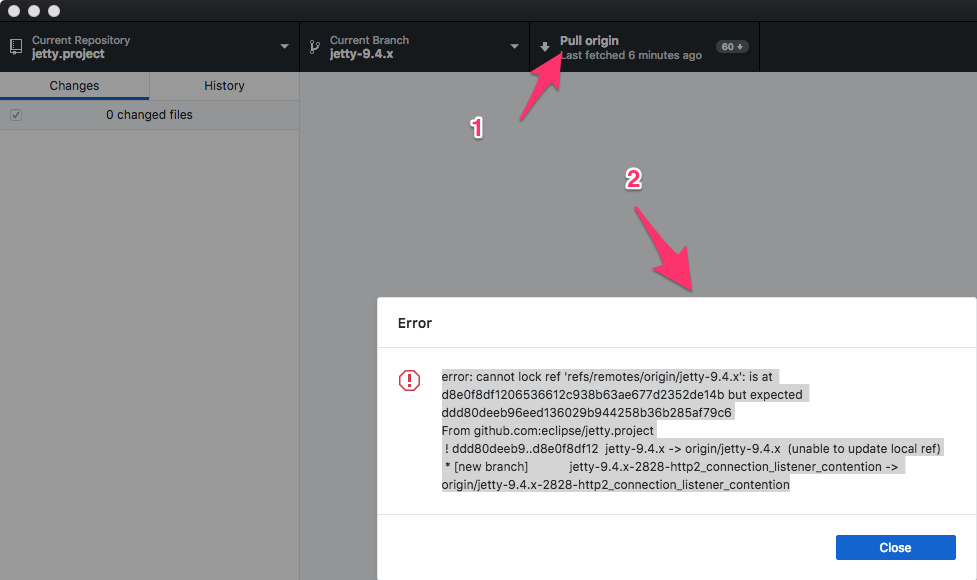
desktop: error: cannot lock ref 'refs/remotes/origin/
It only happens a few times
error: cannot lock ref 'refs/remotes/origin/jetty-9.4.x': is at d8e0f8df1206536612c938b63ae677d2352de14b but expected ddd80deeb96eed136029b944258b36b285af79c6
From github.com:eclipse/jetty.project
 ! ddd80deeb9..d8e0f8df12  jetty-9.4.x -> origin/jetty-9.4.x  (unable to update local ref)
 * [new branch]            jetty-9.4.x-2828-http2_connection_listener_contention -> origin/jetty-9.4.x-2828-http2_connection_listener_contention
Version 1.3.3 $ git --version git version 2.18.0 macOS 10.13.6
About this issue
- Original URL
- State: closed
- Created 6 years ago
- Reactions: 10
- Comments: 55 (3 by maintainers)
On windows, happens to me nearly every time. Same exact error as you: error: cannot lock ‘ref/remotes/origin/blahblahblah’: is at something but expected somethingelse
Hacky workaround I’ve been doing is a combination of: running: git gc --prune=now and deleteing .git/refs/remote/origin
This worked for me : git remote prune origin
Hi, This is the fix, please delete all the files present in the folder c:[yourrepo].git\refs\remotes\origin\ and do the git fetch…
I solved it by doing $ git fetch --prune
Delete the Entire Folder .git/refs/remote/origin , and try Git pull or push . It works for me [Windows]
Thanks for taking the time to open an issue! 🙇
This error is often a symptom of more than one process trying to act on the same repository at the same time.
@natros could you verify if you are using other tools to manage your repository while Desktop is open (some IDEs and text editors have git plugins that may access your repository)?
cc @desktop/support
my solution:
I got the same problem but this one didn’t work
What happened in my case is that I tried to push to a new branch i.e.
and my remote repository has an existing branch named
refactor.I solved it by creating and pushing to a new branch that name didn’t start with
refactor/.anyone solved this issue? i face this problem too…
Thank you, it works for me. However, instead of deleting everything in that folder, I prefer deleting the <branch_name> file which is causing this error
This actually works for me!
Hi, This is the fix, please delete all the files present in the folder c:[yourrepo].git\refs\remotes\origin\ and do the git fetch…
Worked for me
@harishnarayanan thanks. This solution works. Mostly this problem arises when we make some commit on pull request remotely.
https://github.com/desktop/desktop/issues/5438#issuecomment-499407043 worked for me, on Windows. The remote had some overlapping refs like
refs/remote/origin/aandrefs/remote/origin/a/bwhich seems to have cause a problem. Who knows…Hi I’m having repository https://github.com/rpotter12/whatsapp-play. In this CircleCI build fails with the same reason. Logs are in: https://circleci.com/gh/rpotter12/whatsapp-play/571. please guide me why it is failing and how to resolve it. 😃
This worked for me. Thanks.