desktop: Detect merge conflicts before a merge
Goal: As a user and consumer, when I am considering merging another branch into my own and before merging, I want to:
- know whether I’ll get into a conflict
- be warned on how bad the conflict will be so that I can choose the best time to merge and be mentally prepared for it.
Background
Built upon the Compare Branch feature that’s about to land in 1.2. This is demonstrated in the initial mockups as a message below the merge button, like this:
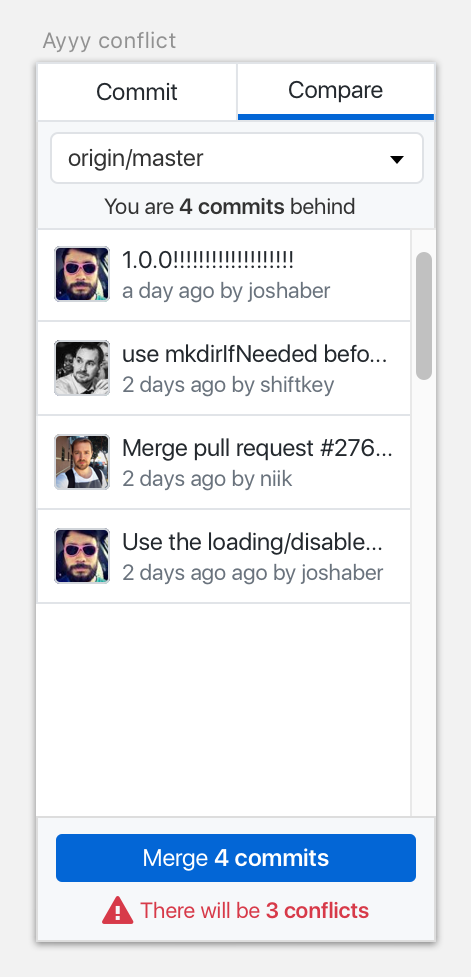
Implementation-wise, this is how we will accomplish the goal:
- know whether I’ll get into a conflict = test merging another branch without actually performing the merge
- be warned on how bad the conflict will be = display a number of files that will be conflicted if the user decides to proceed
Interactive Example
I’m going to use https://github.com/desktop/desktop/pull/3675 as an example here, because this currently has a merge conflict.
Web Editor Flow
Here’s what you see when you view the pull request:
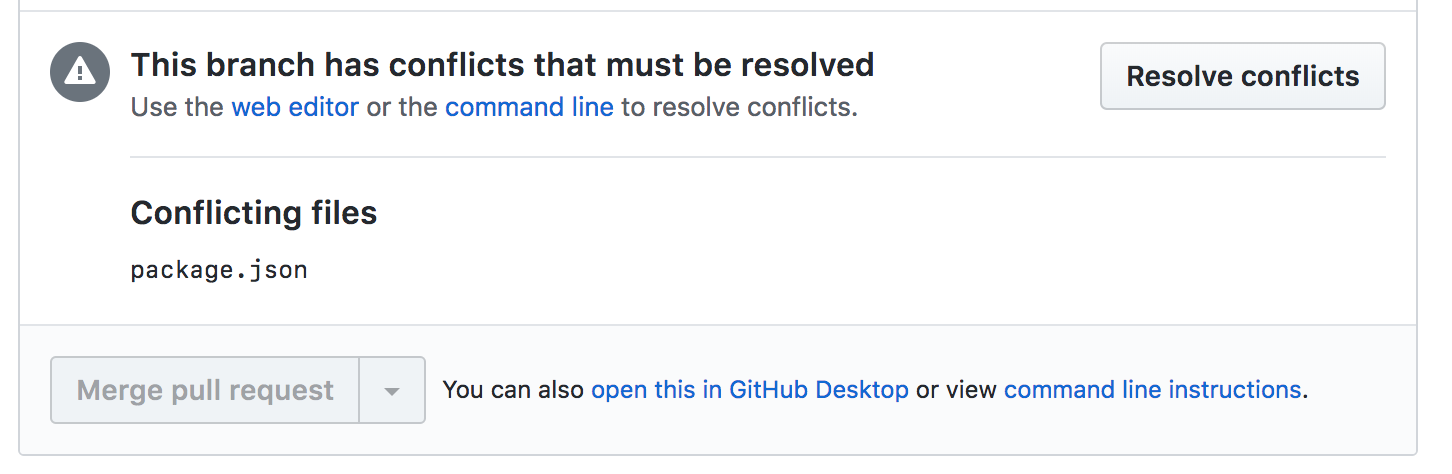
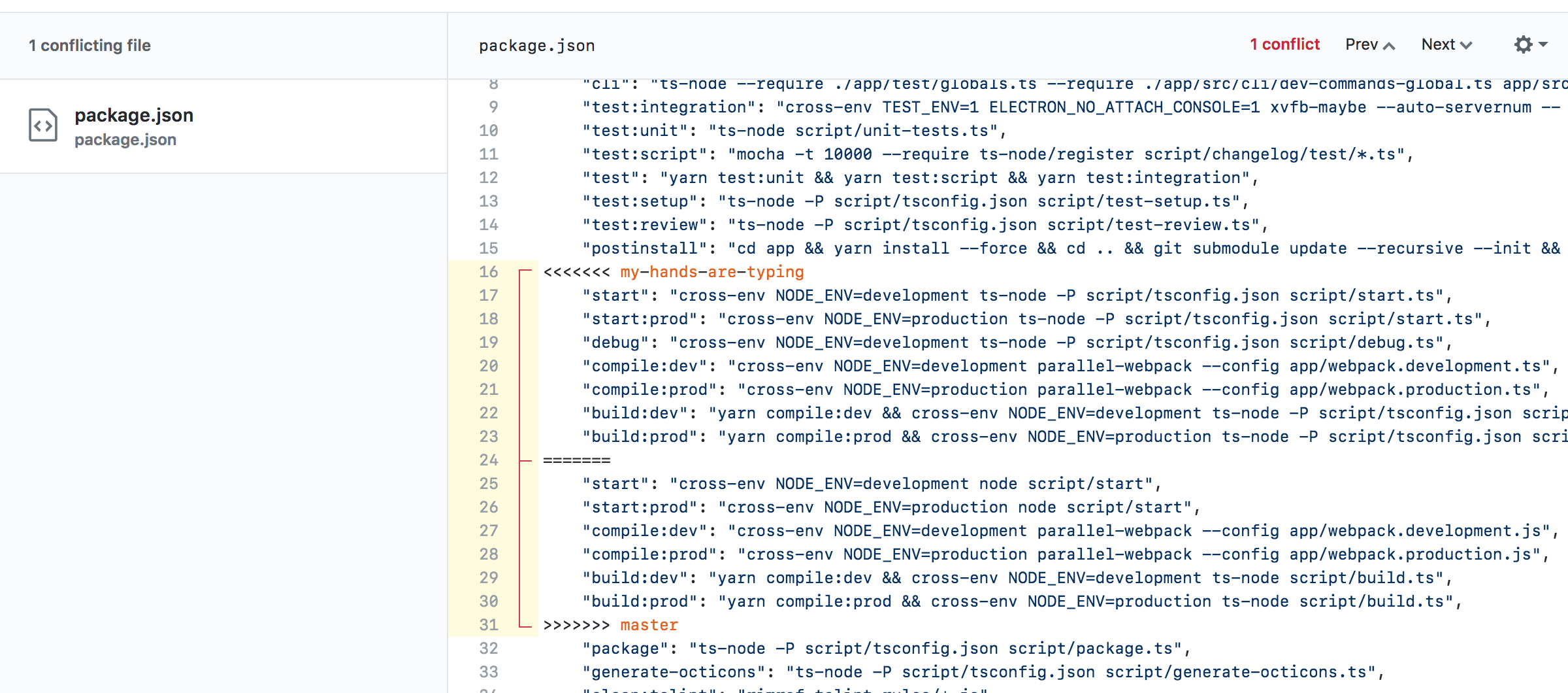
If we try and resolve this conflict in the editor, we see that it’s just one file and one conflicted change:
Current Compare Branch Flow
There’s no indicator when you compare to master that you’re gonna have a bad time:
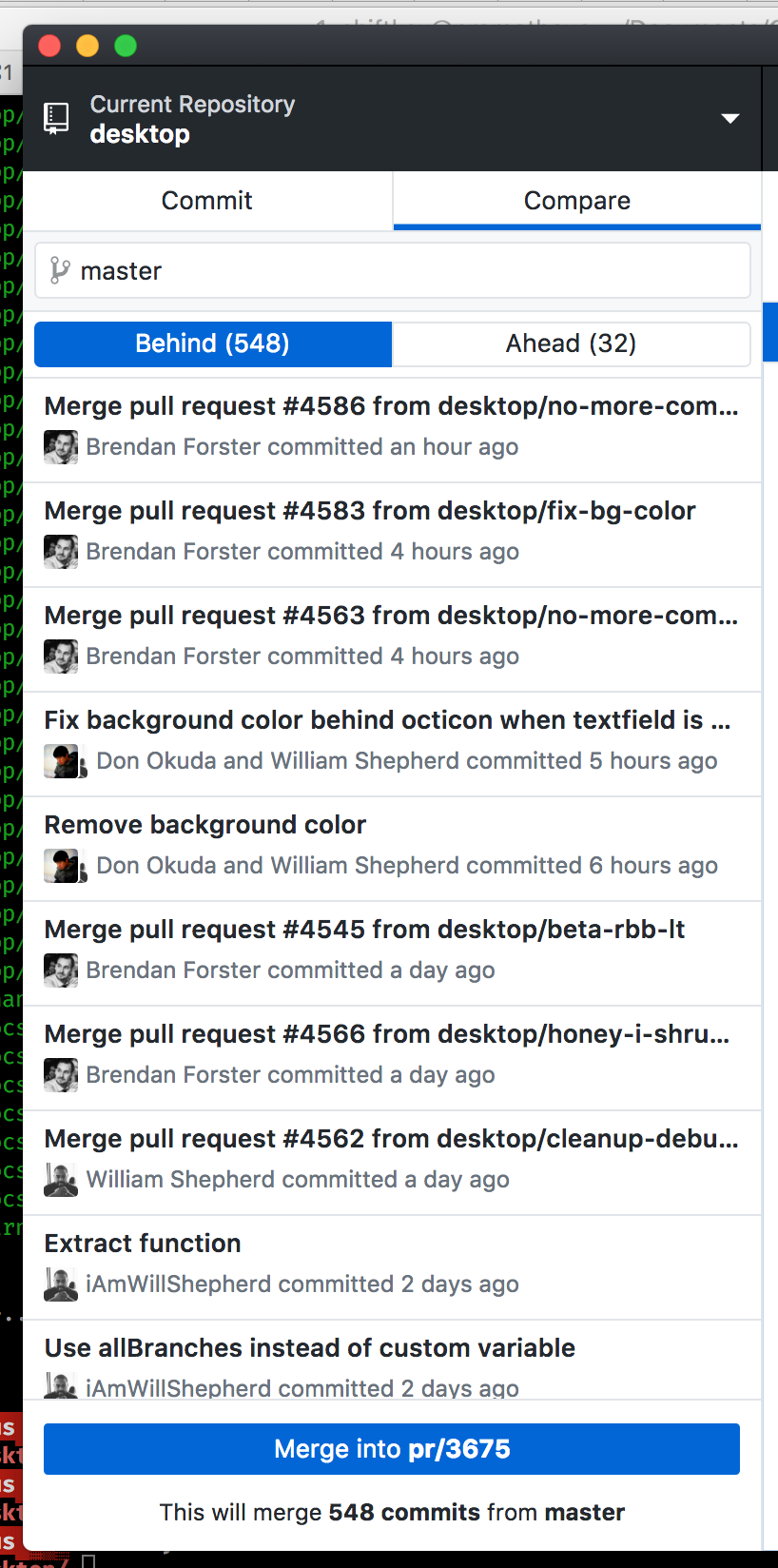
When you merge master into the PR branch, you’ll see this error:
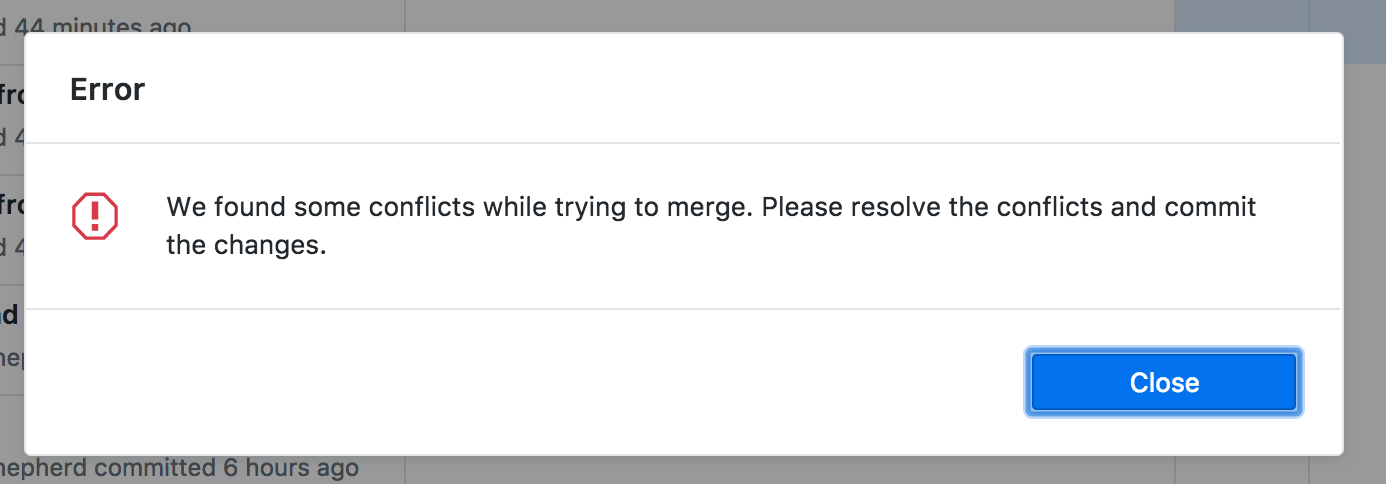
And when you switch to the Commit tab you’ll see there’s our conflicted file to resolve:
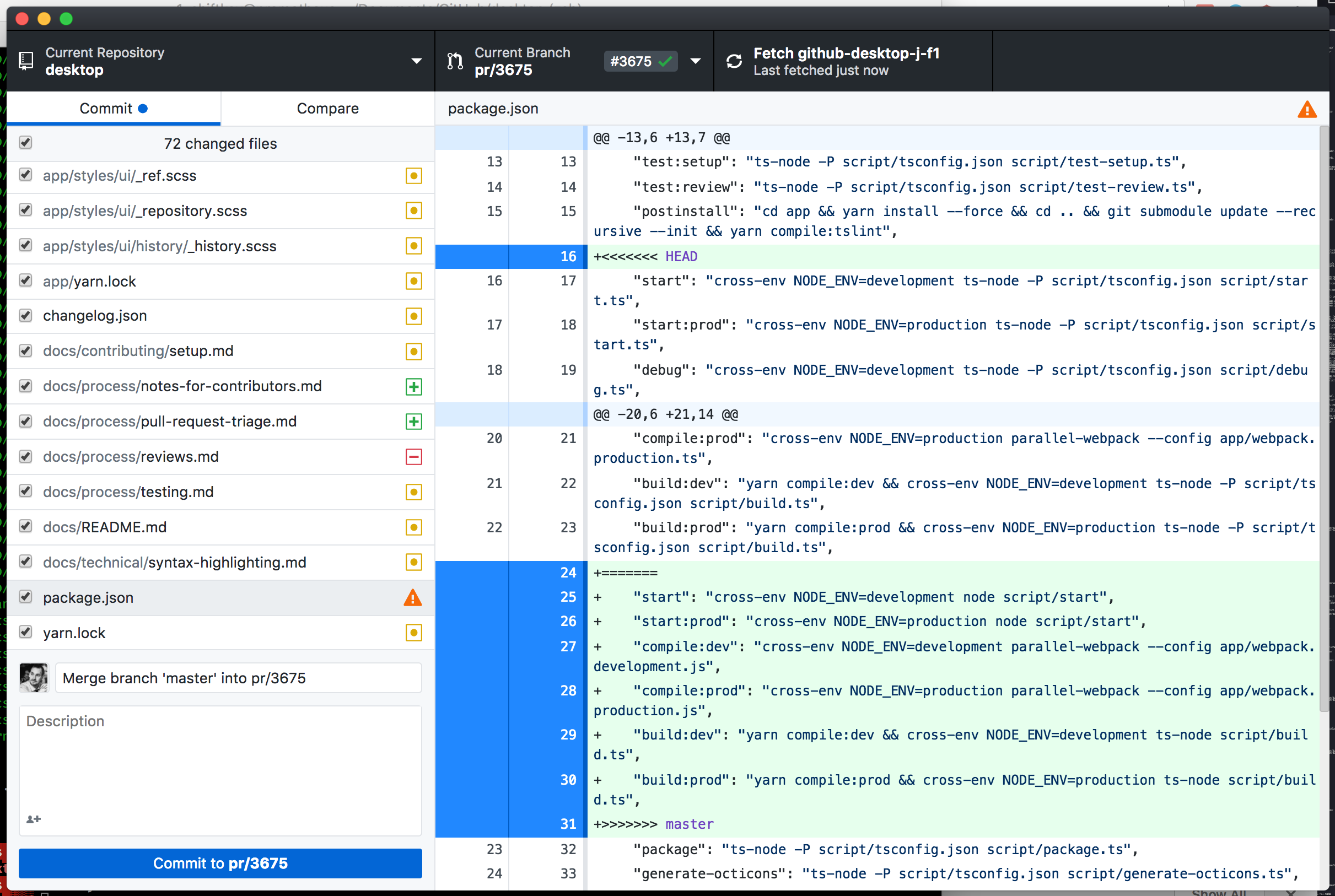
Command Line Example
If you use git merge --no-commit [other-branch] to test this, it will still apply the result to the index - requiring a git merge --abort to undo the test merge. So how can we do this in Git without actually performing the merge?
The classic Windows version of Desktop used libgit2sharp to detect any merge conflicts, and as we’re not interested in adding additional dependencies we need to figure out how to do this using git.git. Thankfully we have git merge-tree.
git merge-tree takes three arguments. In order:
<base-tree>- this is a common ancestor to both branches<branch1>- this is the target branch for the merge (“ours” in Git terminology)<branch2>- this is the source branch for the merge (“theirs” in Git terminology)
For the example in #3675, we can work out the base-tree SHA like this:
$ git merge-base pr/3675 master
c46391569aa99773c99bf8028753ba225df0678d
Then we can execute git merge-tree:
$ git merge-tree c46391569aa99773c99bf8028753ba225df0678d pr/3675 master
merged
  result 100644 41d8e9e745215d5ba5f382f949f6f4167ace4754 .github/ISSUE_TEMPLATE.md
  our    100644 65c8c0a5f5c37299d369ce4811128ae829368d2d .github/ISSUE_TEMPLATE.md
@@ -2,7 +2,7 @@
 First and foremost, we’d like to thank you for taking the time to contribute to our project. Before submitting your issue, please follow these steps:

 1. Familiarize yourself with our contributing guide:
-	* https://github.com/desktop/desktop/blob/master/CONTRIBUTING.md#contributing-to-github-desktop
+	* https://github.com/desktop/desktop/blob/master/.github/CONTRIBUTING.md#contributing-to-github-desktop
 2. Check if your issue (and sometimes workaround) is in the known-issues doc:
 	* https://github.com/desktop/desktop/blob/master/docs/known-issues.md
 3. Make sure your issue isn’t a duplicate of another issue
merged
  result 100644 16f2723406e57be8ea6ac3501f148e5c89b6442f app/package.json
  our    100644 d7ae9a501991fb77213d5228ec2232d8882e8457 app/package.json
@@ -3,7 +3,7 @@
...
Git emits the merge result to stdout, and it’s a format that seems pretty easy to parse:
- the first line is the a keyword representing the result -
merged,added in remote,removed in remote,changed in bothseem to be the potential values (there might be others) - then one or more lines, indented by two spaces, containing the file mode, blob and paths to the contents representing the merge result
  base   100644 3f546193411ef428c7563a87efa8645326e8ee37 yarn.lock
  our    100644 a77184dc2241173e769e2be6feccb7248aec4fb2 yarn.lock
  their  100644 fd340f7005ceda34a5d8c6dc7dce20bf35b0253a yarn.lock
- Lastly, the unified diff of the merge result
Our conflicted file looks like this in the output from git merge-tree:
changed in both
  base   100644 78eb74f896151b4acefbb48dfbb920cd79aefc6e package.json
  our    100644 e821187bff2cd846836ef3f8fdffe86703f92251 package.json
  their  100644 643893279bcbef680b0cb3e1f3835702f4fe05bf package.json
@@ -13,6 +13,7 @@
     "test:setup": "ts-node -P script/tsconfig.json script/test-setup.ts",
     "test:review": "ts-node -P script/tsconfig.json script/test-review.ts",
     "postinstall": "cd app && yarn install --force && cd .. && git submodule update --recursive --init && yarn compile:tslint",
+<<<<<<< .our
     "start": "cross-env NODE_ENV=development ts-node -P script/tsconfig.json script/start.ts",
     "start:prod": "cross-env NODE_ENV=production ts-node -P script/tsconfig.json script/start.ts",
     "debug": "cross-env NODE_ENV=development ts-node -P script/tsconfig.json script/debug.ts",
@@ -20,6 +21,14 @@
     "compile:prod": "cross-env NODE_ENV=production parallel-webpack --config app/webpack.production.ts",
     "build:dev": "yarn compile:dev && cross-env NODE_ENV=development ts-node -P script/tsconfig.json script/build.ts",
     "build:prod": "yarn compile:prod && cross-env NODE_ENV=production ts-node -P script/tsconfig.json script/build.ts",
+=======
+    "start": "cross-env NODE_ENV=development node script/start",
+    "start:prod": "cross-env NODE_ENV=production node script/start",
+    "compile:dev": "cross-env NODE_ENV=development parallel-webpack --config app/webpack.development.js",
+    "compile:prod": "cross-env NODE_ENV=production parallel-webpack --config app/webpack.production.js",
+    "build:dev": "yarn compile:dev && cross-env NODE_ENV=development ts-node script/build.ts",
+    "build:prod": "yarn compile:prod && cross-env NODE_ENV=production ts-node script/build.ts",
+>>>>>>> .their
     "package": "ts-node -P script/tsconfig.json script/package.ts",
     "generate-octicons": "ts-node -P script/tsconfig.json script/generate-octicons.ts",
     "clean:tslint": "rimraf tslint-rules/*.js",
@@ -99,7 +108,7 @@
     "tslint-microsoft-contrib": "^5.0.3",
     "tslint-react": "^3.5.1",
     "typescript": "^2.8.1",
-    "typescript-eslint-parser": "^14.0.0",
+    "typescript-eslint-parser": "^15.0.0",
     "webpack": "^3.10.0",
     "webpack-bundle-analyzer": "^2.11.1",
     "webpack-dev-middleware": "^2.0.3",
What’s useful here is that we can see the merge conflict markers inline, which is the same output as you get when you do a git merge master into pr/3675.
For reference, a different changed in both entry which was auto-merged looks like this:
changed in both
  base   100644 3f546193411ef428c7563a87efa8645326e8ee37 yarn.lock
  our    100644 a77184dc2241173e769e2be6feccb7248aec4fb2 yarn.lock
  their  100644 fd340f7005ceda34a5d8c6dc7dce20bf35b0253a yarn.lock
@@ -7267,9 +7267,9 @@
   version "0.0.6"
   resolved "https://registry.yarnpkg.com/typedarray/-/typedarray-0.0.6.tgz#867ac74e3864187b1d3d47d996a78ec5c8830777"

-typescript-eslint-parser@^14.0.0:
-  version "14.0.0"
-  resolved "https://registry.yarnpkg.com/typescript-eslint-parser/-/typescript-eslint-parser-14.0.0.tgz#c90a8f541c1d96e5c55e2807c61d154e788520f9"
+typescript-eslint-parser@^15.0.0:
+  version "15.0.0"
+  resolved "https://registry.yarnpkg.com/typescript-eslint-parser/-/typescript-eslint-parser-15.0.0.tgz#882fd3d7aabffbab0a7f98d2a59fb9a989c2b37f"
   dependencies:
     lodash.unescape "4.0.1"
     semver "5.5.0"
By streaming the output from Git into a parser, I think we can cheaply aggregate the number of files that have changed, as well as which files are conflicted, without having to actually perform the merge and update the index.
Task List (TBC)
- build a merge result parser that can read the results from
git merge-treeand generate a summary to emulate merging - build the Git infrastructure to generate the merge result between two branches
- execute merge test in
AppStorewhen branch selected and hasaheadcommits to merge - add UI to Compare tab for displaying the merge conflict result (if found)
- incorporate analytics - #5550
Related
- inform help-docs on user-facing updates
- update marketing page screenshots and add feature page
- update blog post for GitHub blog
About this issue
- Original URL
- State: closed
- Created 6 years ago
- Reactions: 11
- Comments: 24 (23 by maintainers)
@donokuda Agreed about reusing the styles for the three “normal” cases (and excluding “Update from default branch”):
Branch > Merge into current branchI love these, they’re really good. Only minor nit would be to downcase “check” in “Pending Check.”
Re: the clickability of the merge button in your previous comment, it sounds like there is actually utility in being able to click “Merge” anyway. That the clicking the button triggers the conflict, which introduces the ways to resolve those conflicts in your chosen way (for example, by hopping over to Atom and using the conflict resolution tool there).
Similar to what @j-f1 suggested and your idea, would preventing merging all together help in the meantime? We can consider introducing another state for situations where you’re unable to merge two branches together:
I think it’s okay for people to be able to click merge since we’re warning them of conflicts ahead of time.
I’d be interested in doing something like this. Making the entire button red might feel a little jarring and scary, but dotcom does a similar treatment for destructive actions:
Here’s the web UI for that case @nerdneha @desktop/design.
Does the user get any benefit by being able to click merge if there are conflicts present? I feel like the answer might be no, but I’m not sure about that. Would love thoughts on whether having it greyed out like dotcom would be a reasonable approach for us too until we have a better story to tell on handling of conflicts when they actually occur.
@billygriffin no, this should only fire when the user is interacting with the compare tab to change branches (or whatever flows we decide to settle on for this) so it should be constrained to that action.
This was me looking at the time required for the underlying Git operations where the branches diverge by 20k commits or so on Windows:
On slower machines we shouldn’t assume this check will finish immediately, so I was thinking about how to show “we’re checking things”. I’m sure there’s other chronic bottlenecks like “omg there’s conflicts in every file” to consider as part of this flow.
👍
Going to rework the prototype before opening a PR, but wanted to add a note here about the UX.
This is how it currently looks when we combine the merge commit hint with the message about what this merge will do to the repository:
This is making the area rather busy, and I have a suggestion to combine these two messages to keep things simple:
The “clean merge” message essentially becomes
✅This will merge XY commits from [branch] into [branch], and the “conflicts detected” becomes⚠️ There will be X conflicts after merging [branch] into [branch], with a loading spinner in between.This helps keep the context focus on what the next action will be, but I’m open to other ideas around how we’re using this area to communicate information.
I’ve pushed up the
parsing-merge-tree-resultbranch that shows what the heavy lifting of merge conflict detection might look like. Testing it on a Windows 7 VM, these are the timings for one of the chronic cases from VSCodeThe timings on this are pretty interesting, and are a good guide for “slow” merge conflict detection:
getMergeBaseneeds to be done to figure out the common ancestor between the two refs, but if this method returns one of the known refs it means this branch is only behind, or only ahead, so it can probably be done as a fast-forward merge (but we don’t do that currently). We can probably skip this check if we already have the ahead/behind count and we know it’s an ahead-only or behind-only branch.mergeTreewhat we have when a ref is both ahead and behind the other ref, and is the work required by Git to identify whether there are any merge conflicts that the user needs to doparseMergeResultis the new code to parse the output from Git and identify whether there are any conflicts that the user will have to work withIf we continue down this path, the UX should definitely support being executed and updated asynchronously.
@billygriffin I’ve switched this label to
user-researchbased on our discussion today