desktop: Concerning the askpass-trampoline.bat issue, no longer able to push to remote.
I have had some problems concerning the askpass-trampoline.bat issue.
When I try to push my commits or fetch origin on GitHub Desktop 2.5.5 on Windows 10 Home, it pops up with an askpass-trampoline.bat error. l have tried many theoretical solutions; logging in and out, deleting the contents of %AppData%/GitHub Desktop/ & %LocalAppData%/GitHubDesktop/ and had a ‘publickey’ issue when running most commands on the Git command line, which rules out using SSH (see old issue below!). I have tried everything it says in the help document on the issue, and all of the solutions were not very helpful. This issue is persisting on all of my repositories.
Proposed solution
How will it benefit Desktop and its users?
It will save Desktop users from having to experience the inconvenience for having to dig through the history of GitHub Desktop issues and may solve a unique unreported problem like what I have been encountering.
Reference and links
I have viewed issues/articles #8860, #9641, #6538, #7982, #9776, https://github.community/t/github-says-authentication-failed/554/7, #2623, #4124, #6879, #6882.
publickey issue in docs Help document
2020-12-20T09:03:18.785Z - info: [ui] [AppStore] loading 15 repositories from store
2020-12-20T09:03:18.788Z - info: [ui] [AppStore] found account: SuperHarmony910 (SuperHarmony910)
2020-12-20T09:03:20.087Z - info: [ui] Executing getRemotes: git remote -v (took 1.263s)
2020-12-20T09:03:20.277Z - info: [ui] Executing getStatus: git --no-optional-locks status --untracked-files=all --branch --porcelain=2 -z (took 1.424s)
2020-12-20T09:03:21.061Z - info: [ui] launching: 2.5.6 (Windows 10.0.19041)
2020-12-20T09:03:21.062Z - info: [ui] execPath: 'C:\Users\name-omitted\AppData\Local\GitHubDesktop\app-2.5.6\GitHubDesktop.exe'
2020-12-20T09:03:21.237Z - info: [ui] Executing getStatus: git --no-optional-locks status --untracked-files=all --branch --porcelain=2 -z (took 1.136s)
2020-12-20T09:03:21.582Z - info: [ui] Executing getCommits: git log 583cbc6b716e8ac0cc713d6d40efba76954d7ec4 --date=raw --max-count=1 --pretty=%H%x1F%h%x1F%s%x1F%b%x1F%an <%ae> %ad%x1F%cn <%ce> %cd%x1F%P%x1F%(trailers:unfold,only)%x1F%D -z --no-show-signature --no-color -- (took 1.069s)
2020-12-20T09:03:22.014Z - info: [ui] Stats reported.
2020-12-20T09:03:23.314Z - info: [ui] Executing getConfigValueInPath: git config -z trailer.separators (took 1.313s)
2020-12-20T09:03:25.970Z - info: [ui] Executing getBranches: git for-each-ref --format=%(refname)%00%(refname:short)%00%(upstream:short)%00%(objectname)%00%(objectname:short)%00%(author)%00%(committer)%00%(symref)%00%1F refs/heads refs/remotes (took 3.498s)
2020-12-20T09:03:26.033Z - info: [ui] Executing getBranches: git for-each-ref --format=%(refname)%00%(refname:short)%00%(upstream:short)%00%(objectname)%00%(objectname:short)%00%(author)%00%(committer)%00%(symref)%00%1F refs/heads refs/remotes (took 2.731s)
2020-12-20T09:03:26.365Z - info: [ui] Executing getRecentBranches: git log -g --no-abbrev-commit --pretty=oneline HEAD -n 2500 -- (took 2.990s)
2020-12-20T09:03:26.496Z - info: [ui] Executing getRecentBranches: git log -g --no-abbrev-commit --pretty=oneline HEAD -n 2500 -- (took 4.013s)
2020-12-20T09:03:26.662Z - info: [ui] Executing getStatus: git --no-optional-locks status --untracked-files=all --branch --porcelain=2 -z (took 2.844s)
2020-12-20T09:03:28.388Z - info: [ui] [AppStore.withAuthenticatingUser] account found for repository: base-generator - SuperHarmony910 (has token)
2020-12-20T09:03:28.794Z - info: [ui] Executing installGlobalLFSFilter: git lfs install --skip-repo (took 8.113s)
2020-12-20T09:03:30.195Z - info: [ui] Executing getStatus: git --no-optional-locks status --untracked-files=all --branch --porcelain=2 -z (took 1.281s)
2020-12-20T09:03:30.311Z - info: [ui] Executing getChangedFiles: git log 583cbc6b716e8ac0cc713d6d40efba76954d7ec4 -C -M -m -1 --no-show-signature --first-parent --name-status --format=format: -z -- (took 1.374s)
2020-12-20T09:03:31.875Z - info: [ui] Executing getConfigValueInPath: git config -z pull.rebase (took 1.045s)
2020-12-20T09:03:31.939Z - info: [ui] Executing fetch: git -c credential.helper= -c protocol.version=2 fetch --progress --prune origin (took 3.354s)
2020-12-20T09:03:31.949Z - error: [ui] `git -c credential.helper= -c protocol.version=2 fetch --progress --prune origin` exited with an unexpected code: 128.
stderr:
The syntax of the command is incorrect.
error: unable to read askpass response from 'C:\Users\name-omitted\AppData\Local\GitHubDesktop\app-2.5.6\resources\app\static\ask-pass-trampoline.bat'
fatal: could not read Username for 'https://github.com': terminal prompts disabled

2020-12-20T09:03:34.184Z - info: [ui] [AppStore.withAuthenticatingUser] account found for repository: base-generator - SuperHarmony910 (has token)
2020-12-20T09:03:34.981Z - info: [ui] [AppStore.withAuthenticatingUser] account found for repository: design-artist - SuperHarmony910 (has token)
2020-12-20T09:03:35.422Z - info: [ui] Executing push: git -c credential.helper= -c protocol.version=2 push origin master:master --progress (took 1.046s)
2020-12-20T09:03:35.423Z - error: [ui] `git -c credential.helper= -c protocol.version=2 push origin master:master --progress` exited with an unexpected code: 128.
stderr:
The syntax of the command is incorrect.
error: unable to read askpass response from 'C:\Users\name-omitted\AppData\Local\GitHubDesktop\app-2.5.6\resources\app\static\ask-pass-trampoline.bat'
fatal: could not read Username for 'https://github.com': terminal prompts disabled

2020-12-20T09:03:36.129Z - info: [ui] Executing fetch: git -c credential.helper= -c protocol.version=2 fetch --progress --prune origin (took 1.012s)
2020-12-20T09:03:36.130Z - error: [ui] `git -c credential.helper= -c protocol.version=2 fetch --progress --prune origin` exited with an unexpected code: 128.
stderr:
The syntax of the command is incorrect.
error: unable to read askpass response from 'C:\Users\name-omitted\AppData\Local\GitHubDesktop\app-2.5.6\resources\app\static\ask-pass-trampoline.bat'
fatal: could not read Username for 'https://github.com': terminal prompts disabled

2020-12-20T09:03:39.592Z - info: [ui] [AppStore.withAuthenticatingUser] account found for repository: extensible-markup - SuperHarmony910 (has token)
2020-12-20T09:03:43.427Z - info: [ui] Executing fetch: git -c credential.helper= -c protocol.version=2 fetch --progress --prune origin (took 3.575s)
Updated 20 December 2020 20:30 AEDT
You will now be viewing the old issue, this is only to preserve what happened in the previous circumstances as an archive, fixed in https://github.com/desktop/desktop/issues/10363#issuecomment-678567456!
Old issue:
I have had some problems concerning the ‘Authentication failed’ issue.
When I try to push my commits or fetch origin on GitHub Desktop 2.5.4 on Windows 10 Home, it pops up with an ‘Authentication failed’ error. The suggestions aren’t very helpful, as I’ve logged in and out, created and associated my account with SSH keys (git/ssh-agent), deleted the contents of %APPDATA%/GitHubDesktop/ and had a ‘publickey’ issue when running most commands on the Git command line. I have tried everything it says in the article on publickey, and all of the issues’ solutions were not very helpful. This issue was persisting on all of my repositories.
This issue is the result of trying to fix an askpass.bat issue, in which I consulted issue #2623 and Stack Overflow for assistance (This issue has reoccurred after I switched back to HTTPS, the Stack Overflow issue fix unknowingly made me switch to SSH, explained in more detail at https://github.com/desktop/desktop/issues/10363#issuecomment-681195483).
Proposed solution
How will it benefit Desktop and its users?
It will save Desktop users from having to experience the inconvenience for having to dig through the history of GitHub Desktop issues and may solve a unique unreported problem like what I have been encountering.
Reference and links
I have viewed issues/articles #8860, #9641, #6538, #7982, #9776, https://github.community/t/github-says-authentication-failed/554/7

publickey issue in docs: https://docs.github.com/en/github/authenticating-to-github/error-permission-denied-publickey
Old logfile from old issue:
Logfile: 2020-08-11T05:37:16.545Z - info: [ui] [AppStore] loading 10 repositories from store
2020-08-11T05:37:16.548Z - info: [ui] [AppStore] found account: SuperHarmony910 (SuperHarmony910)
2020-08-11T05:37:18.160Z - info: [ui] launching: 2.5.3 (Windows 10.0.19041)
2020-08-11T05:37:18.161Z - info: [ui] execPath: 'C:\Users\name private\AppData\Local\GitHubDesktop\app-2.5.3\GitHubDesktop.exe'
2020-08-11T05:37:19.053Z - info: [ui] Stats reported.
2020-08-11T05:37:19.695Z - info: [ui] Executing getRecentBranches: git log -g --no-abbrev-commit --pretty=oneline HEAD -n 2500 -- (took 1.895s)
2020-08-11T05:37:22.074Z - info: [ui] Executing installGlobalLFSFilter: git lfs install --skip-repo (took 3.951s)
2020-08-11T05:37:26.805Z - info: [ui] [AppStore.withAuthenticatingUser] account found for repository: genuine-first-public-class-train - SuperHarmony910 (has token)
2020-08-11T05:37:26.991Z - info: [ui] proxy url not resolved, protocol not supported
2020-08-11T05:37:29.325Z - info: [ui] Executing push: git -c credential.helper= -c protocol.version=2 push origin master:master --progress (took 2.323s)
2020-08-11T05:37:29.327Z - error: [ui] git -c credential.helper= -c protocol.version=2 push origin master:master --progress exited with an unexpected code: 128.
stderr:
git@github.com: Permission denied (publickey).
fatal: Could not read from remote repository.

Please make sure you have the correct access rights
and the repository exists.

(The error was parsed as 2: Authentication failed. Some common reasons include:

- You are not logged in to your account: see File > Options.
- You may need to log out and log back in to refresh your token.
- You do not have permission to access this repository.
- The repository is archived on GitHub. Check the repository settings to confirm you are still permitted to push commits.
- If you use SSH authentication, check that your key is added to the ssh-agent and associated with your account.)
2020-08-11T05:37:33.220Z - info: [ui] proxy url not resolved, protocol not supported
2020-08-11T05:37:35.761Z - info: [ui] Executing fetch: git -c credential.helper= -c protocol.version=2 fetch --progress --prune origin (took 2.311s)
2020-08-11T05:37:35.762Z - error: [ui] `git -c credential.helper= -c protocol.version=2 fetch --progress --prune origin` exited with an unexpected code: 128.
stderr:
git@github.com: Permission denied (publickey).
fatal: Could not read from remote repository.

Please make sure you have the correct access rights
and the repository exists.

(The error was parsed as 2: Authentication failed. Some common reasons include:

- You are not logged in to your account: see File > Options.
- You may need to log out and log back in to refresh your token.
- You do not have permission to access this repository.
- The repository is archived on GitHub. Check the repository settings to confirm you are still permitted to push commits.
- If you use SSH authentication, check that your key is added to the ssh-agent and associated with your account.)
2020-08-11T05:38:26.331Z - info: [ui] [AppStore.withAuthenticatingUser] account found for repository: genuine-first-public-class-train - SuperHarmony910 (has token)
2020-08-11T05:38:26.431Z - info: [ui] proxy url not resolved, protocol not supported
2020-08-11T05:38:28.298Z - info: [ui] Executing push: git -c credential.helper= -c protocol.version=2 push origin master:master --progress (took 1.862s)
2020-08-11T05:38:28.300Z - error: [ui] `git -c credential.helper= -c protocol.version=2 push origin master:master --progress` exited with an unexpected code: 128.
stderr:
git@github.com: Permission denied (publickey).
fatal: Could not read from remote repository.

Please make sure you have the correct access rights
and the repository exists.

(The error was parsed as 2: Authentication failed. Some common reasons include:

- You are not logged in to your account: see File > Options.
- You may need to log out and log back in to refresh your token.
- You do not have permission to access this repository.
- The repository is archived on GitHub. Check the repository settings to confirm you are still permitted to push commits.
- If you use SSH authentication, check that your key is added to the ssh-agent and associated with your account.)
2020-08-11T05:38:57.315Z - info: [ui] [AppStore.withAuthenticatingUser] account found for repository: genuine-first-public-class-train - SuperHarmony910 (has token)
2020-08-11T05:38:57.445Z - info: [ui] proxy url not resolved, protocol not supported
2020-08-11T05:38:59.334Z - info: [ui] Executing push: git -c credential.helper= -c protocol.version=2 push origin master:master --progress (took 1.883s)
2020-08-11T05:38:59.335Z - error: [ui] `git -c credential.helper= -c protocol.version=2 push origin master:master --progress` exited with an unexpected code: 128.
stderr:
git@github.com: Permission denied (publickey).
fatal: Could not read from remote repository.

Please make sure you have the correct access rights
and the repository exists.

(The error was parsed as 2: Authentication failed. Some common reasons include:

- You are not logged in to your account: see File > Options.
- You may need to log out and log back in to refresh your token.
- You do not have permission to access this repository.
- The repository is archived on GitHub. Check the repository settings to confirm you are still permitted to push commits.
- If you use SSH authentication, check that your key is added to the ssh-agent and associated with your account.)
2020-08-11T05:39:18.843Z - info: [ui] [AppStore.withAuthenticatingUser] account found for repository: base-generator - SuperHarmony910 (has token)
2020-08-11T05:39:18.845Z - info: [ui] proxy url not resolved, protocol not supported
2020-08-11T05:39:20.721Z - info: [ui] Executing fetch: git -c credential.helper= -c protocol.version=2 fetch --progress --prune origin (took 1.782s)
2020-08-11T05:39:20.721Z - error: [ui] `git -c credential.helper= -c protocol.version=2 fetch --progress --prune origin` exited with an unexpected code: 128.
stderr:
git@github.com: Permission denied (publickey).
fatal: Could not read from remote repository.

Please make sure you have the correct access rights
and the repository exists.

(The error was parsed as 2: Authentication failed. Some common reasons include:

- You are not logged in to your account: see File > Options.
- You may need to log out and log back in to refresh your token.
- You do not have permission to access this repository.
- The repository is archived on GitHub. Check the repository settings to confirm you are still permitted to push commits.
- If you use SSH authentication, check that your key is added to the ssh-agent and associated with your account.)
2020-08-11T05:39:24.148Z - info: [ui] Executing getStatus: git --no-optional-locks status --untracked-files=all --branch --porcelain=2 -z (took 2.234s)
2020-08-11T05:39:25.215Z - info: [ui] [AppStore.withAuthenticatingUser] account found for repository: design-artist - SuperHarmony910 (has token)
2020-08-11T05:39:25.215Z - info: [ui] proxy url not resolved, protocol not supported
2020-08-11T05:39:27.161Z - info: [ui] Executing fetch: git -c credential.helper= -c protocol.version=2 fetch --progress --prune origin (took 1.859s)
2020-08-11T05:39:27.162Z - error: [ui] `git -c credential.helper= -c protocol.version=2 fetch --progress --prune origin` exited with an unexpected code: 128.
stderr:
git@github.com: Permission denied (publickey).
fatal: Could not read from remote repository.

Please make sure you have the correct access rights
and the repository exists.

(The error was parsed as 2: Authentication failed. Some common reasons include:

- You are not logged in to your account: see File > Options.
- You may need to log out and log back in to refresh your token.
- You do not have permission to access this repository.
- The repository is archived on GitHub. Check the repository settings to confirm you are still permitted to push commits.
- If you use SSH authentication, check that your key is added to the ssh-agent and associated with your account.)
2020-08-11T05:39:29.405Z - info: [ui] Executing getRecentBranches: git log -g --no-abbrev-commit --pretty=oneline HEAD -n 2500 -- (took 1.413s)
2020-08-11T05:39:31.051Z - info: [ui] [AppStore.withAuthenticatingUser] account found for repository: genuine-first-public-class-train - SuperHarmony910 (has token)
2020-08-11T05:39:31.052Z - info: [ui] proxy url not resolved, protocol not supported
2020-08-11T05:39:33.000Z - info: [ui] Executing fetch: git -c credential.helper= -c protocol.version=2 fetch --progress --prune origin (took 1.811s)
2020-08-11T05:39:33.000Z - error: [ui] 'git -c credential.helper= -c protocol.version=2 fetch --progress --prune origin' exited with an unexpected code: 128.
stderr:
git@github.com: Permission denied (publickey).
fatal: Could not read from remote repository.

Please make sure you have the correct access rights
and the repository exists.

(The error was parsed as 2: Authentication failed. Some common reasons include:

- You are not logged in to your account: see File > Options.
- You may need to log out and log back in to refresh your token.
- You do not have permission to access this repository.
- The repository is archived on GitHub. Check the repository settings to confirm you are still permitted to push commits.
- If you use SSH authentication, check that your key is added to the ssh-agent and associated with your account.)
2020-08-11T05:39:45.285Z - info: [ui] Background fetch for 10 repositories took 28.554sec
2020-08-11T05:42:54.528Z - info: [ui] proxy url not resolved, protocol not supported
2020-08-11T05:42:56.594Z - info: [ui] Executing fetch: git -c credential.helper= -c protocol.version=2 fetch --progress --prune origin (took 1.764s)
2020-08-11T05:42:56.594Z - error: [ui] `git -c credential.helper= -c protocol.version=2 fetch --progress --prune origin` exited with an unexpected code: 128.
stderr:
git@github.com: Permission denied (publickey).
fatal: Could not read from remote repository.

Please make sure you have the correct access rights
and the repository exists.

(The error was parsed as 2: Authentication failed. Some common reasons include:

- You are not logged in to your account: see File > Options.
- You may need to log out and log back in to refresh your token.
- You do not have permission to access this repository.
- The repository is archived on GitHub. Check the repository settings to confirm you are still permitted to push commits.
- If you use SSH authentication, check that your key is added to the ssh-agent and associated with your account.)
Updated 13 September 2020 16:50 AEST
About this issue
- Original URL
- State: closed
- Created 4 years ago
- Reactions: 2
- Comments: 55 (14 by maintainers)
Yep, the beta works! Cheers @steveward and thanks for the help! In the meantime, I leant the entirety of Git; quite useful to know.
@SuperHarmony910 please download the latest beta, which has a fix for the issue. We’d appreciate you testing it out and letting us know if you run into any problems. Thanks!
Hi @SuperHarmony910, I’m sorry to hear you’re having problems authenticating. I see that you’re using the SSH protocol in your repositories. Presumably because of the previous issues you had with
askpass.bat. While many of our users are happily using SSH in conjunction with GitHub Desktop our support for it is basic at best. We’re tracking potential future work to improve our support for SSH remotes in https://github.com/desktop/desktop/issues/2579.Given that you’re previous issue with
askpass.bathas been resolved would you be able to switch back to using the http protocol?@Msadr471 Oh, why thank you very much, I would love to delve deep into these new VS Code extensions, and hopefully they serve as much convenience to me as they have done to you!
Well, my dear friend @SuperHarmony910, I put this link here for you and I hope you can easily use this plugin.
https://code.visualstudio.com/docs/editor/versioncontrol
Finally, install these two plugins!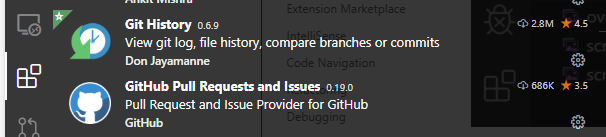 They are very convenient and useful, and if you want, you can look for other useful plugins in the same section of plugins.
Good luck.
That’s great to hear @Msadr471, what was it you would’ve liked to recommend me? I do secretly prefer SSH, even though I have extremely partial knowledge of it. 😄
May I inquire to ask what is ‘vs’? I would like to know what would the plugin be compatible with?
Thanks a lot, @SuperHarmony910
Just yesterday I had a major problem with the “git” but friends (@steveward) helped and it was solved. In this regard, I must say that the program has no problems now! Only I try to use ssh for verifications, I have a problem. Of course, I’m not in a hurry to solve this problem, because I personally prefer “cmd” for coding and programming for “git”. Even two days ago I downloaded a very attractive and cool plugin for vs that works easily! And it does not require any programming and works perfectly as a “GUI”. Most interestingly, I was able to easily install and use the “GPG” security keys on vs.
My suggestion to you is this last option. I hope this desktop version is fixed soon.
I have one question about your issue @Msadr471, are you launching from the updated version? Because it looks to me in the bottom centre of the image, indicated by the blue underline that you are using the old version. To fix this, delete any shortcuts to GitHub (that includes taskbar!), go to
%LOCALAPPDATA%\GitHubDesktopand create a new shortcut from the LocalAppData installationGitHubDesktop.exe. For the taskbar shortcut, just search ‘GitHub Desktop’ in the search bar and click on ‘Pin to taskbar’. The icon should appear like the image below:As much as you prefer SSH, you will probably have to resort to the HTTPS protocol. Will you be able to clone the repository from remote? Hopefully this works, I am not very skilled in Git and GitHub, I am offering advice on my behalf with hardly any information whatsoever.
@SuperHarmony910 thanks for sharing at. These entries are causing GitHub Desktop to use SSH instead of HTTPS:
Removing those lines should hopefully get things working for you. Did you set these configuration values?