democratic-csi: freenas-nfs: Invalid mount option -- o\nmount.nfs
Hello; I’m trying to set up NFS but I cannot make it mount.
jlipiec@kubernetes-node-a:~$ kubectl get pvc -A
NAMESPACE      NAME                                                    STATUS   VOLUME                                     CAPACITY   ACCESS MODES   STORAGECLASS      AGE
external-dns   data-etcd-0                                             Bound    pvc-d4839191-57d5-4ed1-8a78-8042e3ae0221   8Gi        RWO            freenas-nfs-csi   14m
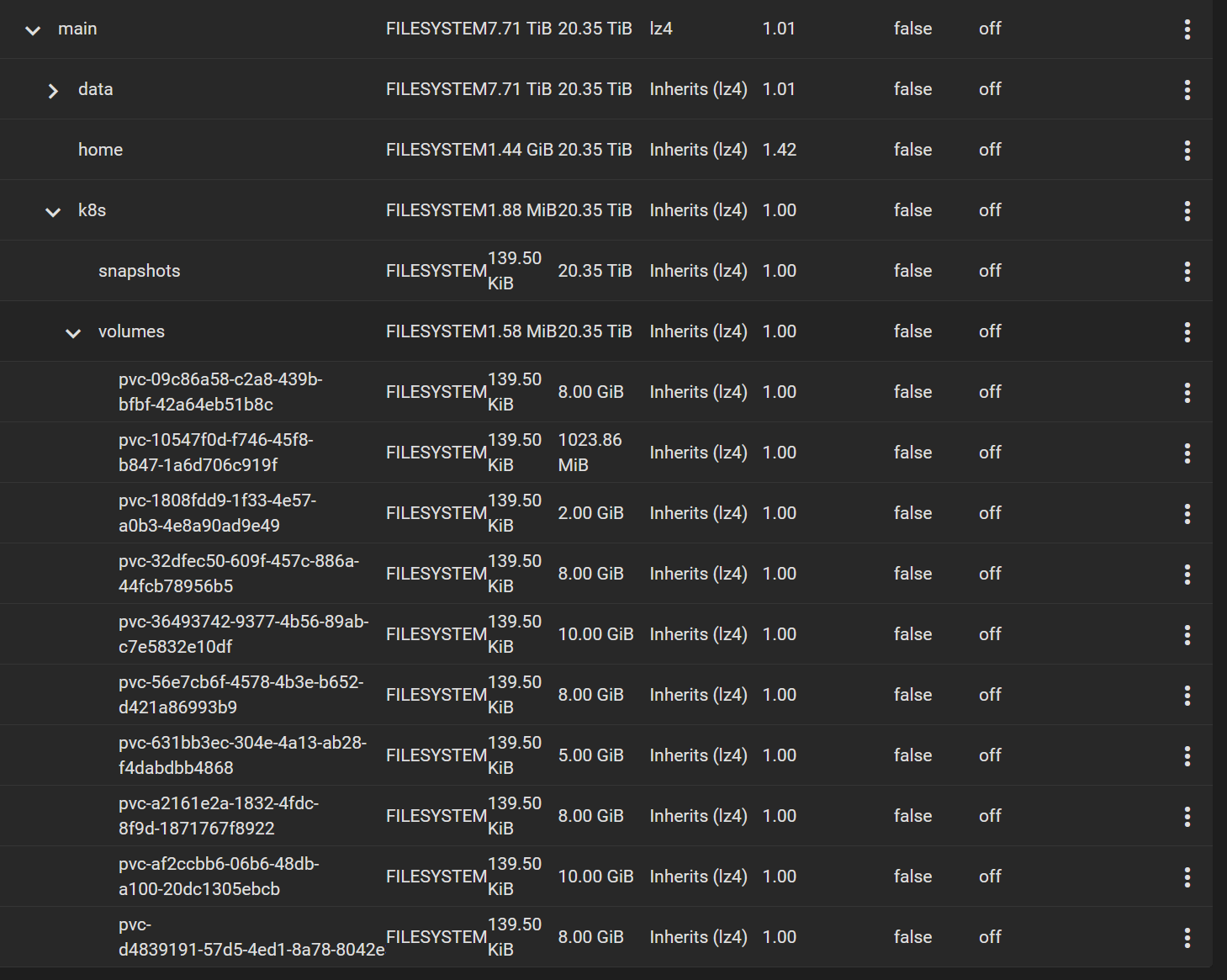
gerrit         gerrit-git-gc-logs-pvc                                  Bound    pvc-10547f0d-f746-45f8-b847-1a6d706c919f   1Gi        RWO            freenas-nfs-csi   17m
gerrit         gerrit-git-repositories-pvc                             Bound    pvc-631bb3ec-304e-4a13-ab28-f4dabdbb4868   5Gi        RWX            freenas-nfs-csi   17m
gerrit         gerrit-site-gerrit-gerrit-stateful-set-0                Bound    pvc-af2ccbb6-06b6-48db-a100-20dc1305ebcb   10Gi       RWO            freenas-nfs-csi   17m
monitoring     grafana                                                 Bound    pvc-36493742-9377-4b56-89ab-c7e5832e10df   10Gi       RWO            freenas-nfs-csi   18m
monitoring     opensearch-cluster-master-opensearch-cluster-master-0   Bound    pvc-32dfec50-609f-457c-886a-44fcb78956b5   8Gi        RWO            freenas-nfs-csi   18m
monitoring     opensearch-cluster-master-opensearch-cluster-master-1   Bound    pvc-09c86a58-c2a8-439b-bfbf-42a64eb51b8c   8Gi        RWO            freenas-nfs-csi   18m
monitoring     opensearch-cluster-master-opensearch-cluster-master-2   Bound    pvc-56e7cb6f-4578-4b3e-b652-d421a86993b9   8Gi        RWO            freenas-nfs-csi   18m
monitoring     prometheus-alertmanager                                 Bound    pvc-1808fdd9-1f33-4e57-a0b3-4e8a90ad9e49   2Gi        RWO            freenas-nfs-csi   18m
monitoring     prometheus-server                                       Bound    pvc-a2161e2a-1832-4fdc-8f9d-1871767f8922   8Gi        RWO            freenas-nfs-csi   18m
jlipiec@kubernetes-node-a:~$ kubectl get pod -A | grep -v Running
NAMESPACE      NAME                                                         READY   STATUS              RESTARTS   AGE
external-dns   etcd-0                                                       0/1     ContainerCreating   0          56s
gerrit         gerrit-gerrit-stateful-set-0                                 0/1     Init:0/2            0          54s
monitoring     grafana-5b955ff7c-zbm8g                                      0/1     Init:0/2            0          76s
monitoring     opensearch-cluster-master-0                                  0/1     Init:0/1            0          52s
monitoring     opensearch-cluster-master-1                                  0/1     Init:0/1            0          52s
monitoring     opensearch-cluster-master-2                                  0/1     Init:0/1            0          52s
monitoring     prometheus-alertmanager-64f5c7d9f6-zz4bv                     0/2     ContainerCreating   0          73s
monitoring     prometheus-server-69f966bf76-bjh7n                           0/2     ContainerCreating   0          71s
jlipiec@kubernetes-node-a:~$ kubectl describe pod/etcd-0 -n external-dns | grep Events -A10
Events:
  Type     Reason       Age                  From               Message
  ----     ------       ----                 ----               -------
  Normal   Scheduled    2m39s                default-scheduler  Successfully assigned external-dns/etcd-0 to kubernetes-node-a
  Warning  FailedMount  36s                  kubelet            Unable to attach or mount volumes: unmounted volumes=[data], unattached volumes=[data etcd-jwt-token etcd-client-certs kube-api-access-7scbj]: timed out waiting for the condition
  Warning  FailedMount  29s (x9 over 2m39s)  kubelet            MountVolume.MountDevice failed for volume "pvc-d4839191-57d5-4ed1-8a78-8042e3ae0221" : rpc error: code = Internal desc = {"code":32,"stdout":"","stderr":"/usr/local/bin/mount: illegal option -- o\nmount.nfs: an incorrect mount option was specified\n","timeout":false}
csiDriver:
  # should be globally unique for a given cluster
  name: "org.democratic-csi.nfs"

# add note here about volume expansion requirements
storageClasses:
- name: freenas-nfs-csi
  defaultClass: true
  reclaimPolicy: Delete
  volumeBindingMode: Immediate
  allowVolumeExpansion: true
  parameters:
    # for block-based storage can be ext3, ext4, xfs
    # for nfs should be nfs
    fsType: nfs

    # if true, volumes created from other snapshots will be
    # zfs send/received instead of zfs cloned
    # detachedVolumesFromSnapshots: "false"

    # if true, volumes created from other volumes will be
    # zfs send/received instead of zfs cloned
    # detachedVolumesFromVolumes: "false"

  mountOptions:
  - noatime
  - nfsvers=3
  #secrets:
  #  provisioner-secret:
  #  controller-publish-secret:
  #  node-stage-secret:
  #  node-publish-secret:
  #  controller-expand-secret:

# if your cluster supports snapshots you may enable below
#volumeSnapshotClasses: []
#- name: freenas-nfs-csi
#  parameters:
#  # if true, snapshots will be created with zfs send/receive
#  # detachedSnapshots: "false"
#  secrets:
#    snapshotter-secret:

driver:
  config:
    driver: freenas-nfs
    instance_id: abcd-efgh
    httpConnection:
      protocol: http
      host: "{{ nfsServer.host }}"
      port: 80
      # use only 1 of apiKey or username/password
      # if both are present, apiKey is preferred
      # apiKey is only available starting in TrueNAS-12
      apiKey: "{{nfsServer.apiKey}}"
      #username: "{{nfsServer.username}}"
      ## password:
      allowInsecure: true
      # use apiVersion 2 for TrueNAS-12 and up (will work on 11.x in some scenarios as well)
      # leave unset for auto-detection
      apiVersion: 2
    sshConnection:
      host: "{{ nfsServer.host }}"
      port: 22
      username: "{{nfsServer.ssh.username}}"
      # use either password or key
      # password: "{{nfsServer.username}}"
      privateKey: |
        {% filter indent(width=8) %}{{ nfsServer.ssh.key }}{% endfilter %}

    zfs:
      # can be used to override defaults if necessary
      # the example below is useful for TrueNAS 12
      #cli:
      # sudoEnabled: true
      #
      #  leave paths unset for auto-detection
      #  paths:
      #    zfs: /usr/local/sbin/zfs
      #    zpool: /usr/local/sbin/zpool
      #    sudo: /usr/local/bin/sudo
      #    chroot: /usr/sbin/chroot

      # can be used to set arbitrary values on the dataset/zvol
      # can use handlebars templates with the parameters from the storage class/CO
      #datasetProperties:
      #  "org.freenas:description": "{\{ parameters.[csi.storage.k8s.io/pvc/namespace] }}/{\{ parameters.[csi.storage.k8s.io/pvc/name] }\}"
      #  "org.freenas:test": "{\{ parameters.foo }}"
      #  "org.freenas:test2": "some value"

      datasetParentName: main/k8s/volumes
      # do NOT make datasetParentName and detachedSnapshotsDatasetParentName overlap
      # they may be siblings, but neither should be nested in the other
      detachedSnapshotsDatasetParentName: main/k8s/snapshots
      datasetEnableQuotas: true
      datasetEnableReservation: false
      datasetPermissionsMode: "0777"
      datasetPermissionsUser: 0
      datasetPermissionsGroup: 0
      # datasetPermissionsAcls:
      # - "-m everyone@:full_set:allow"
      # - "-m u:k8s:full_set:allow"

    nfs:
      #shareCommentTemplate: "{\{ parameters.[csi.storage.k8s.io/pvc/namespace] }\}-{\{ parameters.[csi.storage.k8s.io/pvc/name] }\}"
      shareHost: "{{ nfsServer.host }}"
      shareAlldirs: false
      shareAllowedHosts: []
      shareAllowedNetworks: []
      shareMaprootUser: root
      shareMaprootGroup: root
      shareMapallUser: ""
      shareMapallGroup: ""
About this issue
- Original URL
- State: closed
- Created 2 years ago
- Comments: 24 (9 by maintainers)
It was completely unrelated to this issue, but I messed up and needed to change 2 things. Resetting truenas obviously resets your apikeys too…
And me trying every possible setting to make it work, enabled Kerberos and forgot to turn it off again. Once I turned it back off everything worked as expected.
The error
illegal option -- oreally threw me off. Why does it throw that? When I tried the commands manually, the errormount.nfs: access denied by servermade more sense. Glad it’s working again, I’m loving the project, great job @travisghansen!Maybe it helps somebody who is having a similar problem. I got a similar problem like Venthe after a upgrade to TrueNAS-SCALE-22.12.0 and and upgrade of kubernetes to version 1.26. Suddenly existing volumes and new volumes didn’t really work anymore and I got many different errors.
The solution was to change the nfsvers to 4.2 instead of 4. Now everything works again like a charm.
mountOptions:
Great! Welcome to the project and enjoy!
I cannot confirm that: Either restart or disabling of NFSv4 - though I am quite sure that I’ve restarted Truenas on it’s own. I’ll try one more test - I’ll re-enable NFSv4 and schedule another PVC