dbeaver: SELECT statement shouldn't increase uncommitted transactions count
- Version: 4.0.4
- Platform: Ubuntu 16.04
- SQL: MS SQL Server 2012
- Connection Settings:
- Auto-commit: false
- Isolation level: Read committed
When I execute the following SELECT statement:
select * from alarmruleconditions where alarmruleid = 13035
The Commit and Rollback buttons are enabled, and transaction count textbox changes to green with a number “1”.
When hover on this textbox, I will get a popup:
1 total statements
1 modifying statements
1 seconds uptime
I think this is not correct, it is only a SELECT statement, not modifying anything. I remembered this not happens in 4.0.1 ~ 4.0.3.

About this issue
- Original URL
- State: closed
- Created 7 years ago
- Reactions: 2
- Comments: 23 (2 by maintainers)
This issue is back in 7.0 version
It seems that this issue is back in 7.0 version
This issue is back in 7.0 version
Issue is still there in Version 22.1.1.202206261508.
It looks like DBeaver mostly covers PostgreSQL behavior. But even there issuing
COMMIT;orROLLBACK;manually doesn’t finish the transaction in DBeaver. You have to click on “Commit” or “Rollback” button in the user interface to finish the transaction.In other DBMSs, such as i.e. Oracle, the DBeaver user interface doesn’t reflect the DBMS rules. I.e. DDL queries always commit current trasaction on Oracle, but DBeaver increments the transaction statement counter instead. This confuses a lot, because user may think that the DDL query is rollbackable, when it is not. And even when the user clicks on “Rollback” button in the UI, this will not do anything. So, I would say this is rather a serious issue.
Same applies to SELECT queries - in Oracle they start a new transaction only for “Serializable” isolation level, but by default (and in 99% of the cases) “Read Committed” is used, and SELECT queries should not increase transaction statements counter in the UI.
oracle connection. autocommit = off, isolation level: read committed. select 1 from dual; counts as a modifying statement beaver version: 22.1.2.202207091909
this is confusing, bummer!
Does it mean that query statement locking the table in oracle?
Still in Version 21.2.4.202111011413
I’ll add that running each of these statements, including the
rollback, increments the transaction count in the UI. The actual transaction count within the DB server only increments once. This is on MSSQL.Select Statement Increments Transaction Count:
An illustration of the OP’s point, DBeaver increments the transaction count when I issue a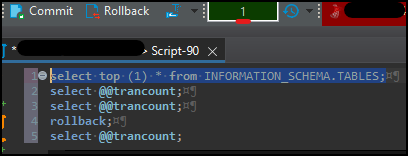
selectstatement:Checking the Server for the Transaction Count
Here, I ask the server for the transaction count. I see that the above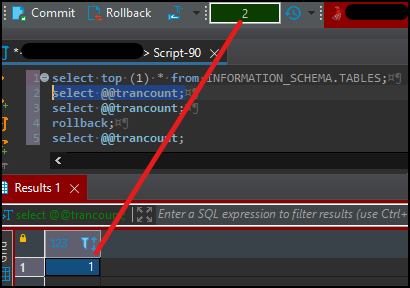
selectstatement did indeed open a transaction, as the server returns1. The UI then indicates that transaction count has been incremented.Checking the Server for the Transaction Count again
So did the transaction count actually increase? No. When I ask the server again, it indicates that there is just one transaction. The count in the UI is incremented again.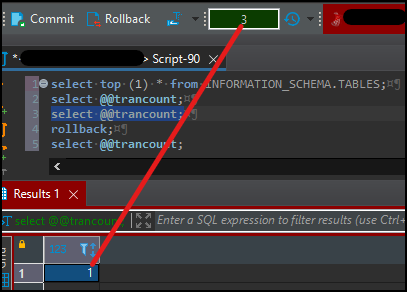
Surely Issuing a Rollback Helps?
When I issue a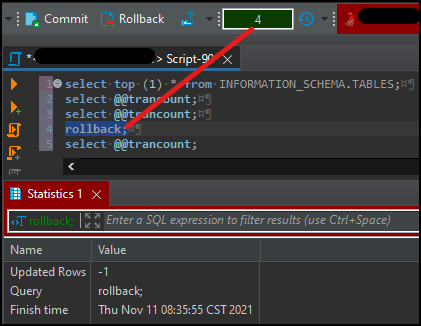
rollback, the transaction count in the UI ticks up yet again:Checking the Server for the Transaction Count after the Rollback
The server correctly shows a transaction count of zero, but in the UI, it looks like I’m now 5 levels deep: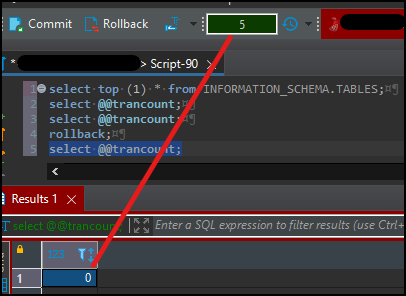
Community Version 21.0.4.202105021514. is still there :=(
We cannot use it in our production environment because the transaction count goes up when autocommit isn’t made.
Due to this reason we are still using version 6.3.5 and can not upgrade to newer versions.
An option for transaction count in select operations would be great.
Hi, it seems that this bug is still there! Pleas fix it, otherwise we cannot use this wonderful tool for productive DB’, because it locks pages each time we execute a SELECT statement. I know that we could set manually the option ‘Auto-Commit’, but this is tedious and it might get forgotten, in particular when we are under high pressure due to PROD Incidents.