dbeaver: Copy-pasting from code editor to OneNote produces bad formatting
Description
Copying syntax-highlighted code from code editor and pasting it into an external application such as Word or OneNote produces bad formatting, i.e. loss of whitespace.
DBeaver Version
Community Edition 22.3.2
Operating System
Windows 10 x64
Database and driver
n/a
Steps to reproduce
The following code:
with cte as
(
	select col1, col2
	from my_table
)
select * from cte;
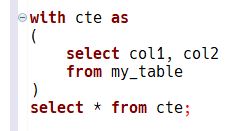
…looks like this in DBeaver’s code editor:
…but copy-pasted from DBeaver to Microsoft Word looks like this:
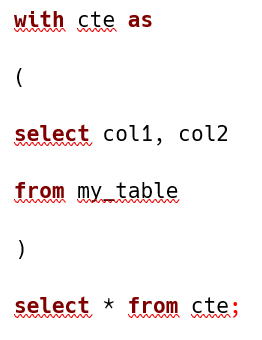 (leading whitespace lost; vertical spacing looks funny but is actually OK, no blank lines are produced)
…and copy-pasted from DBeaver to OneNote looks like this:
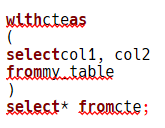 (leading whitespace and whitespace around highlighted words lost)
Copying to Outlook is affected too; the end result looks like the Word example above.
This used to work fine in recent versions (22.0-22.1?).
Additional context
No response
About this issue
- Original URL
- State: closed
- Created a year ago
- Reactions: 1
- Comments: 18 (5 by maintainers)
Issue solved in version 23.0.4.202305071722
In the last version (I’ve tried 23.0.5.202305211610, Win 10 x64), formatting of code copy-pasted to Word and Outlook looks flawless to me, however OneNote is the same as reported. I hope this is ultimately fixable, i.e. that it’s not a some sort of OneNote quirk that can’t be worked around.