dbeaver: Cannot run program "/usr/bin/mysqldump" since version 22.3.4 (Permission denied)
Description
I try to do a mysqldump and get the error
Error executing process
  Cannot run program "/usr/bin/mysqldump" (in directory "/usr/bin"): error=13, Permission denied
  Cannot run program "/usr/bin/mysqldump" (in directory "/usr/bin"): error=13, Permission denied
    error=13, Permission denied
    error=13, Permission denied
DBeaver Version
Community Edition 22.3.4
Operating System
Ubuntu 22.04.1 LTS
Database and driver
- Server version: 10.6.11-MariaDB-0ubuntu0.22.04.1
- Driver name: MySQL 5
Steps to reproduce
- Upgrade to dBeaver version 22.3.4 (dbeaver-ce_22.3.4_amd64.deb)
- Open a database
- Go to Tools > Dump database
- Click on Next and Start
- Get the error
After downgrade back to 22.3.3 it works again.
Additional context
No response
About this issue
- Original URL
- State: closed
- Created a year ago
- Reactions: 15
- Comments: 21 (9 by maintainers)
Most likely it is a result of Java 17 upgrade. We are investigating this and going to fix it in the next version.
Downgrade to version 22.3.3 solve the problem.
=> https://dbeaver.io/files/22.3.3/
According to this, I assume you installed DBeaver package manually and not from Snap or Flatpack. Am I correct?
Same problem, but with Postgres: Pop!_OS 22.04 LTS Version 22.3.4, installed with
apt-getLocal and remote databasesFor some reason the Product Version is empty as well: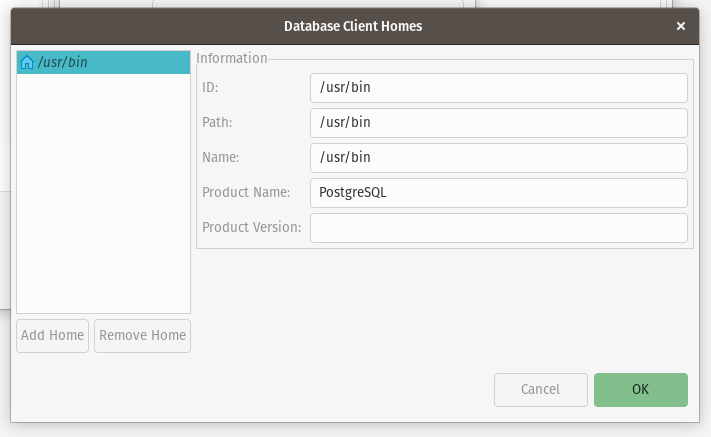
Logs for the Product Version:
Verified
I have the same error, but when I try to connect to databases using SSH tunnel. DBeaver Version Community Edition 22.3.4
Operating System Ubuntu 22.04.1 LTS
After downgrading back to 22.3.3 it works again. 👍