action-download-artifact: Error: no matching workflow run found
Everything was workign fine till last 2 hours.
I just provide the pr in the arguments
- uses: dawidd6/action-download-artifact@v2
   with:
       pr: ${{github.event.pull_request.number}}
        workflow: ci.yml
Log:
==> Workflow: ci.yml
==> Repo: xxxxxxxxx
==> Conclusion: success
==> PR: 304
==> Commit: 01xxx963c6xxxb0b6exxxx58113513927xxx
Its not able to get RunID i think
About this issue
- Original URL
- State: closed
- Created 2 years ago
- Reactions: 32
- Comments: 33 (4 by maintainers)
Commits related to this issue
- ci: Add optional Run ID param for release workflow This was implemented as a workaround when GitHub's elastic search was failed (https://github.com/dawidd6/action-download-artifact/issues/147#issueco... — committed to croz-ltd/klokwrk-project by dmurat 2 years ago
- Disable branch test until GitHub fixes see https://github.com/dawidd6/action-download-artifact/issues/147 — committed to gbhand/action-download-artifact by gbhand 2 years ago
- publisher: update dependencies Update dawidd6/action-download-artifact to 2.19.0 which contains a workaround for Github issue with workflow run searching. Ref: https://github.com/dawidd6/action-do... — committed to nim-works/nimskull by alaviss 2 years ago
- Merge #279 279: publisher: update dependencies r=alaviss a=alaviss ## Summary Update dawidd6/action-download-artifact to 2.19.0 which contains a workaround for Github issue with workflow run search... — committed to nim-works/nimskull by bors[bot] 2 years ago
- Apply GitHub artifact download work around to nuget process as well. https://github.com/dawidd6/action-download-artifact/issues/147#issuecomment-1096296334 — committed to ServiceStack/ServiceStack by Layoric 2 years ago
- Workaround for collate-and-compare-coverage The download step in collate-and-compare-coverage workflow is failing due to an issue with GitHub indexes. This workaround uses gh utility to get the work... — committed to DFE-Digital/apply-for-teacher-training by NickGraham101 2 years ago
- GitHub actions: fix downloading artifacts: Don't check for workflow conclusion According to https://github.com/dawidd6/action-download-artifact/issues/147#issuecomment-1096091049 — committed to lezsakdomi/microscopy-collager by lezsakdomi a year ago
Response from GH on the issue:
One can see how many users are really out there only when something is broken:
😄
I’ve managed to successfully test one solution, and I’ve created a PR here. As it’s written above, if we do not select empty strings filters for
branchandeventattributes, the API will return a non-stale list of workflows.It works with the case when you have a separate pipeline for deploying an artifact (e.g. on merge to master/main) and you don’t care about the
event(as it should always success when merging to master) norbranch(as it’s always master).Hi,
same problem here.
I guess RunIDs after 2147483647 are causing this.
Last Run before 2147483647 worked for me: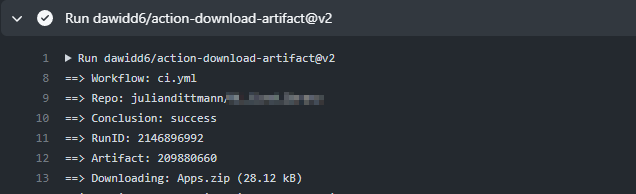
Temporary fix is using GitHub Actions CLI to get the Run ID and then passing it to action-download-artifact action. Example: https://github.com/sidx1024/report-nyc-coverage-github-action/blob/main/.github/workflows/main.yml#L33
It’s a GitHub API issue with workflow runs searching.
@alexeh if you use
workflow_conclusionyou will have to replace withrun_idplus the value of the upload artifact.Eg
You can find the run ID by looking at the summary and looking for the
Artifactwhere the number will be clickable.The link will be
https://github.com/<user>/<repo>/actions/<run_id>where you can grab thatrun_idand put in manually in your workflow yaml for theaction-download-artifactstep.Works fine now, at least in my workflow. If not, see the comments above for workarounds.
@Layoric thanks a lot! I’ll probably wait for GH to fix this since is not really critical for my case, as long as the tests workflow goes all green 😃
Thanks!
@alexeh It is yes, but it can buy time to look for other solutions if a deploy is blocking other tasks. @sidx1024 's example looks good, but I’m having issues with auth and the GitHub CLI I think even though only trying to list on a public repository.
Folks – until this is fixed you can use the
run_iddirectly and the artifact will be foundThis is the
Integer.MAX_VALUEin Java…