devilbox: [Bug]: Laravel with Vite
Have you already looked into this bug?
- I have checked the Troubleshooting Guide
- I have checked Release notes for potential migration steps
- I have checked existing issues for similar bugs
- I have googled this bug already with no luck
- I have not done any of the above
(Optional) Error message
404 for all assets built with vite with
What went wrong?
Hello @cytopia, hope you are doing fine. Since Laravel 9 the new default assets package builder is vitejs (in place of laravel mix). As far as I know now devilbox is not able to make vite works as it should.
I tried on a fresh laravel 10 installation but I cannot make it work with npm run dev.
I have to stress that instead npm run build, which actually build the assets in public folder does work, so the only problem is on the vite dev script.
Once I run it, vite builds a localhost url with this a specific port: http://localhost:5173/ which cannot be reached by devilbox.
I can reach the domain.loc registered on the file hosts, but the result is the welcome page but with all assets 404
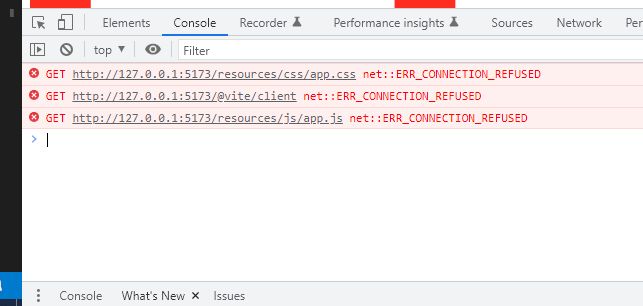
I tried with many different vite configurations but no luck.
Has anyone been able to make this work?
laravel vite docs: https://laravel.com/docs/10.x/vite vite docs: https://vitejs.dev/config/
Expected behaviour
It should be possibile to npm run dev the project without errors.
npm run build instead works as it should.
How can we reproduce the bug?
- Enter PHP 8.1 container (I run Devilbox on WSL 2)
- Install new laravel 10 project
laravel new laravel-project - add the laravel-project.loc to hosts and to laravel .env APP_URL
- install package dependencies:
npm install - apply inside the header tag of the
resources\views\welcome.blade.phpfile this vite directive:@vite(['resources/css/app.css', 'resources/js/app.js'])and comment out tailwindcss style tag - customize app.css with something like
body { background-color: red; } - in the shell run
npm run dev - visit the laravel-project.loc: all assets 404
- in the shell run
npm run build - visit the laravel-project.loc: all assets works (red background with huge laravel icon)
Host Operating System
Linux
Host Platform (amd64, arm64, other)
amd64
(Linux only) Is SELinux enabled?
I don’t know
Docker version
Docker version 23.0.1, build a5ee5b1
Docker Compose version
docker-compose version 1.29.2, build 5becea4c
Devilbox version
Devilbox v2.4.0 (2022-12-18) and 3.0.0-beta-0.3
Have you removed stopped containers before starting?
Yes
Have you pulled latest Docker images before starting?
No
Devilbox start command
docker-compose up mysql
Config: .env file
Not related.
Config: docker-compose.override.yml
No response
Config: ./check-config.sh
Not related.
Log: docker-compose logs
Not related.
(Optional) Additional information
No response
About this issue
- Original URL
- State: closed
- Created a year ago
- Comments: 19 (5 by maintainers)
@masiorama
I have
Devilbox v3.0.0-beta-0.3 (2023-01-02), assuming that is the latest version. You can see he version number by just going tohttps://localhost/, it is shown there in the top left corner of the page. Perhaps try to update Devilbox to the latest version first.Then at the root of the project, inside the
.devilboxfolder I have thebackend.cfgfile withconf:rproxy:ws:php:3000orconf:rproxy:http:php:3000. This works with Svelte, yes. However Svelte and Kit run on Vite, so I assume using something else that is based on Vite should/could work as well.Given https://laravel.com/docs/10.x/vite#configuring-vite and https://laravel.com/docs/10.x/vite#working-with-a-secure-development-server I would assume perhaps something of this sort could work with Laravel in the Vite config, though I have not tested this.
I would first try to update to the latest version of Devilbox and use the
backend.cfgfile inside the.devilboxfolder and see what happens. IF this does not work then try adjusting the Vite config with above example. Hope you will manage. 🤞I don’t use Laravel but might find time to play around with it and see if I can get it running with Devilbox, this is going to take some time though. Comes to mind, have you checked the Vite Discord, if they have any, perhaps someone there can help you. Devilbox also has a Discord, perhaps someone there knows more.
@cytopia do you have any suggestions in here? I’m kinda stuck at this point, unable to upgrade to vite which is the default from laravel 9. Thanks in advance.
Hello @robots4life thanks for you answer, I will check what you suggested and report my discoverings here.
@C4pt4inM To make the Vite HMR work, run it on a different URL. For example, lets your project run on
example. local (local is Devilbox TLD_SUFFIX). You need to run the HMR on some other URL likehmr. local. I usewipas Devilbox, so thelaravel-mix-hot.wip` it just a different nginx vhost.You need to be on that Devilbox V3 beta, and create a new folder in your
wwwfolder calledhmr. Inside thathmrfolder, create a folder.devilbox. Now cd into that.devilboxfolder and create a file calledbackend.cfgand copy the content that I gave in the original comment.Now use that
hostin the vite config, and you are good to go.@cytopia I’m in the same situation of @masiorama
@robots4life I upgraded to devilbox 3.0.0-beta-0.3 without issues. I don’t get the backend.cfg part and its role in the configuration, but I tried alternatively the 2 file contents you suggested (with no luck). I played a bit with the vite configuration (your suggestion and other combinations from the config), but still no luck so far.
@masiorama yes, please do, curious about this, thank you. 😃