cypress: macOS High Sierra fails to unzip Cypress on npm or Cypress install
Current behavior:
Upon running npm install cypress -D or cypress install, the “Unzipping Cypress” step fails with a permission denied error.
Additional Info (images, stack traces, etc)
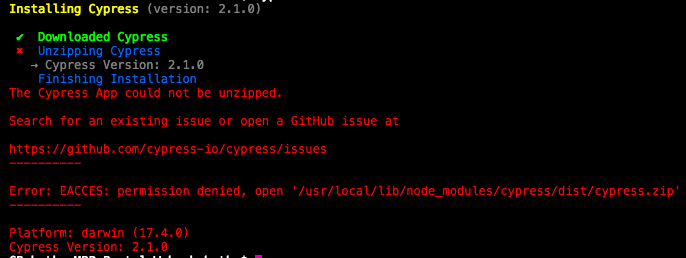
- Operating System: macOS High Sierra Version 10.13.3
- Cypress Version: 2.1.0
- Browser Version: N/A
About this issue
- Original URL
- State: closed
- Created 6 years ago
- Reactions: 5
- Comments: 18 (3 by maintainers)
@cbohatka-cardinal This is 100% a system permission issue. My guess is that you’ve installed
nodeornpmwithsudo. Did any of you install node withnvm? You could try that. It appears you installed a system wide node, which is not recommended.The error
EACCESis coming fromnodewhen we try to access the zip that we just downloaded. I don’t believe there’s anything Cypress can do about it - the binary app and CLI is downloaded 10,000+ times a day on all 3 operating systems so I don’t think there’s anything that’s on our end.You can try running
DEBUG=cypress:* npm install cypressto reinstall the binary and see what happens.You can also try using version
3.x.xof Cypress since we changed how the binary is cached and installed. I’m going to close this issue as there’s no way we can reproduce this since it’s too specific to your systems.Use this commnad:
sudo npm install --unsafe-perm=true --allow-rootThe error I got was
This is after I uninstalled all global versions of Node/NPM and re-installed them using NVM.
I checked the folder for the
cypress.zipfile namedT, and it seems it has an extended attributecom.apple.rootlesswhich has to do with Apple’s System Integrity Protection.I suspect this is what’s preventing Cypress/NPM from automatically unzipping the file. Is there a way for Cypress to download the file into another folder which doesn’t have the
rootlessattribute?