cyber-dojo: Text file is lost after running a test with a stray '\20' in the file
Summary
Something about my keyboard setup means that if I hit a particular key, then a non-ascii character gets inserted.
If I run the tests without spotting it, here’s what happens:
Expected behaviour: error message saying my code is wrong Actual behaviour: error message saying my code is wrong - and the source file is removed from the list of available files.
It’s a windows keyboard attached to a Mac, and the key that on PCs causes the context menu to appear, in cyber-dojo causes a little round circle to appear in the code.
Workaround
This has happened to me 3 times now, in an online course, and each time I have had to use the ‘+’ sign to create a new file, and copy-and-paste the in the file from a previous step, which took a few minutes.
I see now that I can “revert” an earlier step, but either I didn’t spot that, at the time - or I tried it, and it didn’t seem to re-add the file…
Steps to reproduce
Here’s exactly what I did - I suspect some of the middle steps can be removed…
- Start a new session - I chose C++ with CppUTest and Roman numerals
- Run the test and confirm they fail
- Edit HikerTest.cpp to make the failing test pass
- Accidentally hit a key on my keyboard that puts a ‘\20’ (little round blob) into the source
- Run the tests
Example
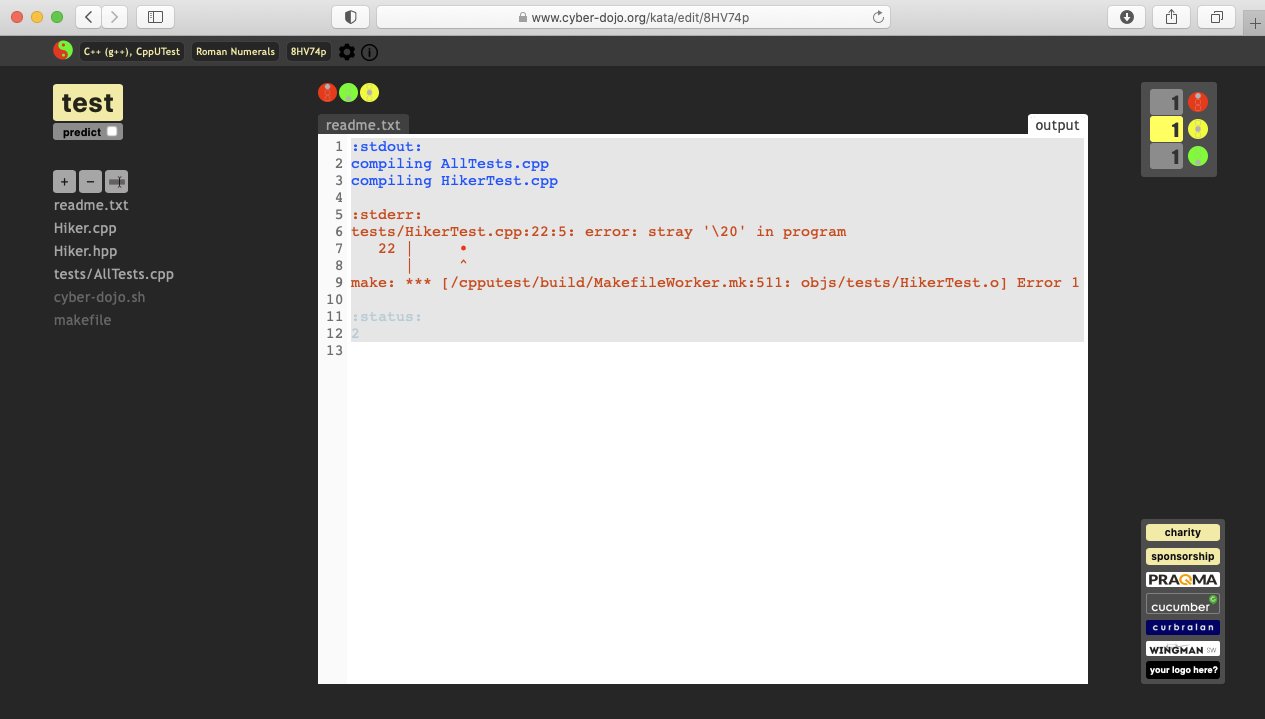
There is an example of this having happened in Step 3 of https://www.cyber-dojo.org/kata/edit/8HV74p
This is the error text in the output window:
:stdout:
compiling AllTests.cpp
compiling HikerTest.cpp

:stderr:
tests/HikerTest.cpp:22:5: error: stray '\20' in program
   22 |
      |     ^
make: *** [/cpputest/build/MakefileWorker.mk:511: objs/tests/HikerTest.o] Error 1

:status:
2
And here is a screenshot: notice how the output file refers to HikerTest.cpp but that file is no longer listed in the list of available files:
About this issue
- Original URL
- State: closed
- Created 3 years ago
- Comments: 16 (8 by maintainers)
Ok. I’ve got something which I’m hoping will solve the problem. Only deployed on beta for now. Could you try on https://beta.cyber-dojo.org please. Thanks
Excellent. Now live on the main site. Thanks again.
Hi again! Making progress here… this is a fun bug! I’ve now got a test which uses a file whose content is not utf8 clean. According to the linux utility (called file) it is a binary file (inside the container). This creates a problem because at the end of the container run, all text files are harvested. This functionality exists because approval-style tests create new text files which have to be returned to the browser. So the upshot is that the file is not harvested, and so it genuinely is being seen as a deleted file. I will have to think about what to do in this case! Thanks
That’s something different! I had a good look at the code last night. I think I have a good idea why it is happening. Pretty busy today. First step will be to find out how to insert a rogue character into test input data in Ruby. Will write a failing test for that over the weekend 😃
Another request if I may… Immediately after hitting [test] and causing a file to be deleted, could you open the browser console and see if anything is reported. Thanks
Excellent. Big thanks for those. It’s interesting because I do explicitly clean the files, looking for this kind of thing. I will create a failing test case and look into it. Will be tomorrow.
https://www.cyber-dojo.org/kata/edit/8HV74p
readme.txt, so you could copy-and-paste it in to source code and experiment… Unfortunately, this caused thereadme.txtto disappear from the UI as well!Ooohh - good call…
https://www.cyber-dojo.org/kata/edit/Swrw9N
test_hiker.rbdisappeared from the file listing…Screenshot of Run 4