Material: UIStackView as Card content doesn't show it's contents
I’m trying to set the UIStackView as my card content however the size seems to work, the content of the UIStackView isn’t shown.
I’m using the following code:
import UIKit
import Material

class LoginViewController: UIViewController{
    fileprivate var card: Card!

    fileprivate var toolbar: Toolbar!
    fileprivate var moreButton: IconButton!


    fileprivate var contentView: UIStackView!

    fileprivate var bottomBar: Bar!
    fileprivate var dateLabel: UILabel!
    fileprivate var favoriteButton: FlatButton!
    fileprivate var defaults: UserDefaults!

    fileprivate var usernameField: TextField!
    fileprivate var passwordField: TextField!

    /// A constant to layout the textFields.
    fileprivate let constant: CGFloat = 32

    override func viewWillAppear(_ animated: Bool) {
        super.viewWillAppear(animated)
        UIApplication.shared.statusBarStyle = .lightContent
    }

    override func viewDidLoad() {
        super.viewDidLoad()
        view.backgroundColor = UIColor(red: 177/255, green: 223/255, blue: 247/255, alpha: 1.0)

        //Looks for single or multiple taps.
        let tap: UITapGestureRecognizer = UITapGestureRecognizer(target: self, action: #selector(LoginViewController.dismissKeyboard))
        view.addGestureRecognizer(tap)

        defaults = UserDefaults.standard;

        prepareDateLabel()
        prepareFavoriteButton()
        prepareMoreButton()
        prepareToolbar()
        prepareEmailField()
        preparePasswordField()
        prepareContentView()
        prepareBottomBar()
        prepareCard()
    }

    /// Handle the resign responder button.
    @objc
    internal func login(button: UIButton) {
//        view.endEditing(true)
//        showLoadingIndicator()
//        api.login(email: usernameField.text!, password: passwordField.text!) { (login) in
//            self.hideLoadingIndicator()
//            print(login.message)
//            if(login.success == true){
//                self.defaults.set(login.token, forKey: "token")
//                let toolbarController = AppSnackbarController(rootViewController: MainViewController(rootViewController: ScannerViewController()))
//                let viewController = AppNavigationDrawerController(rootViewController: toolbarController)
//                viewController.modalTransitionStyle = .crossDissolve
//                self.present(viewController, animated: true, completion: nil)
//            }else{
//                self.showSnackbar(message: login.message)
//            }
//        }
    }

    @objc func dismissKeyboard() {
        //Causes the view (or one of its embedded text fields) to resign the first responder status.
        view.endEditing(true)
    }

}

extension LoginViewController{

    fileprivate func prepareDateLabel() {
        dateLabel = UILabel()
        dateLabel.font = RobotoFont.regular(with: 12)
        dateLabel.textColor = Color.blue.base
        dateLabel.text = "Wachtwoord vergeten?"
    }

    fileprivate func prepareFavoriteButton() {
        favoriteButton = FlatButton(title: "Login")
        favoriteButton.pulseAnimation = .pointWithBacking
    }

    fileprivate func prepareMoreButton() {
        moreButton = IconButton(image: Icon.cm.moreVertical, tintColor: Color.grey.base)
    }

    fileprivate func prepareToolbar() {
        toolbar = Toolbar(rightViews: [])

        toolbar.title = "Aanmelden"
        toolbar.titleLabel.textAlignment = .left

        toolbar.detail = "Vul hier je gebruikersnaam en wachtwoord"
        toolbar.detailLabel.textAlignment = .left
        toolbar.detailLabel.textColor = Color.grey.base
    }

    fileprivate func prepareContentView() {
        contentView = UIStackView()
        contentView.axis = UILayoutConstraintAxis.vertical
        contentView.distribution = UIStackViewDistribution.equalSpacing
        contentView.alignment = UIStackViewAlignment.fill
        contentView.spacing = 0
        contentView.translatesAutoresizingMaskIntoConstraints = false
        contentView.addArrangedSubview(usernameField)
        contentView.addArrangedSubview(passwordField)
    }

    fileprivate func prepareEmailField() {
        usernameField = TextField()
        usernameField.autocapitalizationType = .none
        usernameField.textColor = Color.black
        usernameField.dividerNormalColor = Color.blue.base
        usernameField.dividerActiveColor = Color.blue.base
        usernameField.placeholderNormalColor = Color.blue.base
        usernameField.placeholderActiveColor = Color.blue.base
        usernameField.placeholder = "Username"
        usernameField.isClearIconButtonEnabled = true
    }

    fileprivate func preparePasswordField() {
        passwordField = TextField()
        passwordField.textColor = Color.black
        passwordField.dividerNormalColor = Color.blue.base
        passwordField.dividerActiveColor = Color.blue.base
        passwordField.placeholderNormalColor = Color.blue.base
        passwordField.placeholderActiveColor = Color.blue.base
        passwordField.placeholder = "Password"
        passwordField.clearButtonMode = .whileEditing
        passwordField.isVisibilityIconButtonEnabled = true

        passwordField.visibilityIconButton?.tintColor = Color.white.withAlphaComponent(passwordField.isSecureTextEntry ? 0.38 : 0.54)
    }

    fileprivate func prepareBottomBar() {
        bottomBar = Bar()

        bottomBar.leftViews = [dateLabel]
        bottomBar.rightViews = [favoriteButton]
    }

    fileprivate func prepareCard() {
        card = Card()

        card.toolbar = toolbar
        card.toolbarEdgeInsetsPreset = .square3
        card.toolbarEdgeInsets.bottom = 0
        card.toolbarEdgeInsets.right = 8

        card.contentView = contentView
        card.contentViewEdgeInsetsPreset = .wideRectangle3

        card.bottomBar = bottomBar
        card.bottomBarEdgeInsetsPreset = .wideRectangle2

        view.layout(card).width(300).center()
    }
}
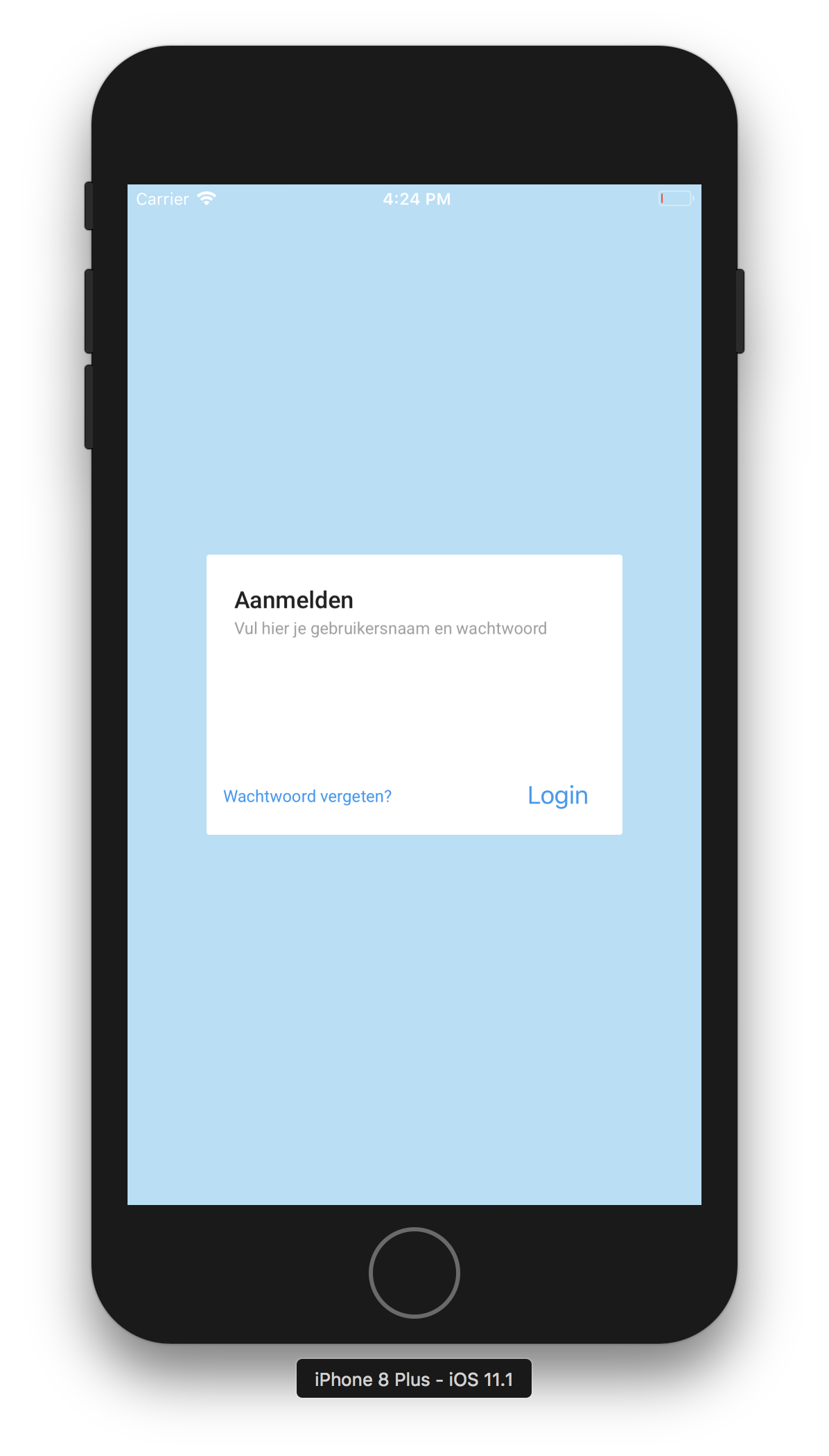
About this issue
- Original URL
- State: closed
- Created 7 years ago
- Reactions: 1
- Comments: 16 (9 by maintainers)
Not necessarily. It would need to know to layout itself so that the height may be obtained. To test this, can you try setting the stack view
layoutIfNeededprior to setting it? Like so:If that works, I can make an update to Material that will fix your issue. Thank you!