rich-text: Embedded images are ignored

I had to use the following to have embedded images display:

let options = {
  renderNode: {
    'embedded-asset-block': (node) =>
      `<img class="img-fluid" src="${node.data.target.fields.file.url}"/>`
  }
}
let bodyHTML = body ? documentToHtmlString(body, options) : ''

Seems like this should be a default (minus that bootstrap class); out-of-the-box, images didn’t display for me.

About this issue

  • Original URL
  • State: open
  • Created 5 years ago
  • Reactions: 44
  • Comments: 47 (2 by maintainers)

Most upvoted comments

Try deleting Gatsby’s .cache folder. There’s an issue with relaonships and caching in the plug-in that I don’t really understand 😉

Here’s a stripeed down example of how i’m doing it with documentToReactComponents Example of embedded assets and a ‘blockquote’ content type

import { BLOCKS, MARKS, INLINES } from '@contentful/rich-text-types';
import { documentToReactComponents } from '@contentful/rich-text-react-renderer';
import React from "react";

import BlockQuote from "./Blockquote";

const richTextOptions = {
  renderNode: {
    [BLOCKS.EMBEDDED_ASSET]: (node) => {
      const { title, description, file } = node.data.target.fields;
      const mimeType = file['en-US'].contentType
      const mimeGroup = mimeType.split('/')[0]

      switch (mimeGroup) {
        case 'image':
          return <img
            title={ title ? title['en-US'] : null}
            alt={description ?  description['en-US'] : null}
            src={file['en-US'].url}
          />
        case 'application':
          return <a
            alt={description ?  description['en-US'] : null}
            href={file['en-US'].url}
            >{ title ? title['en-US'] : file['en-US'].details.fileName }
          </a>
        default:
          return <span style={{backgroundColor: 'red', color: 'white'}}> {mimeType} embedded asset </span>
      }
      
    },
    [BLOCKS.EMBEDDED_ENTRY]: (node) => {
      const fields = node.data.target.fields;
      switch (node.data.target.sys.contentType.sys.id) {
        case 'blockquote':
          return <div>
            <BlockQuote quoteText={fields.quoteText['en-US']} quoter={fields.quoter['en-US']}/>
          </div>
        default:
          return <div>??????????????? {title} </div>

      }
    },
  }
}

let ContentfulRichText = function(text){
  return documentToReactComponents(JSON.parse(text.text), richTextOptions)
}

export default ContentfulRichText

Blockquote component

const BlockQuote = ({quoteText, quoter}) => {
  return (
    <blockquote>
      {quoteText}
      <footer>
        <cite>{quoter}</cite>
      </footer>
    </blockquote>
  )
}

export default BlockQuote

I gave it a few minutes and the typescript and bootstrapping the dev environment was a headache. I’m sure one of your paid developers could do this much more quickly.

👍 Bump.

Completely agreed this should be defaulted or at least clearly written that “embedded assets” (ie simple images) will not be translated into html in the docs; and give examples on how to extend.

I cant get node.data.target.fields to show up no matter what I do and its driving me crazy.

I only get the following output node.data.target.sys

i’ve tried deleting the .cache and running gatsby clean and none of it works.

my query is this

export const query = graphql`
query GetArticle ($id: String = "") {
    contentfulArticle (id: {eq: $id}) {
      author
      date(formatString: "MMMM DD, YYYY")
      slug
      title
      id
      photos {
        gatsbyImageData
      }
      content{
              raw
        references {
          ... on ContentfulAsset {
                __typename
                contentful_id
                fixed {
                    src
                    srcSet
            }
          }
        }
      }
    }
  }
`

and my options are set up as

const options = {
        renderNode: {
            [BLOCKS.PARAGRAPH]: (node, children) => {
                return <Text>{children}</Text>
            },
            [BLOCKS.EMBEDDED_ASSET]: (node) => {
                // I cant render images that i dont have the url to...so this is useless to me at the moment 
            }
        },
    };

the output is this… 👎

Screen Shot 2021-04-12 at 4 43 13 PM

UPDATE This was the hardest most obscure error to fix and I question using contentful for anything other than hobby or test work. I wouldn’t dare sell this to a client but with that gripe out of the way… this is how i fixed it and got the data that i needed… HOPE THIS HELPS THOSE THAT HAD THE SAME ISSUE I WAS HAVING

First thing I had to do was create a utility component that would get the contentful asset using the sys.id as a reference since thats the only data that i was getting for my queries

import { graphql, useStaticQuery } from 'gatsby'


export const useContentfulImage = (assetUrl) => {
    const { assets } = useStaticQuery(
        graphql`
            query CONTENTFUL_IMAGE_QUERY {
                assets: allContentfulAsset {
                    edges {
                        node {
                            contentful_id
                            fluid(maxWidth: 500, quality: 85) {
                                ... GatsbyContentfulFluid
                            }
                        }
                    }
                }
            }
        `
    )
    const asset = assets.edges.find(({ node }) => node.contentful_id === assetUrl)
    return asset
}

Then i imported that util component into my template component and queried the embedded assets like so…

[BLOCKS.EMBEDDED_ASSET]: node => {
            const asset = useContentfulImage(node.data.target.sys.id)
            console.log(asset)
            if (asset) {
                return (
                    <img src={asset.node.fluid.src} alt='' />
                )
            }
        }

AGAIN, I HOPE THIS HELPS ANYONE STRUGGLING WITH THIS ISSUE AS I DED FOR A FEW DAYS

For anyone who still stuck with this. The documentation is not clear enough that make this will not work. This change when fetching Contentful content will fix it

      content {
        raw
        references {
          ... on ContentfulAsset {
            contentful_id
            __typename
            fluid(maxWidth: 2560) {
              ...GatsbyContentfulFluid_withWebp
            }
          }
        }
      }

The big missing piece of the puzzle is adding __typename field, which needed for the library (check source code) to resolve the embedded asset is not mentioned as part of BREAKING CHANGES documentation

I will submit a PR after this

Well I further tested rendering images (EMBEDDED_ASSET) from rich-text. But there is a bug where in all of above cases, the code breaks.

For example:

In the first publish is all OK, you get the URL alright. image (6)
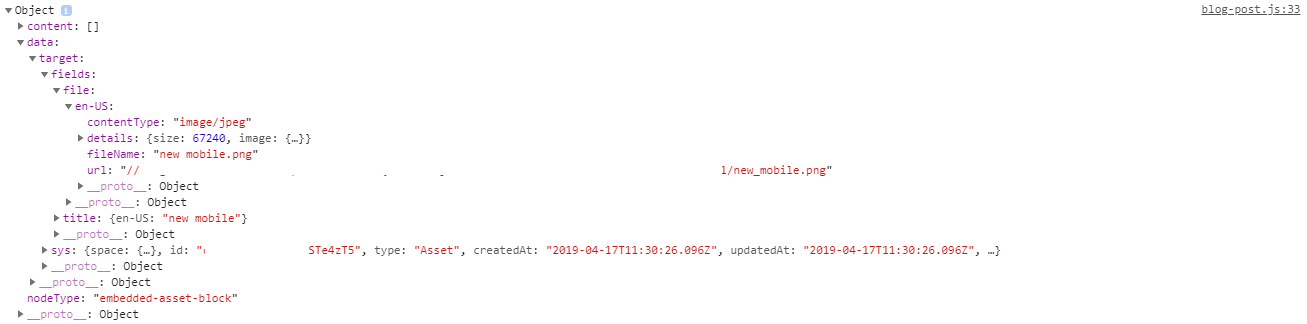
But, for example you are using rich-text in blog post, then after you do some edits, the JSON you get in return is not the same anymore for the assets. image (7)

It seems like the fields part is missing in the node.data.target

Thus, the break image (8)

Anyone has any idea how to fix these cases?

Can confirm that running gatsby clean makes node.data.target.fields re-appear.

That’s the solution that fixed it for me.

I’m having the same problem as @agonqorolli, I cannot for the life of me get “fields” to show up under node.data.target. I can see the full asset data in the links section of the result, but I cannot figure out how to get it somewhere I can use it.

I’m probably just overlooking something dumb, is there anything obviously wrong with this query (ignoring the single-item collection)?

query GetRichText {
    richTextCollection(limit: 1) {
        items {
            title
            richText {
                json
                links {
                    assets {
                        block {
                            fileName
                            title
                            description
                            url
                            sys {
                                id
                            }
                        }
                    }
                }
            }
        }
    }
}

I’m building a statically-compiled NextJS that uses a script to export all of my Contentful data to JSON. Then importing that JSON directly into my source. So section.fields.text is project specific, but it’s basically the JSON blob that comes from a rich text field. Also there’s JSX (NextJS is react-based if you didn’t know), but hopefully you get the idea and this helps.

import { documentToHtmlString } from '@contentful/rich-text-html-renderer'
import { renderToStaticMarkup } from 'react-dom/server'

// Returns JSX
function renderMedia(file) {
  if (file.contentType === 'video/mp4') {
    return (
      <div className='embed-responsive embed-responsive-16by9' style={vidStyle}>
        <video controls>
          <source src={file.url} type='video/mp4'/>
          <p>Your browser doesnt support HTML5 video.</p>
        </video>
      </div>
    )
  } else if (file.contentType === 'image/jpeg') {
    return (<img class="img-fluid" src={file.url} />)
  } else {
    return (<p>Unknown content type</p>)
  }
}

let body = section.fields.text
let options = {
  renderNode: {
    'embedded-asset-block': (node) => {
      let file = node.data.target.fields.file
      // I'm using react so it was easier for me to use JSX for what I was doing
      // here your renderMedia function could just return DOM strings and
      // the renderToStaticMarkup function can be ignored (it's react specific)
      let jsx = renderMedia(file)
      let markup = renderToStaticMarkup(jsx)
      return markup
    }
  }
}
let bodyHTML = body ? documentToHtmlString(body, options) : ''
...
<div dangerouslySetInnerHTML={{__html: bodyHTML}}/>

I wrote this code straight into the browser, so none of this is tested, or pretty…

@Nelrohd

I have come across this issue of not easily being able to display embedded assets in a Contentful Rich Text field using GraphQL. However I am using Next.js and Netlify, so the Gatsby solution does not apply. Here is what I ended up using as a work around using documentToReactComponents():

var embeddedAssetCount = 0;

/**
 * Used to render embedded images or videos in a Rich Text field via the Contentful GraphQL API.
 * Since the "content.json" field that contains all of the content of a Rich Text field does not return
 * the asset's url and just its sys.id, we must also pass in the "content.links.assets.block" array where
 * the asset's url IS returned.
 *
 * In order to be able to display multiple embedded assets, we must keep track of which index of the "block"
 * array we are currently on, and increment each time the function is called.
 *
 * @param {block} The "block" array coming from Contentful
 */ 
function embeddedAssetOptions(block) {
  return {
    renderNode: {
      [BLOCKS.EMBEDDED_ASSET]: (node) => {
        const asset = block[embeddedAssetCount];
        embeddedAssetCount++;

        if (asset?.contentType?.startsWith('image/')) {
          return ...image tag...;
        } else if (asset?.contentType?.startsWith('video/')) {
          return ...video tag...
        }
      },
    },
  }
}

and then to use it:

{documentToReactComponents(
     article.content.json,
     embeddedAssetOptions(article.content.links?.assets?.block)
)}

Try deleting Gatsby’s .cache folder. There’s an issue with relaonships and caching in the plug-in that I don’t really understand 😉

this totally worked.

Wanted to share what I found for those using Nextjs or NOT Gatsby. It seems there are different fields if you’re not using Gatsby’s package. So rather than data.target.fields, you need to look for the links field such as in the below comment.

Contentful is building an example that shows how to use these queries to render Rich text Content including embedded assets and entries. I was able to follow this and render embedded images for my content: https://github.com/whitep4nth3r/p4nth3rblog/blob/main/components/RichTextPageContent/index.js#L17-L23

Hope this helps!

I’m having the same problem as @agonqorolli, I cannot for the life of me get “fields” to show up under node.data.target. I can see the full asset data in the links section of the result, but I cannot figure out how to get it somewhere I can use it.

I’m probably just overlooking something dumb, is there anything obviously wrong with this query (ignoring the single-item collection)?

query GetRichText {
    richTextCollection(limit: 1) {
        items {
            title
            richText {
                json
                links {
                    assets {
                        block {
                            fileName
                            title
                            description
                            url
                            sys {
                                id
                            }
                        }
                    }
                }
            }
        }
    }
}

hello, any progress on the issue? I have to use the code from @nijotz to make it work in Next.js

shouldn’t it be a default behaviour in rich text renderer?

const richTextOptions = {
  renderNode: {
    [BLOCKS.EMBEDDED_ASSET]: (node) => {
      const { title, description, file } = node.data.target.fields;
      const mimeType = file['en-US'].contentType
      const mimeGroup = mimeType.split('/')[0]

      switch (mimeGroup) {
        case 'image':
          return <img
            title={ title ? title['en-US'] : null}
            alt={description ?  description['en-US'] : null}
            src={file['en-US'].url}
        // ...

@grgcnnr Why is that my [BLOCKS.EMBEDDED_ASSET]: node.data.target.fields does not contain such title['en-US'] and file['en-US']? It only directly have a string-typed title and file?

Had the same problem, solved with ‘embedded-asset-block’ in gatsby-config.js Thanks a lot !

By the way, is there any way to make a HTML hypertext link on any Contentful image asset ?

Does anyone know if there is a fix for this besides deleting the .cache folder?

Here is my workaround (Contentful+SvelteKit+GraphQL; fields is missing from my rich text links): https://stackoverflow.com/a/77498343/135791

@know-mad - right in the bullseye! Thanks a lot! I confirm that this is the only solution for now

Had the same problem, solved with ‘embedded-asset-block’ in gatsby-config.js Thanks a lot !

By the way, is there any way to make a HTML hypertext link on any Contentful image asset ?

@bannouheol I need to see your solution man! I have the same problem, can’t find where to fix. My problem is, “field” key is not showing. const options = { renderNode:{ "embedded-asset-block": (node) => { const alt = node.data.target.fields.title['en-US'] const url = node.data.target.fields.file['en-US'].url return <img alt={alt} src={url} /> } } }

Just for reference of anyone as stupid as me, I literally forgot to put the content stuff into my template page query on Gatsby and it worked 🙈…

import { graphql } from 'gatsby';

// ...

export const pageQuery = graphql`
  query Article($slug: String!) {
    contentfulArticle(slug: { eq: $slug }) {
      exampleRichTextField {
        json
        content {
          data {
            target {
              fields {
                file {
                  en_US {
                    url
                  }
                }
              }
            }
          }
        }
      }
    }
  }
`;

Thanks @grgcnnr - your code example made it really easy to understand this.

oh ya, using the constants would probably be a good idea

For sure, I have been checking just the first part if the mimetype (the “image” part of “image/jpeg”) that seems to be enough for most cases. I’ll try to put a minimal example together next week.

On Sat, 2 Mar 2019, 2:13 AM Jerry Harrison, notifications@github.com wrote:

👍 Bump.

Completely agreed this should be defaulted or at least clearly written that “embedded assets” (ie simple images) will not be translated into html in the docs; and give examples on how to extend.

— You are receiving this because you commented. Reply to this email directly, view it on GitHub https://github.com/contentful/rich-text/issues/61#issuecomment-468660414, or mute the thread https://github.com/notifications/unsubscribe-auth/ACkbfnFVn691UYHW8K9XpQrlRksdqONeks5vSSdigaJpZM4aCZ2P .