Maui: [BUG] IconTintColorBehavior to change TintColor at runtime not working
Is there an existing issue for this?
- I have searched the existing issues
Did you read the “Reporting a bug” section on Contributing file?
- I have read the “Reporting a bug” section on Contributing file: https://github.com/CommunityToolkit/Maui/blob/main/CONTRIBUTING.md#reporting-a-bug
Current Behavior
Using .Net Maui Community Toolkit to change the TintColor at runtime. DynamicResource is not working.
Expected Behavior
DynamicResource works
Steps To Reproduce
-
Create a new MAUI project
-
Install CommunityToolkit.Maui with version 4.0.0
-
Add the following code in MainPage.xaml, don’t forget adding xmlns:mct=“http://schemas.microsoft.com/dotnet/2022/maui/toolkit” in the ContentPage property.
     `<Image Source="dotnet_bot.png"
            SemanticProperties.Description="Cute dot net bot waving hi to you!"
            HeightRequest="100"
            HorizontalOptions="Center">
         <Image.Behaviors>
             <xct:IconTintColorBehavior TintColor="Yellow" />
         </Image.Behaviors>
     </Image>

     <Image Source="dotnet_bot.png"
            SemanticProperties.Description="Cute dot net bot waving hi to you!"
            HeightRequest="100"
            HorizontalOptions="Center">
         <Image.Behaviors>
             <xct:IconTintColorBehavior TintColor="{StaticResource Cyan}" />
         </Image.Behaviors>
     </Image>

     <Image Source="dotnet_bot.png"
            SemanticProperties.Description="Cute dot net bot waving hi to you!"
            HeightRequest="100"
            HorizontalOptions="Center">
         <Image.Behaviors>
             <xct:IconTintColorBehavior TintColor="{DynamicResource Red}" />
         </Image.Behaviors>
     </Image>`
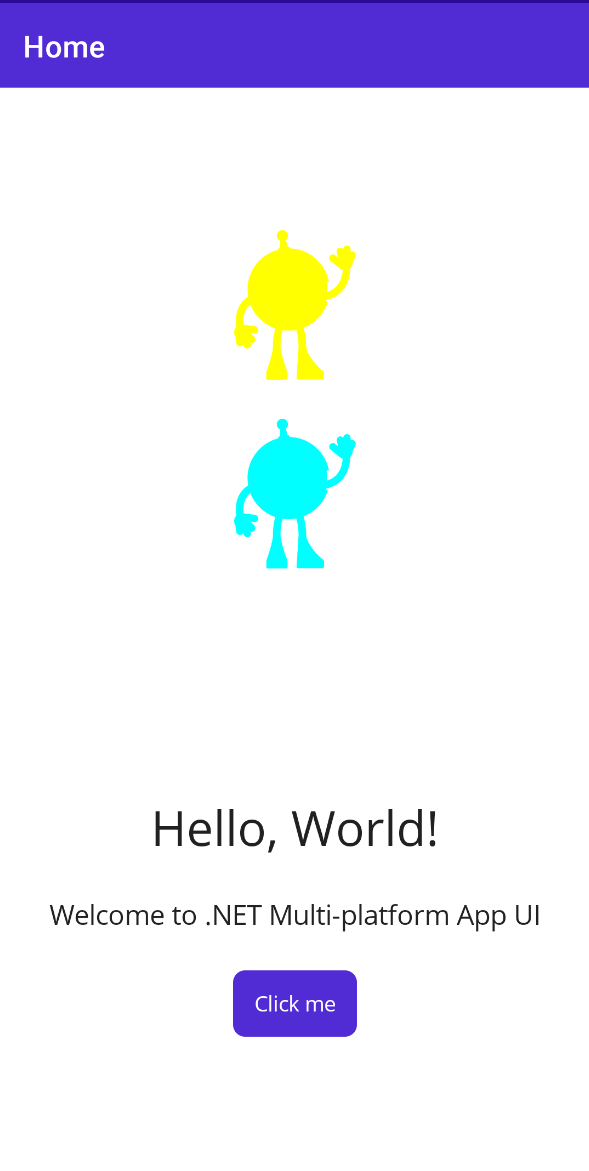
Link to public reproduction project repository
https://github.com/sesitosvdx/MauiAppForTesting.App
Environment
- .NET MAUI CommunityToolkit: 4.0.0
- OS: Android API30
- .NET MAUI: 7.0.0.49
Anything else?
No response
About this issue
- Original URL
- State: closed
- Created 4 years ago
- Reactions: 6
- Comments: 23 (3 by maintainers)
Had same issue but I resolved it by referencing other element (You can probably make zombie elements just to use them as color reference or match it with others)
<Label x:Name="Ref" BackgroundColor="{DynamicResource MyColor}" IsEnabled="False" IsVisible="False" />can be any element for example
Labeland then on your image
<toolkit:IconTintColorBehavior TintColor="{Binding Source={x:Reference Ref}, Path=BackgroundColor}" />These are a bunch of implementation details, you’re missing the forest for the trees. The only thing important to me as a developer of an app being “upgraded” to Maui: the Xamarin effect has turned into a behavior and as a result apparently doesn’t support DynamicResource. This is a very big regression for our use case, a large app with full support for dark mode and hence heavy use of the previous effect. Please revisit whether having this as a behavior is really the way to go if it can’t support something as essential for a modern real-life app as dynamic tinting based on centrally defined values. This isn’t the 90s, nobody tints something HTML “Red” or “Blue”, hehe.
More importantly, in the meantime, what is your recommended course of action? Bindings with a reference in BaseVM to a central color store populated directly off Application.Resources was my first thought, but this also yields a blank, hmm. I’m guessing I’m missing something obvious here. How do we update our app without a ton of busywork or redoing manually what we’ve so far been able to do automatically?
@Kadlerz showed not all heroes wear a cape.
For those that come across this in the future you can mostly solve the problem by creating an image component wrapper. This is a basic version, just place this CS file somewhere (no xaml required) and replace the namespace. Instead of using a Behaviour in xaml it just adds the TintColor property directly to the component. Then it automatically manages the behaviour based on the colour you select. No extra libraries or significant code pattern changes.
I hope this helps others that run into the same issue.
PS: Please don’t use the one the medium article provides, it’s a bad implementation with its biggest problem being the continual addition of tint behaviours whenever you change the colour. It also just assumes types so could crash at runtime.
Note to community toolkit devs: Feel free to add a component like this to the library to save users from this struggle. Also please update the comment for the TintBehaviour to say it doesn’t support dynamic resources.
The more reasonable question here is not “Why toolkit:IconTintColorBehavior doesn’t work with DynamicResources?”, but “Why in hell it’s not a part of core functionality?”. Literally any app which have black/white theme will stuble into this issue. Jesus…
It’s unfortunate that IconTintColorBehavior doesn’t work with AppThemeBinding. It sets the Tint color for the first time, but doesn’t respond to runtime theme change. This appears to be one of the most fundamental usage scenarios. Probably, you can subscribe to the AppTheme changing in the behavior and trigger the property explicitly.
Btw, IconTintColorBehavior is not inherited from BindableObject. It’s a BasePlatformBehavior descendant which is inherited from the Element class
If someone is still looking for a cleaner workaround have a look at this link - https://medium.com/@alpay18070005016/net-maui-icontintcolor-b54a74a41f19
We ended up using SimpleToolkit which has a tintable Icon component. Plus a ContentButton. Feels like both these should be part of the basic palette of components really, not even MCT but core. So two steps off, but at least we got it solved 😃