TabNine: Extremely high memory and CPU usage
I use TabNine in vim.
When I start vim (with simply vim, empty editor), the TabNine process is created and consumes 1.37 GB of memory.
That seems insane already.
For every couple seconds spent “editing” (typing random english sentences that pop into my head into the file), the memory usage increases by 0.05 GB.
Also the CPU usage is consistently >600% while editing.
Here’s a video of me spewing stream of consciousness:
Whirring fans is annoying. I have only used tabnine for less than a day so am not completely familiar with its problems, but these couple things were glaringly obvious to me once my computer became generally unresponsive by simply leaving a couple vim sessions open in the background.
About this issue
- Original URL
- State: closed
- Created 5 years ago
- Reactions: 11
- Comments: 38 (8 by maintainers)
Same for me, but even worse.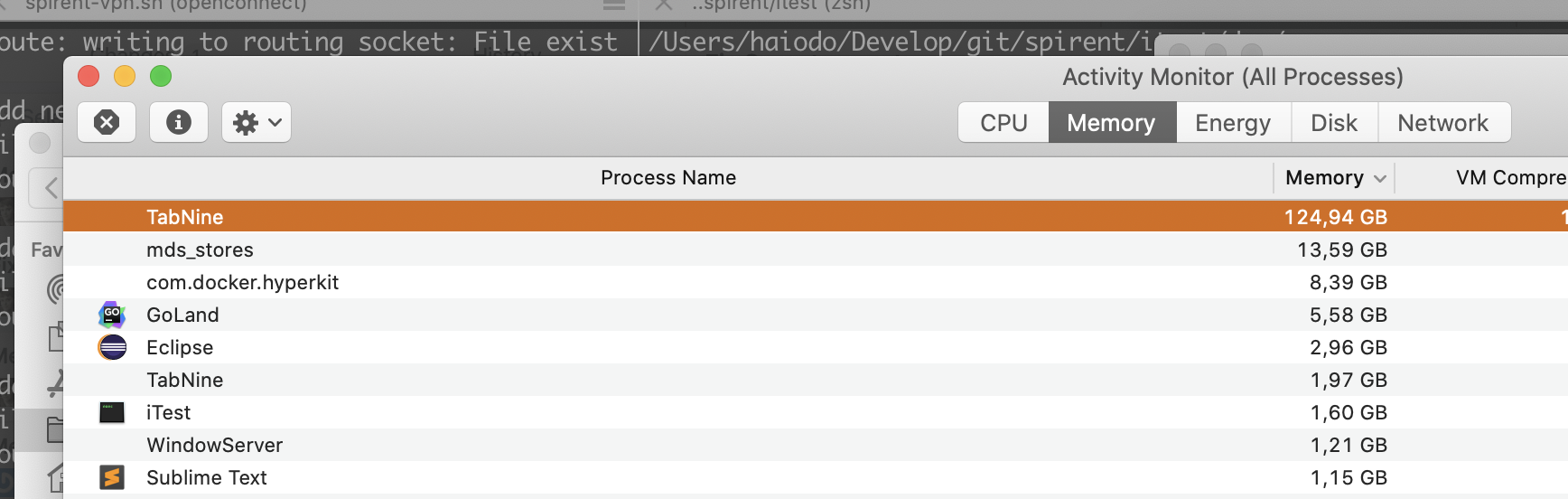
The first out of memory crash on my new PC with 64 GB RAM.
As you can see my version:
Memory consumption:
Environment: Ubuntu 19.10 Vscode: Version: 1.43.2 Commit: 0ba0ca52957102ca3527cf479571617f0de6ed50 Date: 2020-03-24T07:52:11.516Z Electron: 7.1.11 Chrome: 78.0.3904.130 Node.js: 12.8.1 V8: 7.8.279.23-electron.0 OS: Linux x64 5.3.0-42-generic
✨Love where this project is going, and sometimes it’s super useful.
🍏 On
it’s often the highest memory user, consistently at >1GB (~1.1GB) RAM, even when I put on “power saving” mode and turn off both local and cloud deep completions.
💸 Considering cancelling my subscription unless the RAM usage can come down.
🙏Thanks to everyone working on this, I guess it’s pretty complex!
I’m also getting >800% CPU spikes on a 12 core machine and ~1.6Gb memory use in VSCode :
Version: 1.38.1 Commit: b37e54c98e1a74ba89e03073e5a3761284e3ffb0 Date: 2019-09-16T10:22:16.623Z Electron: 4.2.11 Chrome: 69.0.3497.128 Node.js: 10.11.0 V8: 6.9.427.31-electron.0 OS: Linux x64 4.14.149-1-MANJARO
I also want to jump in. I absolutely love this plugin. It’s amazing! But it does take up a lot of memory and it sometimes makes VSCode feels slow even on my 16GB memory machine. I know it’s not easy to just waive a hand and say “well, let’s just get something that uses less memory” but it definitely is an issue. In the meantime, I’ll still be using this plugin, but would love an option to use less memory even at an accuracy cost (again easier said than done).
Thank you!
You can disable Tabnine local feature by
Tabnine::config.